Relocating a business office involves much more than moving desks and furniture. Your network infrastructure is the backbone of daily operations, supporting communication, collaboration, cloud applications, and business-critical systems. Without proper planning, moving network equipment can result in costly downtime, connectivity issues, and security risks.
Understanding the essential network hardware for office moves helps businesses maintain productivity and ensure a smooth transition. From routers and switches to structured cabling and wireless access points, every component plays a crucial role in keeping your organization connected.
This guide explains the network hardware you need, best practices for relocating IT infrastructure, and how professional planning can minimize disruption during your office move.
Why Network Hardware Planning Matters
A poorly planned office move can impact every department within your organization. Network failures may prevent employees from accessing email, cloud applications, VoIP phones, file servers, and customer management systems.
Proper planning helps businesses:
Reduce downtime
Protect valuable equipment
Maintain business continuity
Improve network performance
Enhance cybersecurity
Support future business growth
Investing time in network planning ensures your new office is operational from day one.
Essential Network Hardware for Office Moves
1. Business Router
The router connects your internal network to the internet and manages incoming and outgoing traffic.
During an office move:
Verify ISP compatibility
Update network settings
Configure security policies
Test internet connectivity
A reliable business-grade router ensures secure and uninterrupted internet access.
2. Network Switches
Switches connect computers, printers, servers, IP phones, and wireless access points throughout the office.
Modern managed switches provide:
VLAN support
Traffic monitoring
Quality of Service (QoS)
Improved network security
Replacing outdated switches during relocation can improve overall network performance.
3. Firewall Appliances
Cybersecurity should never be overlooked during an office move.
A dedicated firewall protects your business from:
Unauthorized access
Malware
Ransomware
Network attacks
Data breaches
Ensure firewall configurations are backed up before relocation.
4. Wireless Access Points
Reliable Wi-Fi is essential in today’s hybrid work environment.
Conduct a wireless site survey before installation in the new office.
5. Structured Cabling System
Structured cabling serves as the foundation of every business network.
It includes:
Cat6/Cat6A Ethernet cables
Fiber optic cables
Patch panels
Cable management systems
Wall outlets
Proper cable labeling during relocation makes installation faster and simplifies future maintenance.
6. Server Racks and Cabinets
Server racks organize and protect critical networking equipment.
Benefits include:
Better airflow
Improved cable management
Physical security
Easier maintenance
Space optimization
Use professional rack-mounted installation whenever possible.
7. Patch Panels
Patch panels simplify cable organization and improve troubleshooting.
Advantages include:
Cleaner installations
Faster maintenance
Easy equipment replacement
Reduced cable damage
Every structured cabling system should include properly labeled patch panels.
8. Uninterruptible Power Supply (UPS)
Unexpected power interruptions can damage network equipment.
A UPS provides:
Battery backup
Surge protection
Safe shutdown
Business continuity
Critical equipment such as servers, switches, and firewalls should always be connected to UPS systems.
9. Network Storage Devices
Businesses often relocate:
NAS systems
SAN storage
Backup appliances
File servers
Back up all data before moving any storage device to reduce the risk of data loss.
10. VoIP Phone Systems
Modern offices rely heavily on IP-based communication.
Before relocation:
Verify internet bandwidth
Update phone configurations
Test call quality
Confirm emergency location settings
Proper planning ensures uninterrupted business communication.
Office Network Relocation Checklist
Before moving:
Inventory all network hardware.
Label every cable and device.
Back up firewall and router configurations.
Back up critical business data.
Document IP addresses and network diagrams.
Schedule downtime during non-business hours.
Coordinate with your internet service provider.
Test every device before disconnection.
After installation:
Verify internet connectivity.
Test wired and wireless networks.
Confirm server accessibility.
Check printer connections.
Test VoIP phones.
Validate security policies.
Monitor network performance.
Common Mistakes to Avoid
Many businesses encounter avoidable issues during office moves.
Common mistakes include:
Poor cable labeling
Skipping data backups
Using outdated networking equipment
Ignoring Wi-Fi coverage planning
Not testing hardware before relocation
Failing to document network configurations
Avoiding these mistakes reduces downtime and improves overall efficiency.
Benefits of Professional IT Relocation Services
While some organizations attempt to move network equipment internally, professional IT relocation services provide several advantages:
Expert planning
Secure equipment handling
Faster installation
Reduced business downtime
Improved cable management
Network optimization
Post-move testing
Enhanced cybersecurity
Professional relocation specialists ensure your infrastructure is operational quickly and safely.
Future-Proofing Your Office Network
An office move is an excellent opportunity to modernize your network infrastructure.
Consider upgrading to:
Wi-Fi 6 or Wi-Fi 7 access points
Multi-gigabit switches
Cloud-managed networking
Fiber backbone connections
Advanced firewall solutions
Network monitoring platforms
These upgrades improve performance, scalability, and long-term reliability.
Conclusion
A successful office relocation depends on more than simply transporting equipment—it requires careful planning, proper installation, and reliable network infrastructure. Investing in the right network hardware for office moves ensures that your business experiences minimal downtime, maintains secure connectivity, and is ready for future growth.
By preparing your network infrastructure in advance, labeling equipment, backing up configurations, and working with experienced IT relocation professionals, your organization can transition to its new office with confidence. A well-designed network not only supports day-to-day operations but also creates a strong foundation for long-term business success.
Frequently Asked Questions (FAQs)
1. What network hardware is essential for an office move?
Essential hardware includes routers, managed switches, firewalls, wireless access points, structured cabling, server racks, patch panels, UPS systems, and network storage devices.
2. Why is structured cabling important during office relocation?
3. Should businesses upgrade network equipment during relocation?
Yes. An office move is an ideal time to replace outdated hardware, improve network performance, strengthen security, and support future business growth.
4. How can businesses minimize downtime during a network relocation?
Create a detailed relocation plan, label equipment, back up configurations and data, schedule the move outside business hours, and test all systems after installation.
5. Why hire professional IT relocation services for network hardware?
Professional providers ensure safe transportation, expert installation, reduced downtime, secure data handling, and optimized network performance, allowing businesses to resume operations quickly.
Relocating a business office sounds exciting at first. A bigger workspace, better infrastructure, improved employee comfort, and room for future growth all look great on paper. But behind every smooth office move is something most companies underestimate—network hardware planning. You can have the most beautiful office in the city, but if the internet crashes, Wi-Fi fails, phones stop working, or servers refuse to connect, productivity collapses instantly. Moving an office without carefully planning the networking infrastructure is like moving into a new house without checking the electricity or plumbing. Everything may look fine until you actually try to use it.
Modern businesses rely heavily on cloud platforms, video meetings, VoIP calls, cybersecurity systems, smart devices, and uninterrupted internet connectivity. According to recent enterprise networking reports, businesses are rapidly investing in cloud-first and policy-driven networking systems to support hybrid work, AI-powered operations, and secure connectivity. This shift means office relocations are no longer just about moving desks and chairs. They are now major IT infrastructure projects that require strategic planning and decisions on future-ready hardware.
In this guide, you’ll discover everything you need to know about network hardware essentials for business office moves, including switches, routers, firewalls, cabling, wireless access points, server planning, backup systems, and security considerations. Whether you run a small startup or a growing enterprise, this article will help you avoid downtime, protect data, and create a scalable network environment that supports long-term business growth.
Why Network Planning Matters During Office Relocation
Moving an office without a networking strategy is one of the fastest ways to create operational chaos. Businesses often spend months planning furniture layouts, branding designs, and employee seating arrangements, yet they leave networking decisions until the final week. That approach usually leads to unexpected downtime, rushed installations, and expensive troubleshooting. A company’s digital infrastructure is now the heartbeat of its operations, and every connected device depends on a reliable network foundation. If that foundation fails, daily workflows slow down instantly.
Think about how many business operations rely on stable connectivity today. Customer support teams need VoIP systems; sales teams depend on CRM platforms; marketers use cloud software; finance departments access online accounting tools; and employees collaborate through video meetings. Even a small network interruption can affect customer trust and revenue generation. Recent research in the networking industry highlights that hybrid work and cloud adoption is forcing companies to redesign their office networks from the ground up. Businesses are no longer building networks only for office desktops. They are designing infrastructures that support remote workers, mobile devices, and AI-powered applications simultaneously.
Another important reason network planning matters is scalability. Many businesses relocate because they are growing. Unfortunately, some companies simply transfer old hardware to a larger office without considering future expansion. That’s like putting a tiny engine into a heavy truck and expecting high performance. Smart organizations use office relocations as opportunities to upgrade infrastructure, improve cybersecurity, increase bandwidth capacity, and modernize connectivity systems. A carefully planned network setup not only prevents disruptions but also positions the business for long-term efficiency and innovation.
The Hidden Cost of Poor Network Preparation
The biggest mistake companies make during office relocation is underestimating the financial impact of downtime. Most business owners focus only on hardware costs while ignoring the operational damage caused by network failures. Imagine a customer support center losing internet access for half a day or a finance department being unable to access cloud-based accounting software during payroll processing. The consequences multiply quickly. Lost productivity, frustrated employees, delayed client responses, and missed opportunities all add up faster than expected.
Poor preparation also leads to hidden repair costs. When businesses rush networking installations, technicians often have to redo cabling, replace incompatible hardware, or troubleshoot unstable configurations. That means paying twice for the same work. In many cases, businesses discover after relocation that their existing switches cannot support higher internet speeds or modern Wi-Fi demands. According to networking trend reports, businesses are increasingly moving toward 2.5G and 10G networking switches to handle cloud traffic, HD video conferencing, and large file transfers. Older equipment often becomes a bottleneck in modern office environments.
There’s also a cybersecurity risk. During relocation, IT teams are busy managing logistics, which creates opportunities for overlooked vulnerabilities. Temporary setups, unsecured devices, and rushed configurations can expose sensitive business data. Cybercriminals love weak transition periods because businesses are distracted. That’s why network security planning should always be integrated into relocation strategies from day one. Investing in proper planning may feel expensive initially, but it saves massive operational costs later.
Core Network Hardware Every Office Needs
Every successful office network depends on a few essential hardware components working together seamlessly. These devices form the nervous system of your business environment. Without them, communication between employees, devices, servers, and cloud platforms simply cannot function effectively. Understanding these core components helps businesses make smarter purchasing decisions during relocation.
Hardware
Purpose
Importance
Router
Connects office to internet
Essential
Network Switch
Connects devices internally
Essential
Firewall
Protects network from threats
Critical
Wireless Access Point
Provides Wi-Fi coverage
Essential
UPS System
Backup power during outages
Highly Recommended
Rack Cabinet
Organizes networking equipment
Recommended
PoE Switch
Powers IP devices through Ethernet
Highly Useful
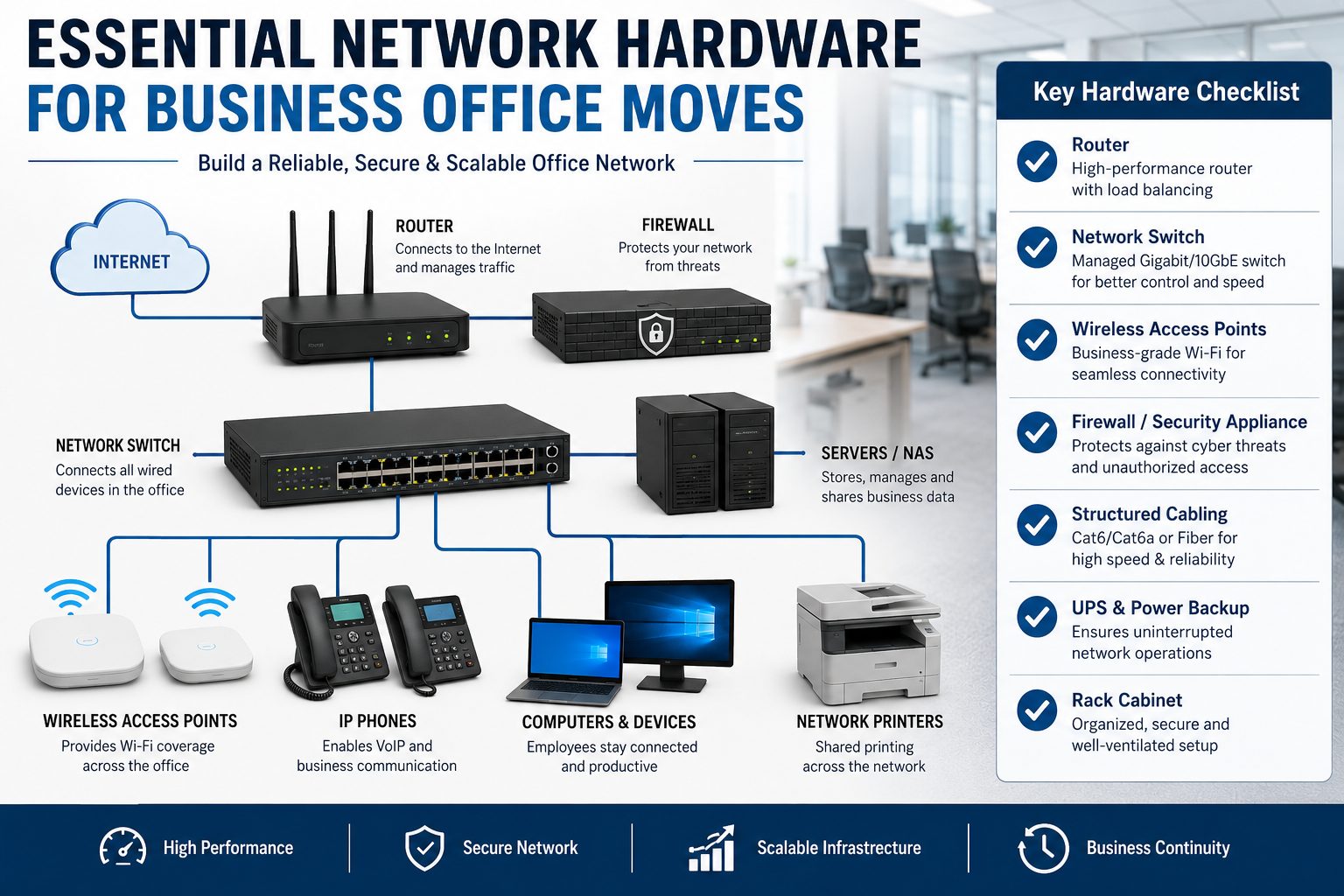
Routers are responsible for directing internet traffic between the office network and external connections. A high-quality business router ensures stable bandwidth distribution, secure VPN connectivity, and advanced traffic management. Businesses handling cloud applications or video meetings should prioritize enterprise-grade routers rather than consumer models. Modern routers also support SD-WAN technology, which many companies now prefer because it offers flexibility and improved cloud performance.
Network switches are equally important because they connect internal devices like computers, printers, servers, and cameras. Managed switches provide better control, monitoring, and scalability than unmanaged switches. They allow IT teams to segment traffic, prioritize bandwidth, and improve security. Wireless access points create strong Wi-Fi coverage throughout the office, which is especially important in hybrid work environments where employees rely heavily on laptops and mobile devices. Businesses upgrading offices in 2026 are increasingly adopting Wi-Fi 7 solutions for faster speeds and lower latency.
Choosing the Right Cabling Infrastructure
Cabling is the invisible foundation of every office network. People often focus on flashy hardware like routers and firewalls while ignoring the cables connecting everything together. That’s a dangerous mistake because even the best networking equipment cannot perform properly with outdated or poorly installed cabling. Think of cables like highways for digital traffic. If the highways are damaged or too narrow, traffic slows down regardless of how powerful the vehicles are.
Businesses relocating offices should strongly consider installing Cat6a or fiber optic cabling instead of older Cat5e systems. Cat6a cables support higher speeds and improved performance over longer distances, making them ideal for modern offices with cloud applications and video conferencing demands. Fiber optic cabling goes even further by delivering extremely high bandwidth with minimal interference. While fiber installations cost more upfront, they provide exceptional scalability and future-proofing benefits.
Recent network cabling reports also show increasing adoption of Power over Ethernet (PoE) infrastructure. PoE technology allows devices like security cameras, VoIP phones, and wireless access points to receive both power and data through a single cable. This simplifies installation, reduces clutter, and lowers infrastructure costs. For growing businesses, PoE creates cleaner and more efficient office environments.
Another factor businesses should consider is structured cabling design. Random cable placement may work temporarily, but it becomes a nightmare during troubleshooting or expansion. Organized cable management inside racks improves airflow, simplifies maintenance, and reduces accidental disconnections. Professional labeling systems also save enormous amounts of time for IT teams managing large office networks.
Server Room and Rack Planning
A server room is more than just a storage area for networking equipment. It’s the control center of the entire business infrastructure. Poor server room planning can lead to overheating, hardware failure, and costly downtime. During office relocation, businesses should carefully evaluate the size, cooling capacity, ventilation, and accessibility of their server rooms before moving equipment.
Temperature management is one of the biggest priorities. Networking hardware generates significant heat, especially switches, servers, and firewalls running continuously. Without proper cooling systems, hardware lifespan decreases rapidly. It’s similar to driving a car engine at maximum speed without enough coolant. Eventually, something breaks. Businesses should install dedicated cooling systems or ensure proper air circulation to maintain stable operating temperatures.
Power protection is equally important. A sudden power outage can damage servers, corrupt data, and interrupt business operations instantly. That’s why UPS (Uninterruptible Power Supply) systems are essential for modern offices. UPS devices provide temporary backup power during outages, allowing systems to shut down safely or continue operating until generators activate. Businesses handling sensitive data or customer transactions should never ignore backup power planning.
Rack cabinets also deserve attention. Proper racks organize networking equipment efficiently while improving airflow and cable management. Businesses should avoid stacking equipment randomly because it creates maintenance problems and increases the risk of accidental damage. Modern rack systems also support scalable expansion, making future upgrades easier and more cost-effective.
Network Security During Office Moves
Office relocations create temporary vulnerabilities that cybercriminals often exploit. During transitions, businesses frequently disconnect devices, reconfigure systems, and establish temporary internet connections. That creates opportunities for unauthorized access, weak security settings, and overlooked vulnerabilities. Cybersecurity should never be treated as an afterthought during relocation projects.
Modern businesses are increasingly adopting Zero Trust security models, where no device or user is automatically trusted without verification. Recent enterprise networking reports show Zero Trust becoming a standard requirement rather than an optional upgrade. This approach is especially valuable during office moves because employees, contractors, and devices may connect from multiple locations simultaneously.
Firewalls remain one of the most critical security investments for any office network. Modern UTM (Unified Threat Management) firewalls combine multiple security functions into a single appliance, including antivirus protection, intrusion prevention, content filtering, and threat monitoring. According to recent SMB networking trends, UTM firewalls are becoming increasingly popular because they simplify network security management while improving protection.
Businesses should also encrypt sensitive data before relocation and create full backups of critical systems. If hardware gets damaged or lost during transit, backups ensure business continuity. Employee cybersecurity awareness is equally important because phishing attacks often increase during busy transition periods. Even the best hardware cannot protect a business if employees unknowingly compromise credentials.
Future-Proofing Your Office Network
Technology evolves faster than most businesses expect. A network setup that feels advanced today may become outdated within a few years. That’s why smart organizations focus on future-proofing during office relocation instead of only solving immediate problems. Investing slightly more today can prevent expensive infrastructure replacements later.
One of the biggest networking trends in 2026 is the rise of Wi-Fi 7 and multi-gig networking. Industry reports highlight growing demand for ultra-fast wireless connectivity capable of supporting video conferencing, cloud computing, AI applications, and smart office devices simultaneously.Businesses planning office relocations should consider hardware capable of handling higher bandwidth demands, even if they don’t need maximum capacity immediately.
Cloud-managed networking systems are also becoming increasingly popular. These platforms allow IT teams to monitor, configure, and troubleshoot networks remotely through centralized dashboards. For businesses with multiple offices or hybrid employees, cloud management dramatically improves visibility and operational efficiency. Instead of manually configuring every device onsite, administrators can manage networks from anywhere.
Sustainability is another emerging factor in networking infrastructure. New hardware designs focus on energy efficiency, reduced heat generation, and environmentally friendly materials. Energy-efficient switches and routers not only reduce electricity costs but also support corporate sustainability goals. Businesses upgrading offices should view networking investments as long-term strategic assets rather than short-term expenses.
Common Mistakes Businesses Make During Relocation
Office relocations are stressful, and businesses often repeat the same networking mistakes. One of the most common problems is waiting too long to involve IT teams. Some companies finalize office layouts before discussing networking requirements, which leads to poor cable routing, weak Wi-Fi coverage, and limited scalability. Networking should influence office design from the beginning, not the other way around.
Another frequent mistake is reusing outdated hardware simply to save money. Old switches, routers, and firewalls may function temporarily, but they often struggle with modern workloads and security requirements. Businesses eventually spend more on troubleshooting and replacements than they would have spent upgrading initially.
Poor Wi-Fi planning is another major issue. Companies sometimes install access points randomly without conducting proper wireless site surveys. That results in dead zones, signal interference, and inconsistent performance. Modern offices filled with video calls and cloud applications require carefully designed wireless coverage.
Some businesses also ignore redundancy planning. They assume internet connectivity will always remain stable, which is risky. Smart offices often install backup internet connections or redundant networking paths to maintain uptime during outages. Downtime can be incredibly expensive, especially for customer-facing operations.
Best Practices for a Smooth Network Migration
Successful network migration requires planning, testing, and coordination. Businesses should start by creating a complete inventory of existing hardware, including routers, switches, servers, cables, and security devices. This inventory helps identify outdated equipment and ensures nothing important gets overlooked during the move.
Testing is critical. Before employees arrive at the new office, IT teams should verify internet connectivity, Wi-Fi coverage, VoIP systems, server access, and security configurations. Think of it like rehearsing before a live performance. Problems discovered early are much easier to fix.
Businesses should also schedule migrations during weekends or low-activity periods whenever possible. Minimizing disruption helps maintain productivity and reduces customer impact. Communication is equally important. Employees should understand what systems may experience temporary downtime and how to access support if issues arise.
Working with professional network engineers can also make a huge difference. Experienced professionals understand cabling standards, security configurations, bandwidth planning, and hardware compatibility. Their expertise often prevents expensive mistakes and accelerates deployment timelines.
Cost Breakdown of Business Network Hardware
Office networking costs vary depending on company size, bandwidth requirements, and security needs. Small offices may spend a few thousand dollars, while large enterprises can invest hundreds of thousands into infrastructure upgrades. Understanding typical hardware costs helps businesses budget more effectively.
Hardware Component
Estimated Cost Range
Business Router
$300 – $2,500
Managed Switch
$500 – $5,000
Wireless Access Point
$150 – $1,200
UTM Firewall
$700 – $10,000
UPS Backup System
$200 – $3,000
Rack Cabinet
$400 – $2,500
Fiber Cabling Installation
Varies by office size
Research indicates that the global networking hardware market continues to expand rapidly due to increasing cloud adoption, AI workloads, and enterprise connectivity demands. Businesses investing in modern infrastructure today are positioning themselves for future scalability and operational resilience.
Price should never be the only factor when choosing networking equipment. Reliability, security, vendor support, scalability, and compatibility matter just as much. Cheap hardware may reduce upfront costs but often creates long-term operational headaches.
Conclusion
A business office move is much more than transporting desks, computers, and office furniture. It’s a rare opportunity to redesign your digital infrastructure for better speed, stronger security, and future scalability. Companies that treat networking as a strategic priority usually experience smoother transitions, fewer disruptions, and stronger operational performance after relocation.
From routers and managed switches to structured cabling, Wi-Fi systems, firewalls, and backup power solutions, every networking component plays a critical role in business continuity. Modern networking trends like Wi-Fi 7, SD-WAN, cloud-managed systems, and Zero Trust security are reshaping how offices operate, making it essential for businesses to think beyond traditional infrastructure models.
The smartest approach is proactive planning. Assess current infrastructure, identify future requirements, involve IT teams early, and invest in scalable hardware that supports long-term growth. A properly planned office network becomes more than a utility — it becomes a competitive advantage that enables productivity, collaboration, and innovation for years to come.
FAQs
1. What is the most important network hardware during an office move?
The most important hardware includes routers, managed switches, firewalls, wireless access points, and structured cabling. These components form the core infrastructure of the office network.
2. Should businesses upgrade network hardware during relocation?
Yes. Office relocation is the perfect opportunity to replace outdated equipment, improve security, increase bandwidth capacity, and prepare for future business growth.
3. What type of cabling is best for modern offices?
Cat6a and fiber optic cabling are highly recommended because they support faster speeds, better reliability, and future scalability compared to older cable standards.
4. Why are managed switches better than unmanaged switches?
Managed switches provide advanced control, monitoring, traffic prioritization, and security features that are essential for modern business environments.
5. How can businesses reduce downtime during office relocation?
Businesses can reduce downtime by planning early, testing systems before launch, scheduling migrations during low-activity periods, and working with professional network engineers.
Moving your office isn’t just about desks, chairs, and décor—it’s about ensuring your business heartbeat (your network) continues without disruption. Think about it: every email sent, every customer transaction, every internal communication depends on your network hardware working perfectly. If your network fails during a move, your business doesn’t just slow down—it can completely stop.
Network hardware forms the backbone of your IT infrastructure. According to industry insights, IT infrastructure includes hardware, software, and network components that support business operations. When relocating, even a small misstep—like improper router placement or poor cabling—can lead to connectivity issues, slow speeds, or even security risks.
Now imagine moving into your new office, and nothing works—no internet, no internal systems, no communication. Sounds like a nightmare, right? That’s exactly why understanding the essentials of network hardware is critical. It’s not just about moving equipment—it’s about rebuilding your digital ecosystem.
Common Challenges Businesses Face
Office moves are exciting, but they come with hidden technical challenges that many businesses underestimate. One major issue is downtime, which can cost companies thousands of dollars per hour, depending on their operations. Without proper planning, businesses often face delays in internet setup, hardware installation, and network configuration.
Another big challenge is hardware compatibility and scalability. During relocation, businesses often realize their existing infrastructure is outdated or insufficient. Experts recommend evaluating hardware performance before moving to avoid bottlenecks later.
There’s also the complexity of logistics—packing sensitive equipment, ensuring safe transport, and reinstalling everything correctly. Unlike furniture, network hardware is fragile and requires anti-static handling and careful labelling.
Lastly, security risks increase during transitions. Data breaches, misconfigurations, or unsecured networks can occur if proper precautions aren’t taken. That’s why a structured approach is not optional—it’s essential.
Understanding Network Hardware Basics
What is Network Hardware?
Let’s simplify things. Network hardware is basically the physical devices that allow computers and systems to communicate. These include routers, switches, servers, cables, and more. Without them, your office network simply wouldn’t exist.
Technically speaking, network hardware refers to devices that mediate data transmission in a computer network. In simple terms, they are the roads and traffic signals of your digital world. They ensure data reaches the right destination quickly and securely.
Think of your office network like a city:
Routers = Highways connecting different cities
Switches = Streets connecting buildings
Cables = Roads carrying traffic
Servers = Central hubs storing information
Without these components working together, your business operations would collapse.
Core vs Edge Devices Explained
Network hardware can be divided into core devices and edge devices. Core devices, like routers and switches, handle the main data flow. They are responsible for directing traffic efficiently across the network.
Edge devices, on the other hand, are the endpoints—like computers, printers, and IoT devices. They interact directly with users and rely on core devices to function properly.
Understanding this distinction helps during office moves by determining where and how each device should be placed. Core devices usually require secure, centralised locations, such as server rooms, while edge devices are distributed throughout the office.
Pre-Move Planning for Network Infrastructure
Conducting an IT Audit
Before you even think about unplugging a cable, you need to conduct a complete IT audit. This means documenting every piece of hardware, software, and network configuration in your current setup.
Why is this important? Because without a clear inventory, you risk losing track of equipment, missing critical components, or reinstalling systems incorrectly. Experts strongly recommend documenting model numbers, configurations, and connections before relocation.
An audit also helps you identify outdated or unnecessary equipment. Maybe you have old switches slowing down your network or redundant servers consuming power. A move is the perfect opportunity to upgrade and optimise.
Designing Network Layout for New Office
Your new office isn’t just a new location—it’s a chance to design a better, faster, and more efficient network. Start by evaluating the layout of the new space. Where will employees sit? Where will servers be placed? How will cables run?
Planning your network layout in advance ensures:
Better connectivity
Reduced interference
Efficient cable management
It’s also important to check infrastructure requirements like power, internet availability, and cooling systems. A strong foundation ensures your network performs optimally from day one
Essential Network Hardware for Office Moves
Routers and Switches
Routers and switches are the brain and nervous system of your network. Routers connect your office to the internet, while switches connect devices within your office.
During a move, ensure:
Proper placement for optimal signal distribution
Updated firmware for security
Compatibility with new network requirements
Upgrading to modern, high-speed switches can significantly improve performance, especially if your business relies on heavy data usage.
Servers and Storage Devices
Servers are where your data lives. Whether it’s customer information, internal files, or applications, servers handle it all. Moving them requires extreme care.
You should:
Backup all data before moving
Use secure packaging
Test functionality after setup
Many businesses also consider switching to cloud or hybrid solutions during relocation for better scalability.
Firewalls and Security Appliances
Security should never be an afterthought. Firewalls protect your network from cyber threats, and during a move, they must be configured correctly.
A misconfigured firewall can expose your entire network to attacks. Always verify:
Security policies
Access controls
Network segmentation
Wireless Access Points
In today’s workplace, Wi-Fi is everything. Poor wireless coverage can frustrate employees and reduce productivity.
Place access points strategically to ensure:
Full office coverage
Minimal interference
High-speed connectivity
Cabling and Connectivity Essentials
Structured Cabling Systems
Cabling is often overlooked, but it’s one of the most critical components of a network. A structured cabling system ensures organized and efficient connectivity.
Benefits include:
Easy maintenance
Reduced downtime
Better performance
Fibre Optics vs Ethernet
Feature
Fiber Optics
Ethernet
Speed
Very High
Moderate
Distance
Long Range
Short Range
Cost
Expensive
Affordable
Reliability
High
Medium
Choosing the right type depends on your business needs. Fiber is ideal for large offices, while Ethernet works well for smaller setups.
Backup and Data Protection Hardware
Importance of Data Backup Before Moving
Imagine losing all your business data during a move. It’s not just inconvenient—it can be catastrophic. That’s why backing up data is non-negotiable.
Experts recommend creating multiple backups, including cloud and physical storage, before relocation.
Backup Devices and Solutions
Common backup solutions include:
External hard drives
NAS (Network Attached Storage)
Cloud storage systems
Power and Cooling Infrastructure
UPS Systems
Power interruptions can damage hardware and cause data loss. UPS (Uninterruptible Power Supply) systems provide backup power and protect equipment.
Cooling and Ventilation Needs
Overheating can destroy hardware. Ensure proper cooling systems are in place, especially for server rooms.
Post-Move Setup and Testing
Installation Best Practices
Once everything is moved, careful installation is crucial. Follow your planned layout and ensure all connections are secure.
Network Testing and Optimization
Testing ensures everything works as expected. Check:
Internet speed
Connectivity
Security configurations
Future-Proofing Your Network Setup
Scalability Considerations
Your network should grow with your business. Choose hardware that supports expansion.
Cloud and Hybrid Infrastructure
Modern businesses are shifting towards cloud solutions for flexibility and efficiency.
Cost Optimization and ROI
Upgrade vs Reuse Hardware Decisions
Not all hardware needs replacing. Evaluate performance and decide wisely.
Budget Planning Tips
Plan your budget to avoid overspending while ensuring quality infrastructure.
Conclusion
Relocating your office is more than just a physical move—it’s a strategic opportunity to upgrade and optimize your network infrastructure. By understanding the essentials of network hardware, planning carefully, and implementing best practices, you can ensure a seamless transition with minimal downtime. A well-executed move not only keeps your business running smoothly but also sets the foundation for future growth and success.
FAQs
1. What is the most important network hardware during an office move?
Routers and switches are the most critical as they handle connectivity and data flow.
2. How can I minimize downtime during relocation?
Plan ahead, backup data, and test systems before and after the move.
3. Should I upgrade hardware during an office move?
Yes, it’s the best time to replace outdated equipment and improve performance.
4. How do I ensure network security after moving?
Configure firewalls, update software, and thoroughly test security settings.
5. Is cloud migration recommended during office relocation?
Yes, it offers scalability and flexibility while reducing dependency on physical hardware.