
Imagine your business phone system talking directly to your customer database. Sounds smooth, right? That’s exactly what happens when you VOIP and CRM integration and business tools. In today’s fast-moving digital world, businesses can’t afford scattered systems. Communication and data need to flow together like water in a single pipe.
This integration is no longer a “nice-to-have.” It’s a must-have for businesses that want speed, clarity, and better customer relationships.
What is VOIP Technology?
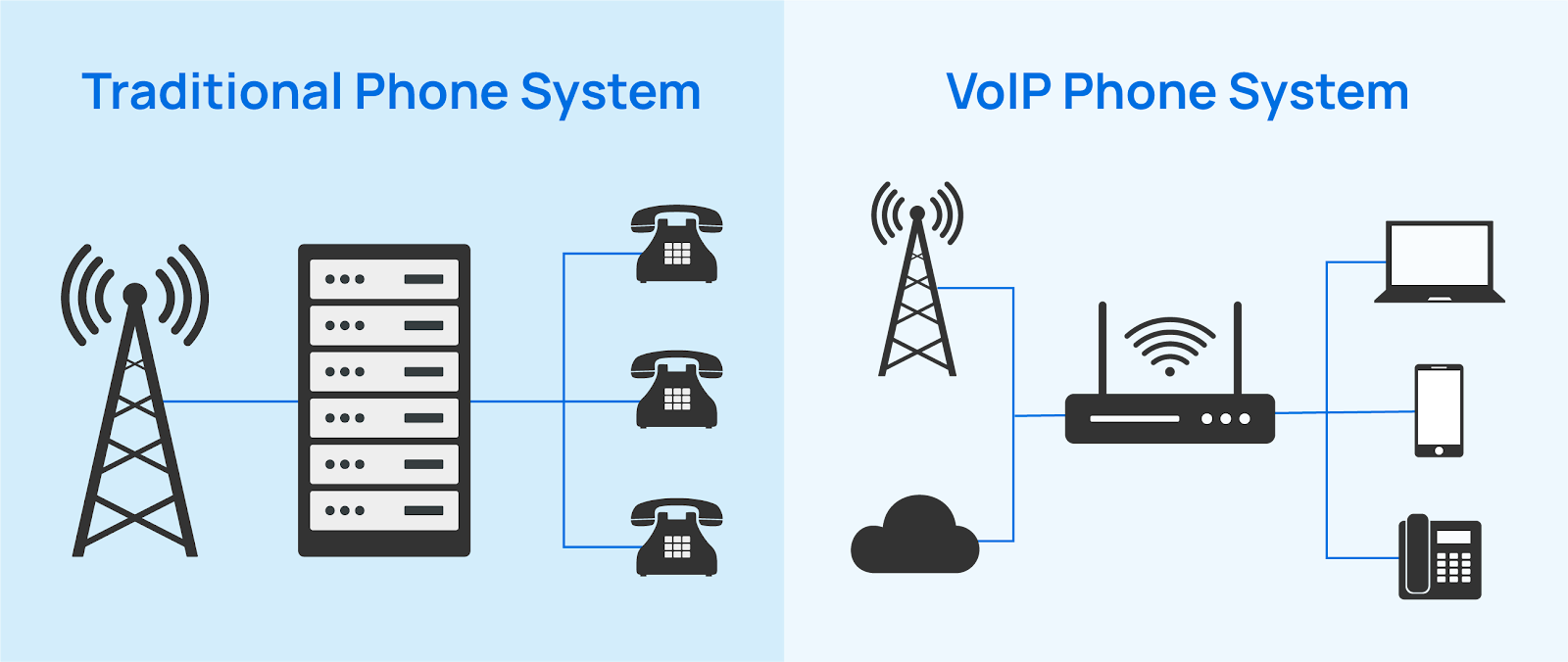
VOIP stands for Voice over Internet Protocol. In simple words, it allows you to make phone calls using the internet instead of traditional phone lines.
How VOIP Works
VOIP converts your voice into digital data packets. These packets travel over the internet and are converted back into sound on the receiver’s end. Think of it like sending a WhatsApp voice note—but in real time.
Key Features of VOIP Systems
- Internet-based calling
- Call recording and monitoring
- Virtual phone numbers
- Call forwarding and routing
- Scalability without heavy hardware
Understanding Cloud CRM Systems
What is a Cloud CRM?
A cloud CRM (Customer Relationship Management) system stores customer data online instead of on local servers. This means your sales, support, and marketing teams can access customer information anytime, anywhere.
Popular Cloud CRM Capabilities
- Contact and lead management
- Sales pipeline tracking
- Customer interaction history
- Automation and analytics
- Team collaboration
Why Integrate VOIP with Cloud CRM?
Here’s a simple question: what’s the use of great calls if the data is missing?
The Communication–Data Gap Problem
Without integration, your team jumps between tools—phone system here, CRM there. This wastes time and causes errors. Integration bridges that gap by syncing calls directly with customer records.
Core Benefits of VOIP and CRM Integration
Improved Customer Experience
When a customer calls, their details pop up instantly. No more asking, “Can you repeat your issue?” Customers feel heard and valued.
Increased Team Productivity
Click-to-call, automatic call logs, and follow-up reminders save hours every week. Your team focuses on selling and solving, not searching.
Centralized Data Management
All call records, notes, and recordings are stored in one place. It’s like having a single source of truth for customer communication.
How VOIP Integrates with Cloud CRM
API-Based Integrations
APIs allow VOIP systems and CRMs to talk to each other. This method is flexible and powerful, especially for custom workflows.
Native CRM Integrations
Many VOIP providers offer built-in CRM integrations. These are easier to set up and perfect for small to mid-sized businesses.
VOIP Integration with Other Business Tools
CRM is just the beginning.
Helpdesk & Ticketing Tools
Incoming calls can automatically create support tickets. No issue gets lost, and response time improves dramatically.
Marketing Automation Platforms
Call data helps marketers understand campaign performance. Which ad triggered the call? Which keyword converted? Now you know.
Collaboration Tools
VOIP integrates with internal chat and collaboration tools so teams stay aligned in real time.
Real-Time Features Enabled by Integration
Click-to-Call
Just click a phone number inside your CRM and call instantly. Simple, fast, effective.
Call Logging & Recording
Every call is logged automatically with date, duration, and notes. Recordings help with training and quality control.
Screen Pop-ups
When a call comes in, the customer profile pops up like magic. It’s like caller ID on steroids.
Use Cases Across Different Industries
Sales Teams
Sales reps get instant context before calling leads. Follow-ups become smarter and conversions go up.
Customer Support
Support agents resolve issues faster with complete call history and previous tickets in front of them.
Remote & Hybrid Workforces
Cloud-based VOIP and CRM tools keep distributed teams connected without missing a beat.
Security and Compliance Considerations
Data Encryption
Calls and data should always be encrypted. This keeps sensitive customer information safe from breaches.
Compliance Standards
Make sure your tools support standards like GDPR and other regional data protection laws.
Challenges in VOIP–CRM Integration
Technical Compatibility
Not all systems play nicely together. Compatibility checks are crucial before integration.
User Adoption
Even the best system fails if teams don’t use it properly. Training is key.
Best Practices for Successful Integration
- Choose tools with proven integration support
- Start with basic features, then scale
- Train your team thoroughly
- Monitor performance and optimize workflows
Choosing the Right VOIP and CRM Combination
The right combo depends on your business size, industry, and goals. Focus on ease of use, scalability, and support rather than fancy features alone.
Future of VOIP and Cloud Business Integrations
The future is smarter and more automated. AI-powered call analytics, voice bots, and predictive insights will soon become standard. VOIP and cloud tools will feel less like software and more like digital teammates.
Conclusion
Integrating VOIP with cloud CRM and business tools is like connecting your mouth to your brain—communication finally makes sense. It boosts productivity, improves customer experience, and gives your business a serious competitive edge. If you’re still using disconnected systems, now is the time to upgrade and integrate.
FAQs
1. Is VOIP and CRM integration expensive?
Not really. Cloud-based solutions are cost-effective and scalable for all business sizes.
2. Can small businesses benefit from this integration?
Absolutely. Small teams often see the biggest productivity gains.
3. Does integration require technical expertise?
Basic integrations are simple, especially with native CRM support.
4. Are call recordings stored securely in CRM?
Yes, if proper encryption and security settings are enabled.
5. Will VOIP integration slow down CRM performance?
No. With cloud infrastructure, performance usually improves.