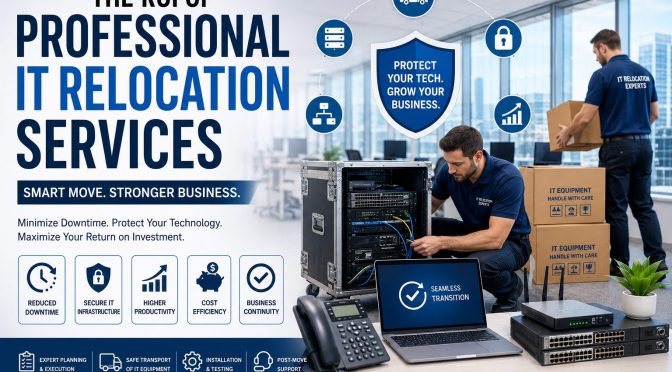
Relocating an office is one of the most challenging projects a business can undertake. Beyond moving desks and furniture, companies must safely transfer servers, networking equipment, workstations, communication systems, and other critical technology without disrupting daily operations. This is where IT relocation services become invaluable.
Professional IT relocation services ensure that your technology infrastructure is moved securely, efficiently, and with minimal downtime. While some businesses consider handling an office move internally to save money, the hidden costs of delays, equipment damage, and productivity loss often outweigh any initial savings.
In this guide, we’ll explore the true return on investment (ROI) of professional IT relocation services and explain why partnering with experienced specialists is one of the smartest investments your business can make.
What Are IT Relocation Services?
IT relocation services involve the planning, transportation, installation, testing, and optimization of an organization’s technology infrastructure during an office move, expansion, or data center migration.
These services typically include:
Server relocation
Network infrastructure relocation
Workstation disconnect and reconnect
Data center relocation
Wireless network installation
Structured cabling
Audio Visual (AV) equipment relocation
Cloud migration support
Technology asset management
Post-move testing and optimization
The primary objective is to ensure business continuity while minimizing operational disruption.
Why Businesses Choose Professional IT Relocation Services
Modern organizations rely heavily on digital infrastructure. Even a few hours of downtime can result in lost revenue, reduced productivity, missed opportunities, and customer dissatisfaction.
Professional IT relocation experts help businesses:
Minimize downtime
Protect sensitive data
Reduce operational risks
Improve project efficiency
Ensure seamless technology transitions
Instead of treating an office move as a logistics project, they manage it as a business continuity initiative.
Understanding the ROI of IT Relocation Services
Return on Investment (ROI) is more than comparing service costs with moving expenses. The real value comes from avoiding costly disruptions and ensuring that employees remain productive throughout the transition.
Key ROI drivers include:
1. Reduced Business Downtime
Downtime is one of the biggest expenses during an office move.
When systems are unavailable, employees cannot access files, communicate with clients, or perform their daily tasks. Professional IT relocation teams follow structured migration plans that significantly reduce downtime by coordinating every stage of the move.
Less downtime means:
Higher employee productivity
Faster business recovery
Improved customer service
Reduced revenue loss
2. Protection of Critical IT Assets
Servers, switches, storage devices, and networking equipment are expensive and sensitive. Improper handling can lead to hardware failures, data loss, and unexpected replacement costs.
Professional IT relocation services use specialized packing materials, transportation methods, and equipment handling procedures to protect your technology investments.
3. Improved Business Continuity
Every successful office relocation begins with a comprehensive business continuity plan.
Experienced relocation specialists identify potential risks before the move, create backup strategies, and establish recovery procedures that keep operations running even if unexpected challenges arise.
4. Lower Risk of Data Loss
Data is one of a company’s most valuable assets.
Professional IT relocation companies implement secure backup procedures before moving critical infrastructure. They also verify systems after installation to ensure that no data has been lost during the transition.
5. Faster Employee Productivity
A delayed workstation setup means employees spend hours—or even days—waiting to resume work.
Professional teams reconnect computers, monitors, printers, phones, and networking equipment quickly so staff can return to work immediately.
The productivity gains alone often justify the investment.
Hidden Costs of DIY IT Relocation
Many organizations underestimate the complexity of relocating IT infrastructure.
Attempting a DIY move may result in:
Extended downtime
Equipment damage
Data loss
Network failures
Poor cable management
Compliance issues
Increased employee stress
Unexpected repair costs
While internal teams understand the business environment, they may lack the specialized tools and expertise required for a seamless relocation.
Key Components of Professional IT Relocation Services
A professional provider typically follows a structured process that includes:
Assessment and Planning
Before moving any equipment, technicians evaluate:
Existing infrastructure
Network architecture
Server requirements
Office layout
Cabling needs
Power requirements
Proper planning minimizes surprises on moving day.
Secure Equipment Packing
Professional packing protects:
Servers
Storage arrays
Switches
Firewalls
AV equipment
Desktop computers
Network devices
Anti-static packaging and protective cases reduce the risk of damage.
Transportation
Technology assets require specialized transportation to prevent vibration, moisture exposure, and physical impact.
Professional movers use purpose-built equipment to ensure safe delivery.
Installation and Testing
Once equipment reaches the new location, technicians:
Install hardware
Configure networks
Verify internet connectivity
Test servers
Validate applications
Confirm data accessibility
Businesses can resume operations with confidence.
Benefits Beyond Cost Savings
The ROI of IT relocation extends far beyond immediate financial savings.
Businesses also benefit from:
Improved cybersecurity
Better cable management
Network optimization
Infrastructure upgrades
Future scalability
Compliance support
Enhanced collaboration
Many organizations use relocation as an opportunity to modernize outdated technology.
Best Practices for a Successful IT Relocation
To maximize ROI:
Start planning early.
Create a detailed relocation timeline.
Inventory all technology assets.
Back up critical business data.
Label all equipment clearly.
Test systems before and after the move.
Communicate with employees.
Partner with experienced IT relocation professionals.
Choosing the Right IT Relocation Partner
When selecting an IT relocation provider, consider:
Industry experience
Certified technicians
Insurance coverage
Security procedures
Proven project management
Positive client reviews
Emergency support
End-to-end relocation capabilities
Choosing the right partner reduces risk and ensures a smoother transition.
Conclusion
Relocating your business technology is far more than moving equipment from one office to another. It is a strategic project that directly impacts productivity, customer satisfaction, and business continuity.
Professional IT relocation services help organizations reduce downtime, protect critical infrastructure, improve security, and ensure a seamless transition to a new workspace. Although hiring experts requires an upfront investment, the long-term return on investment is substantial through lower operational risks, faster recovery, and enhanced efficiency.
Whether you’re relocating a small office or a large enterprise, partnering with an experienced IT relocation provider ensures that your move supports business growth rather than disrupting it.
Frequently Asked Questions
1. What are IT relocation services?
IT relocation services involve planning, transporting, installing, and testing an organization’s technology infrastructure during an office move while minimizing downtime and protecting critical systems.
2. Why should businesses hire professional IT relocation experts?
Professional experts reduce downtime, protect expensive IT equipment, ensure secure data handling, and streamline the entire relocation process.
3. How do IT relocation services improve ROI?
They minimize business disruption, reduce equipment damage, speed up employee productivity, lower operational risks, and improve overall efficiency.
4. What equipment is included in IT relocation?
Services typically cover servers, networking equipment, desktop computers, laptops, storage devices, AV systems, structured cabling, wireless infrastructure, and telecommunications equipment.
5. How can businesses prepare for an IT relocation?
Create a detailed relocation plan, back up critical data, inventory all assets, communicate with employees, and work with an experienced IT relocation provider to ensure a smooth transition.
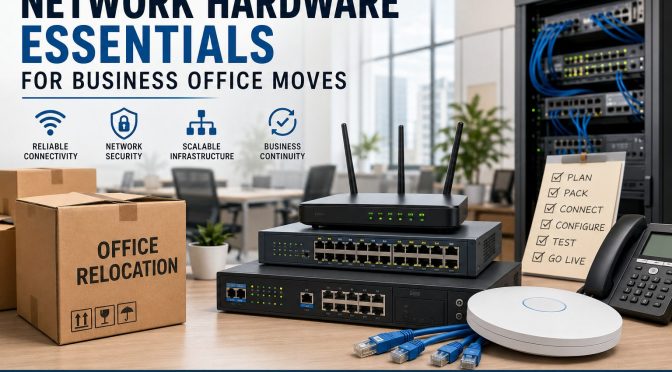
Relocating a business office sounds exciting at first. A bigger workspace, better infrastructure, improved employee comfort, and room for future growth all look great on paper. But behind every smooth office move is something most companies underestimate—network hardware planning. You can have the most beautiful office in the city, but if the internet crashes, Wi-Fi fails, phones stop working, or servers refuse to connect, productivity collapses instantly. Moving an office without carefully planning the networking infrastructure is like moving into a new house without checking the electricity or plumbing. Everything may look fine until you actually try to use it.
Modern businesses rely heavily on cloud platforms, video meetings, VoIP calls, cybersecurity systems, smart devices, and uninterrupted internet connectivity. According to recent enterprise networking reports, businesses are rapidly investing in cloud-first and policy-driven networking systems to support hybrid work, AI-powered operations, and secure connectivity. This shift means office relocations are no longer just about moving desks and chairs. They are now major IT infrastructure projects that require strategic planning and decisions on future-ready hardware.
In this guide, you’ll discover everything you need to know about network hardware essentials for business office moves, including switches, routers, firewalls, cabling, wireless access points, server planning, backup systems, and security considerations. Whether you run a small startup or a growing enterprise, this article will help you avoid downtime, protect data, and create a scalable network environment that supports long-term business growth.
Why Network Planning Matters During Office Relocation
Moving an office without a networking strategy is one of the fastest ways to create operational chaos. Businesses often spend months planning furniture layouts, branding designs, and employee seating arrangements, yet they leave networking decisions until the final week. That approach usually leads to unexpected downtime, rushed installations, and expensive troubleshooting. A company’s digital infrastructure is now the heartbeat of its operations, and every connected device depends on a reliable network foundation. If that foundation fails, daily workflows slow down instantly.
Think about how many business operations rely on stable connectivity today. Customer support teams need VoIP systems; sales teams depend on CRM platforms; marketers use cloud software; finance departments access online accounting tools; and employees collaborate through video meetings. Even a small network interruption can affect customer trust and revenue generation. Recent research in the networking industry highlights that hybrid work and cloud adoption is forcing companies to redesign their office networks from the ground up. Businesses are no longer building networks only for office desktops. They are designing infrastructures that support remote workers, mobile devices, and AI-powered applications simultaneously.
Another important reason network planning matters is scalability. Many businesses relocate because they are growing. Unfortunately, some companies simply transfer old hardware to a larger office without considering future expansion. That’s like putting a tiny engine into a heavy truck and expecting high performance. Smart organizations use office relocations as opportunities to upgrade infrastructure, improve cybersecurity, increase bandwidth capacity, and modernize connectivity systems. A carefully planned network setup not only prevents disruptions but also positions the business for long-term efficiency and innovation.
The Hidden Cost of Poor Network Preparation
The biggest mistake companies make during office relocation is underestimating the financial impact of downtime. Most business owners focus only on hardware costs while ignoring the operational damage caused by network failures. Imagine a customer support center losing internet access for half a day or a finance department being unable to access cloud-based accounting software during payroll processing. The consequences multiply quickly. Lost productivity, frustrated employees, delayed client responses, and missed opportunities all add up faster than expected.
Poor preparation also leads to hidden repair costs. When businesses rush networking installations, technicians often have to redo cabling, replace incompatible hardware, or troubleshoot unstable configurations. That means paying twice for the same work. In many cases, businesses discover after relocation that their existing switches cannot support higher internet speeds or modern Wi-Fi demands. According to networking trend reports, businesses are increasingly moving toward 2.5G and 10G networking switches to handle cloud traffic, HD video conferencing, and large file transfers. Older equipment often becomes a bottleneck in modern office environments.
There’s also a cybersecurity risk. During relocation, IT teams are busy managing logistics, which creates opportunities for overlooked vulnerabilities. Temporary setups, unsecured devices, and rushed configurations can expose sensitive business data. Cybercriminals love weak transition periods because businesses are distracted. That’s why network security planning should always be integrated into relocation strategies from day one. Investing in proper planning may feel expensive initially, but it saves massive operational costs later.
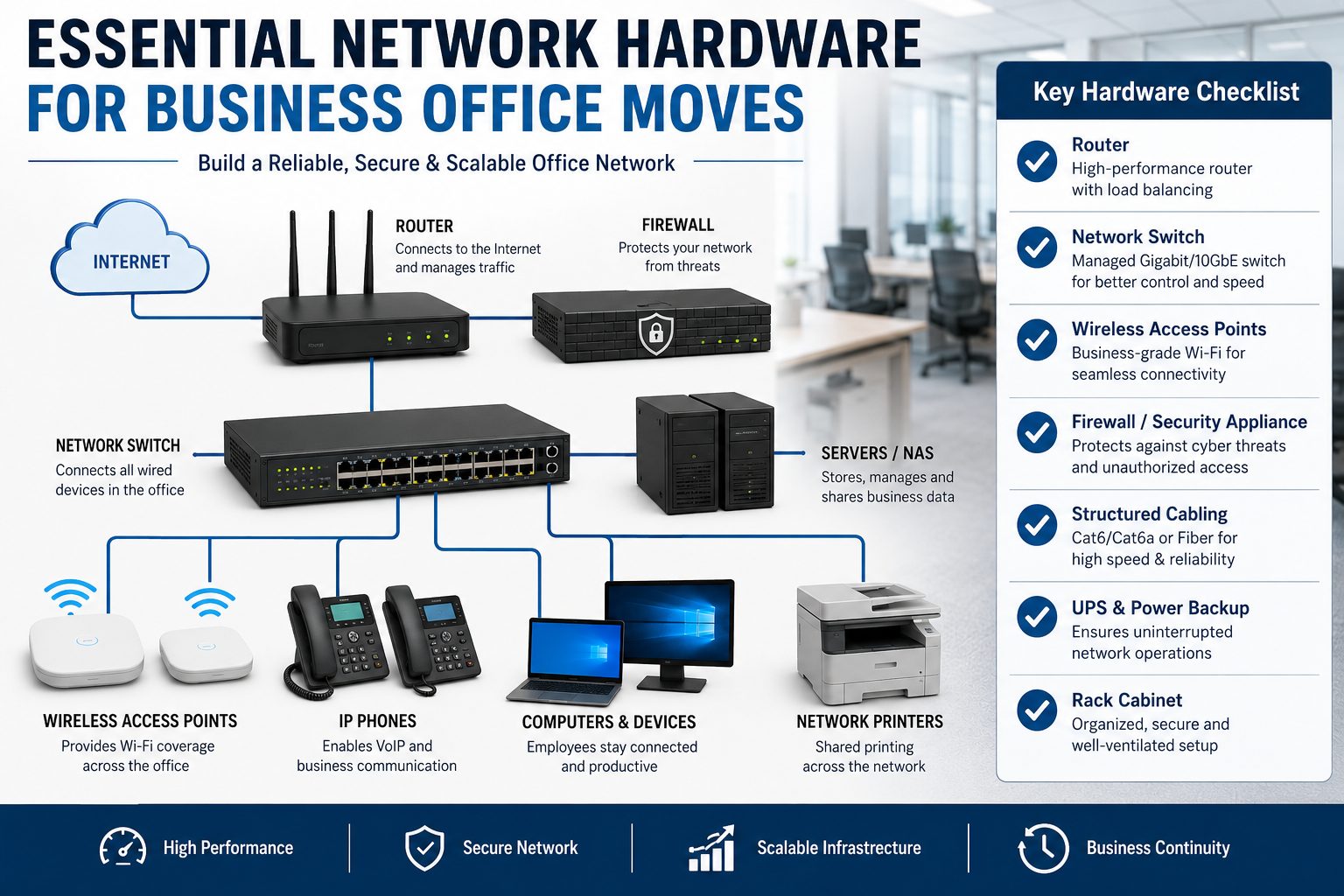
Core Network Hardware Every Office Needs
Every successful office network depends on a few essential hardware components working together seamlessly. These devices form the nervous system of your business environment. Without them, communication between employees, devices, servers, and cloud platforms simply cannot function effectively. Understanding these core components helps businesses make smarter purchasing decisions during relocation.
Hardware
Purpose
Importance
Router
Connects office to internet
Essential
Network Switch
Connects devices internally
Essential
Firewall
Protects network from threats
Critical
Wireless Access Point
Provides Wi-Fi coverage
Essential
UPS System
Backup power during outages
Highly Recommended
Rack Cabinet
Organizes networking equipment
Recommended
PoE Switch
Powers IP devices through Ethernet
Highly Useful
Routers are responsible for directing internet traffic between the office network and external connections. A high-quality business router ensures stable bandwidth distribution, secure VPN connectivity, and advanced traffic management. Businesses handling cloud applications or video meetings should prioritize enterprise-grade routers rather than consumer models. Modern routers also support SD-WAN technology, which many companies now prefer because it offers flexibility and improved cloud performance.
Network switches are equally important because they connect internal devices like computers, printers, servers, and cameras. Managed switches provide better control, monitoring, and scalability than unmanaged switches. They allow IT teams to segment traffic, prioritize bandwidth, and improve security. Wireless access points create strong Wi-Fi coverage throughout the office, which is especially important in hybrid work environments where employees rely heavily on laptops and mobile devices. Businesses upgrading offices in 2026 are increasingly adopting Wi-Fi 7 solutions for faster speeds and lower latency.
Choosing the Right Cabling Infrastructure
Cabling is the invisible foundation of every office network. People often focus on flashy hardware like routers and firewalls while ignoring the cables connecting everything together. That’s a dangerous mistake because even the best networking equipment cannot perform properly with outdated or poorly installed cabling. Think of cables like highways for digital traffic. If the highways are damaged or too narrow, traffic slows down regardless of how powerful the vehicles are.
Businesses relocating offices should strongly consider installing Cat6a or fiber optic cabling instead of older Cat5e systems. Cat6a cables support higher speeds and improved performance over longer distances, making them ideal for modern offices with cloud applications and video conferencing demands. Fiber optic cabling goes even further by delivering extremely high bandwidth with minimal interference. While fiber installations cost more upfront, they provide exceptional scalability and future-proofing benefits.
Recent network cabling reports also show increasing adoption of Power over Ethernet (PoE) infrastructure. PoE technology allows devices like security cameras, VoIP phones, and wireless access points to receive both power and data through a single cable. This simplifies installation, reduces clutter, and lowers infrastructure costs. For growing businesses, PoE creates cleaner and more efficient office environments.
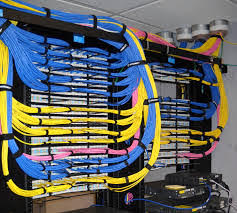
Another factor businesses should consider is structured cabling design. Random cable placement may work temporarily, but it becomes a nightmare during troubleshooting or expansion. Organized cable management inside racks improves airflow, simplifies maintenance, and reduces accidental disconnections. Professional labeling systems also save enormous amounts of time for IT teams managing large office networks.
Server Room and Rack Planning
A server room is more than just a storage area for networking equipment. It’s the control center of the entire business infrastructure. Poor server room planning can lead to overheating, hardware failure, and costly downtime. During office relocation, businesses should carefully evaluate the size, cooling capacity, ventilation, and accessibility of their server rooms before moving equipment.
Temperature management is one of the biggest priorities. Networking hardware generates significant heat, especially switches, servers, and firewalls running continuously. Without proper cooling systems, hardware lifespan decreases rapidly. It’s similar to driving a car engine at maximum speed without enough coolant. Eventually, something breaks. Businesses should install dedicated cooling systems or ensure proper air circulation to maintain stable operating temperatures.
Power protection is equally important. A sudden power outage can damage servers, corrupt data, and interrupt business operations instantly. That’s why UPS (Uninterruptible Power Supply) systems are essential for modern offices. UPS devices provide temporary backup power during outages, allowing systems to shut down safely or continue operating until generators activate. Businesses handling sensitive data or customer transactions should never ignore backup power planning.
Rack cabinets also deserve attention. Proper racks organize networking equipment efficiently while improving airflow and cable management. Businesses should avoid stacking equipment randomly because it creates maintenance problems and increases the risk of accidental damage. Modern rack systems also support scalable expansion, making future upgrades easier and more cost-effective.
Network Security During Office Moves
Office relocations create temporary vulnerabilities that cybercriminals often exploit. During transitions, businesses frequently disconnect devices, reconfigure systems, and establish temporary internet connections. That creates opportunities for unauthorized access, weak security settings, and overlooked vulnerabilities. Cybersecurity should never be treated as an afterthought during relocation projects.
Modern businesses are increasingly adopting Zero Trust security models, where no device or user is automatically trusted without verification. Recent enterprise networking reports show Zero Trust becoming a standard requirement rather than an optional upgrade. This approach is especially valuable during office moves because employees, contractors, and devices may connect from multiple locations simultaneously.
Firewalls remain one of the most critical security investments for any office network. Modern UTM (Unified Threat Management) firewalls combine multiple security functions into a single appliance, including antivirus protection, intrusion prevention, content filtering, and threat monitoring. According to recent SMB networking trends, UTM firewalls are becoming increasingly popular because they simplify network security management while improving protection.
Businesses should also encrypt sensitive data before relocation and create full backups of critical systems. If hardware gets damaged or lost during transit, backups ensure business continuity. Employee cybersecurity awareness is equally important because phishing attacks often increase during busy transition periods. Even the best hardware cannot protect a business if employees unknowingly compromise credentials.
Future-Proofing Your Office Network
Technology evolves faster than most businesses expect. A network setup that feels advanced today may become outdated within a few years. That’s why smart organizations focus on future-proofing during office relocation instead of only solving immediate problems. Investing slightly more today can prevent expensive infrastructure replacements later.
One of the biggest networking trends in 2026 is the rise of Wi-Fi 7 and multi-gig networking. Industry reports highlight growing demand for ultra-fast wireless connectivity capable of supporting video conferencing, cloud computing, AI applications, and smart office devices simultaneously.Businesses planning office relocations should consider hardware capable of handling higher bandwidth demands, even if they don’t need maximum capacity immediately.
Cloud-managed networking systems are also becoming increasingly popular. These platforms allow IT teams to monitor, configure, and troubleshoot networks remotely through centralized dashboards. For businesses with multiple offices or hybrid employees, cloud management dramatically improves visibility and operational efficiency. Instead of manually configuring every device onsite, administrators can manage networks from anywhere.
Sustainability is another emerging factor in networking infrastructure. New hardware designs focus on energy efficiency, reduced heat generation, and environmentally friendly materials. Energy-efficient switches and routers not only reduce electricity costs but also support corporate sustainability goals. Businesses upgrading offices should view networking investments as long-term strategic assets rather than short-term expenses.
Common Mistakes Businesses Make During Relocation
Office relocations are stressful, and businesses often repeat the same networking mistakes. One of the most common problems is waiting too long to involve IT teams. Some companies finalize office layouts before discussing networking requirements, which leads to poor cable routing, weak Wi-Fi coverage, and limited scalability. Networking should influence office design from the beginning, not the other way around.
Another frequent mistake is reusing outdated hardware simply to save money. Old switches, routers, and firewalls may function temporarily, but they often struggle with modern workloads and security requirements. Businesses eventually spend more on troubleshooting and replacements than they would have spent upgrading initially.
Poor Wi-Fi planning is another major issue. Companies sometimes install access points randomly without conducting proper wireless site surveys. That results in dead zones, signal interference, and inconsistent performance. Modern offices filled with video calls and cloud applications require carefully designed wireless coverage.
Some businesses also ignore redundancy planning. They assume internet connectivity will always remain stable, which is risky. Smart offices often install backup internet connections or redundant networking paths to maintain uptime during outages. Downtime can be incredibly expensive, especially for customer-facing operations.
Best Practices for a Smooth Network Migration
Successful network migration requires planning, testing, and coordination. Businesses should start by creating a complete inventory of existing hardware, including routers, switches, servers, cables, and security devices. This inventory helps identify outdated equipment and ensures nothing important gets overlooked during the move.
Testing is critical. Before employees arrive at the new office, IT teams should verify internet connectivity, Wi-Fi coverage, VoIP systems, server access, and security configurations. Think of it like rehearsing before a live performance. Problems discovered early are much easier to fix.
Businesses should also schedule migrations during weekends or low-activity periods whenever possible. Minimizing disruption helps maintain productivity and reduces customer impact. Communication is equally important. Employees should understand what systems may experience temporary downtime and how to access support if issues arise.
Working with professional network engineers can also make a huge difference. Experienced professionals understand cabling standards, security configurations, bandwidth planning, and hardware compatibility. Their expertise often prevents expensive mistakes and accelerates deployment timelines.
Cost Breakdown of Business Network Hardware
Office networking costs vary depending on company size, bandwidth requirements, and security needs. Small offices may spend a few thousand dollars, while large enterprises can invest hundreds of thousands into infrastructure upgrades. Understanding typical hardware costs helps businesses budget more effectively.
Hardware Component
Estimated Cost Range
Business Router
$300 – $2,500
Managed Switch
$500 – $5,000
Wireless Access Point
$150 – $1,200
UTM Firewall
$700 – $10,000
UPS Backup System
$200 – $3,000
Rack Cabinet
$400 – $2,500
Fiber Cabling Installation
Varies by office size
Research indicates that the global networking hardware market continues to expand rapidly due to increasing cloud adoption, AI workloads, and enterprise connectivity demands. Businesses investing in modern infrastructure today are positioning themselves for future scalability and operational resilience.
Price should never be the only factor when choosing networking equipment. Reliability, security, vendor support, scalability, and compatibility matter just as much. Cheap hardware may reduce upfront costs but often creates long-term operational headaches.
Conclusion
A business office move is much more than transporting desks, computers, and office furniture. It’s a rare opportunity to redesign your digital infrastructure for better speed, stronger security, and future scalability. Companies that treat networking as a strategic priority usually experience smoother transitions, fewer disruptions, and stronger operational performance after relocation.
From routers and managed switches to structured cabling, Wi-Fi systems, firewalls, and backup power solutions, every networking component plays a critical role in business continuity. Modern networking trends like Wi-Fi 7, SD-WAN, cloud-managed systems, and Zero Trust security are reshaping how offices operate, making it essential for businesses to think beyond traditional infrastructure models.
The smartest approach is proactive planning. Assess current infrastructure, identify future requirements, involve IT teams early, and invest in scalable hardware that supports long-term growth. A properly planned office network becomes more than a utility — it becomes a competitive advantage that enables productivity, collaboration, and innovation for years to come.
FAQs
1. What is the most important network hardware during an office move?
The most important hardware includes routers, managed switches, firewalls, wireless access points, and structured cabling. These components form the core infrastructure of the office network.
2. Should businesses upgrade network hardware during relocation?
Yes. Office relocation is the perfect opportunity to replace outdated equipment, improve security, increase bandwidth capacity, and prepare for future business growth.
3. What type of cabling is best for modern offices?
Cat6a and fiber optic cabling are highly recommended because they support faster speeds, better reliability, and future scalability compared to older cable standards.
4. Why are managed switches better than unmanaged switches?
Managed switches provide advanced control, monitoring, traffic prioritization, and security features that are essential for modern business environments.
5. How can businesses reduce downtime during office relocation?
Businesses can reduce downtime by planning early, testing systems before launch, scheduling migrations during low-activity periods, and working with professional network engineers.
Let’s be honest—business communication has changed faster than most of us expected. Desk phones tied to wires feel as outdated as fax machines. In 2026, VOIP isn’t just an option anymore; it’s the backbone of modern business communication.
What is a VOIP Phone System?
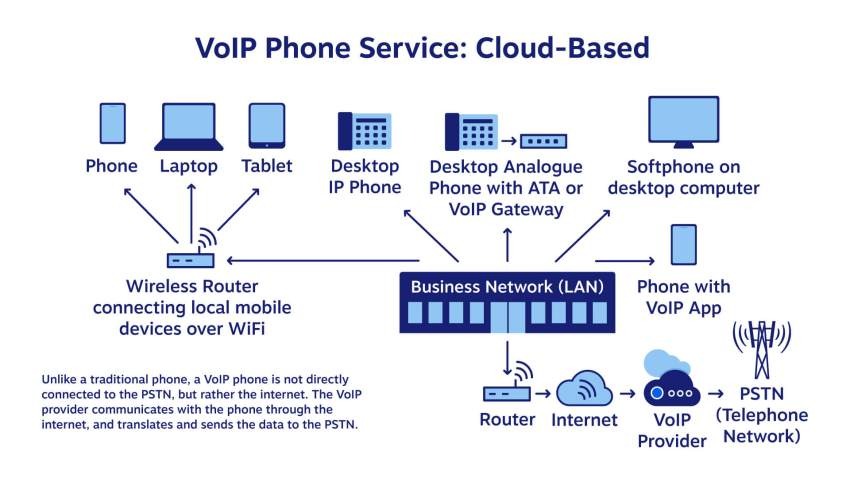
VOIP (Voice over Internet Protocol) lets you make and receive calls using the internet instead of traditional phone lines. Think of it like sending voice messages the same way you send emails—faster, cheaper, and smarter.
Why VOIP is the Future of Business Communication
Why are businesses ditching old phone systems? Simple. VOIP is flexible, cost-effective, and built for remote work. Whether your team is in one office or spread across cities, VOIP keeps everyone connected without breaking the bank.
Why Choosing the Right VOIP System Matters
Choosing a VOIP system is like choosing a business partner. Get it right, and things run smoothly. Get it wrong, and you’ll deal with dropped calls, frustrated customers, and wasted money.
Impact on Productivity and Customer Experience
Clear calls, fast connections, and smart routing mean customers don’t wait—and employees don’t struggle. A good VOIP system quietly boosts productivity while making your business look professional.
Cost Control and Business Growth
VOIP helps you scale without heavy investments. Add users, open new locations, or support remote teams without installing new hardware every time.
Key Trends Shaping VOIP in 2026
VOIP in 2026 isn’t what it used to be even two years ago.
AI-Powered Call Management
AI now helps with call routing, voice analytics, spam call detection, and even real-time coaching. It’s like having a smart assistant listening in (in a good way).
Cloud-First and Remote Work Support
Cloud-based VOIP systems dominate because they work anywhere. Office, home, or café—your phone system follows you.
Mobile-First VOIP Solutions
Mobile apps now offer full desk-phone features. Your smartphone becomes your business phone, no extra device needed.
Understanding Your Business Needs
Before comparing providers, pause and look inward.
Small Business vs Enterprise Requirements
A small business may need simplicity and affordability. Enterprises need advanced analytics, security, and integrations. One size doesn’t fit all.
Industry-Specific VOIP Use Cases
Sales teams need call recording and CRM sync. Support teams need IVR and queue management. Choose based on how you actually work.
Types of VOIP Phone Systems
Hosted (Cloud-Based) VOIP
This is the most popular choice in 2026. No servers, no maintenance headaches. Just log in and start calling.
On-Premise VOIP
Best for businesses that want full control and have strong IT teams. Higher upfront cost, but more customization.
Hybrid VOIP Systems
A mix of cloud and on-premise. Ideal if you’re transitioning or need flexibility.
Essential Features to Look for in 2026
Call Quality and Reliability
HD voice, low latency, and uptime guarantees are non-negotiable. Poor call quality kills credibility.
Advanced Calling Features
Look for call forwarding, voicemail-to-email, auto attendants, and conference calling.
IVR, Call Recording, and Analytics
These features help you manage calls smarter and improve performance using real data.
Security and Compliance Considerations
Data Encryption and Privacy
Your calls carry sensitive data. Encryption protects you from eavesdropping and breaches.
Regulatory Compliance
Depending on your industry, compliance with local and international regulations is critical. Don’t ignore this.
Scalability and Flexibility
Adding Users and Locations Easily
Your VOIP system should grow with you, not slow you down.
Supporting Remote and Hybrid Teams
In 2026, flexibility isn’t a perk—it’s a requirement.
Integration with Business Tools
CRM and Helpdesk Integration
Integrated systems save time and reduce errors. Calls logged automatically? Yes, please.
Collaboration Tools and APIs
The more your VOIP system talks to other tools, the smoother your workflows become.
Cost and Pricing Models
Subscription vs Usage-Based Pricing
Flat monthly plans are predictable. Usage-based plans work if call volume fluctuates.
Hidden Costs to Watch Out For
Setup fees, hardware costs, international calling—always read the fine print.
Evaluating VOIP Providers
Reputation and Reviews
What do real users say? Reviews often reveal what sales pages hide.
Customer Support and SLA
24/7 support and clear SLAs can save you during critical moments.
Internet and Infrastructure Requirements
Bandwidth and Network Quality
VOIP depends on your internet. Poor connection equals poor calls.
Hardware vs Softphones
Modern businesses increasingly prefer softphones. Less hardware, more flexibility.
Implementation and Setup
Easy Deployment and Training
If your team can’t use it easily, it won’t matter how powerful it is.
Migration from Traditional Phone Systems
Choose providers that offer smooth number porting and migration support.
Common Mistakes to Avoid
Choosing Price Over Quality
Cheap systems often cost more in the long run.
Ignoring Future Needs
Plan for growth now, not later.
Final Checklist Before Buying
Questions to Ask VOIP Vendors
Is it scalable?
Is support reliable?
Are features future-ready?
Is pricing transparent?
Conclusion
Choosing the best VOIP phone system in 2026 is about balance—features, cost, scalability, and reliability. Don’t rush. Understand your needs, study trends, and choose a system that grows with your business. The right VOIP system won’t just connect calls—it will connect people, ideas, and opportunities.
FAQs
1. Is VOIP better than traditional phone systems in 2026?
Yes. VOIP is cheaper, more flexible, and better suited for remote and hybrid work.
2. How much internet speed is required for VOIP?
A stable connection with good upload speed is more important than raw speed.
3. Can VOIP work during power outages?
Cloud VOIP can still work via mobile apps if internet access is available.
4. Is VOIP secure for business calls?
Yes, when proper encryption and security practices are used.
5. How long does it take to set up a VOIP system?
Most cloud VOIP systems can be set up within a few hours to a few days.
If you run a small business, every rupee and every minute matters. Communication is the backbone of sales, support, and trust—but traditional phone systems are expensive, rigid, and outdated. That’s where VOIP comes in.
VOIP has quietly transformed how small businesses talk to customers, partners, and teams. And the best part? You don’t need to be a tech expert to use it.
What Does VOIP Stand For?
VOIP stands for Voice Over Internet Protocol.
In simple terms, VOIP lets you make phone calls using the internet instead of traditional telephone lines. Your voice becomes digital data, travels through the internet, and turns back into sound on the receiver’s side.
Think of it like WhatsApp calling—but built for professional business use.
Why VOIP Matters in Today’s Business World
Small businesses today are:
Remote or hybrid
Cost-conscious
Customer-experience driven
VOIP fits perfectly because it’s:
Affordable
Flexible
Scalable
Easy to manage
Whether you’re a startup, local shop, coaching center, or IT agency—VOIP levels the playing field.
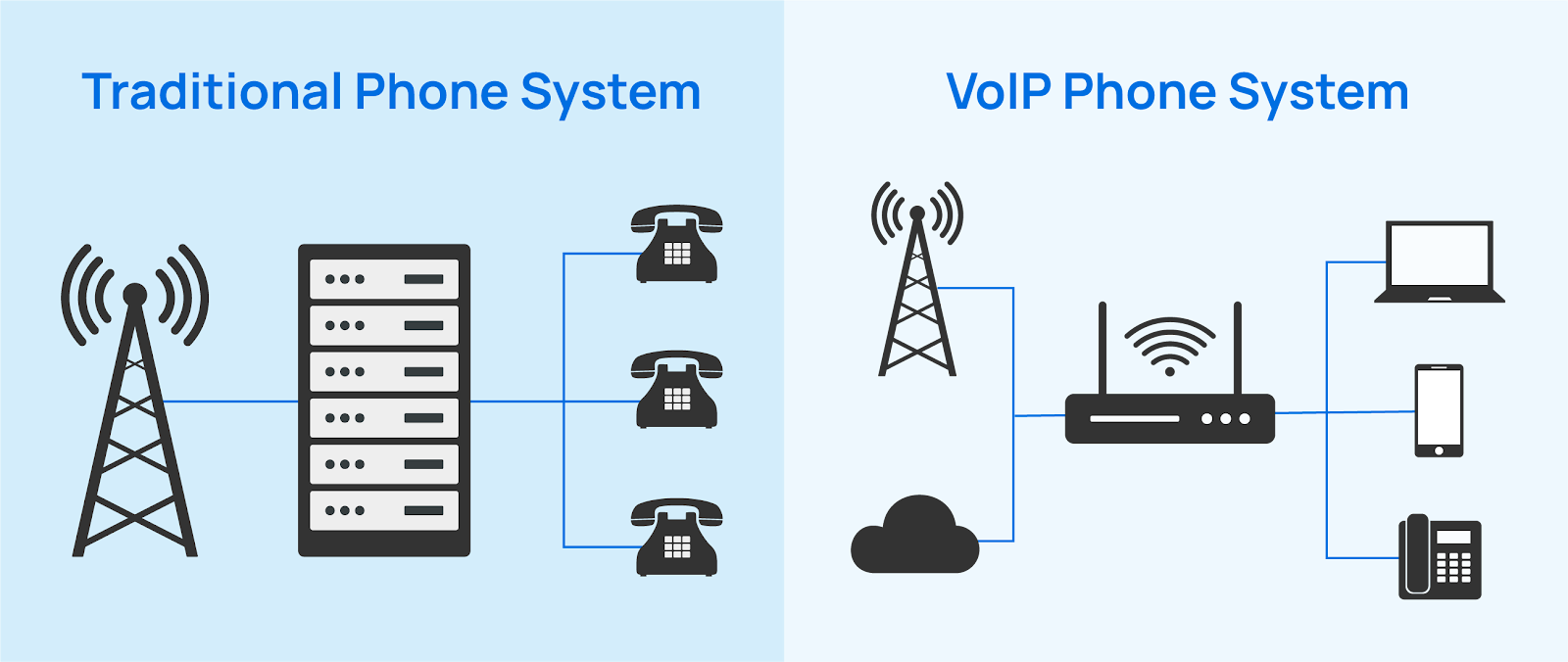
Traditional Phone Systems vs VOIP
How Landline Phones Work
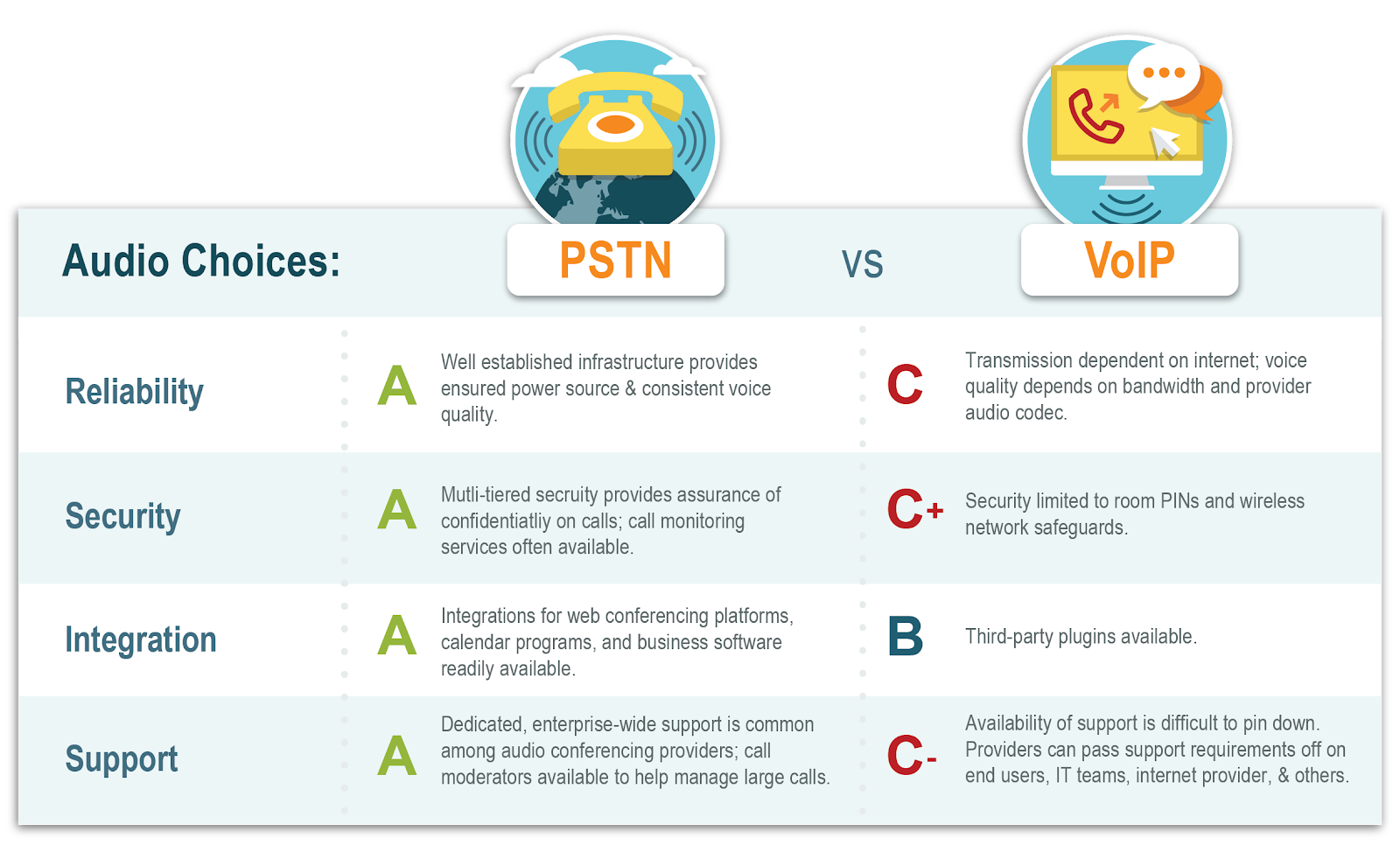
Traditional phones use PSTN (Public Switched Telephone Network). Calls travel through physical copper wires owned by telecom companies.
Problems?
Expensive installation
Limited features
No mobility
Hard to scale
Key Differences Between VOIP and PSTN
Cost Comparison
Landlines charge per line and per call. VOIP uses monthly plans with unlimited or low-cost calls.
Flexibility and Scalability
Need 1 user or 50 users? VOIP grows with you—no rewiring needed.
How VOIP Works (Simple Explanation)
Converting Voice to Data Packets
When you speak:
Your voice is captured by a mic
Converted into digital data
Broken into small packets
Role of the Internet
These packets travel over the internet—just like emails or videos—and reassemble at the other end in real time.
Codecs and Compression
Codecs compress voice data so calls stay clear without eating bandwidth.
Packet Switching Explained
Unlike landlines (fixed path), VOIP finds the fastest route—like Google Maps for voice.
Core Components of a VOIP System
Internet Connection
Stable broadband or fiber is essential.
VOIP Phones and Softphones
Desk IP phones
Mobile apps
Laptop softphones
VOIP Servers and PBX
Cloud-Based PBX vs On-Premise PBX
Cloud PBX is hosted online—no hardware, no headache. Perfect for small businesses.
Types of VOIP Services
Hosted VOIP
Everything runs in the cloud. Easy and affordable.
SIP Trunking
Ideal if you already have a PBX and want internet calling.
Unified Communications
Voice + video + chat + file sharing in one platform.
Mobile VOIP Apps
Take business calls anywhere—office, home, or road.
Key Features of VOIP for Small Businesses
Call Forwarding and Routing
Never miss a call again.
Auto Attendant
“Press 1 for Sales, Press 2 for Support”—sounds professional instantly.
Voicemail to Email
Get voicemails in your inbox.
Call Analytics and Reporting
Track call volume, duration, and performance.
Benefits of VOIP for Small Businesses
Cost Savings
Save up to 60% compared to landlines.
Remote Work Enablement
Your team can work from anywhere.
Professional Business Image
Even a 2-person company can sound like a big brand.
Easy Business Expansion
Add users in minutes, not weeks.
Is VOIP Reliable for Small Businesses?
Call Quality Factors
Good internet = crystal clear calls.
Internet Speed Requirements
Minimum 100 kbps per call is enough.
Redundancy and Failover
Calls can auto-switch to mobile if the internet drops.
VOIP isn’t just a cheaper phone system—it’s a business growth tool. It helps small businesses look professional, stay connected anywhere, and scale without stress. If communication matters to your business (and it does), VOIP is no longer optional—it’s essential.
FAQs
1. Do I need special phones for VOIP? No. You can use mobile apps, laptops, or IP phones.
2. Can VOIP work with slow internet? Yes, but stable internet improves quality.
3. Is VOIP safe for business calls? Yes, with encryption and secure providers.
4. Can I keep my existing number? Absolutely. Number porting is common.
5. Is VOIP suitable for very small businesses? Perfect—even for solo founders.
For companies of all sizes, dependable and effective network infrastructure is crucial in today’s digital world. Investing in expert structured cabling services is one of the best choices, regardless of whether you’re building a new facility, expanding your office, or updating your technology. The business community in Northern Virginia (Northern VA) is flourishing, and as businesses grow, there is a greater need than ever for well-organized cabling systems. This post will discuss the value of structured cabling and how Northern Virginia’s specialized services can help your company.
Structured Cabling: What is it?
A standardized system of cables and parts used to connect and send voice, video, and data throughout a building or campus is known as structured cabling. It consists of several wires, connectors, and channels that guarantee a dependable and seamless communication flow between workstations, servers, and devices. A carefully thought-out cabling system can significantly increase your network’s performance, scalability, and efficiency.
Northern Virginia’s Structured Cabling Advantages
1. Enhanced Network Efficiency
High-speed internet and faultless communication are crucial because Northern Virginia is a centre for tech companies and startups. By ensuring that your network runs as quickly and reliably as possible, structured cabling lowers the possibility of connectivity problems that could interfere with business operations.
2. Preparing Your Infrastructure for the Future
Businesses require scalable solutions that can expand with the rapidly changing technological landscape. Companies can integrate new technologies like 5G, IoT, and fibre optics without completely redesigning their network, thanks to structured cabling’s flexibility for future upgrades.
3. Cost-Effective
Structured cabling is a more cost-effective option in the long run, even though the initial investment may seem high. Businesses can save time and money by avoiding frequent repairs and system failures due to a well-organised cabling system.
4. Increased Security
Protecting your network is essential because cyber threats are getting more complex. Data transmission security and the design of the entire infrastructure with physical security measures in mind are guaranteed by structured cabling. Northern Virginia recognises the importance of stringent security measures because it is home to many government agencies and private companies.
5. More Efficiency
An uninterrupted, up-and-running network can significantly boost worker productivity. Thanks to structured cabling, employees have continuous access to the resources they require to perform their duties, which guarantees little downtime.
Essential Elements of Services for Structured Cabling
Comprehensive Network Design: Professionals in Northern Virginia will evaluate your company’s needs and create a customised cabling system to meet them.
Installation & Setup: Expert installation guarantees that the system is implemented with the least interference with your regular business operations.
Maintenance & Support: Regular maintenance guarantees that your network will continue functioning at its peak efficiency, with repairs and troubleshooting available.
Cable Management: Maintaining a clean and orderly network with proper cable management makes it easier to expand and troubleshoot.
Compliance: Structured cabling companies guarantee that your system complies with regional laws and industry standards.
Why Pick Northern Virginia Structured Cabling Services?
Numerous service providers focusing on structured business cabling are in Northern Virginia. Working with a local service provider guarantees prompt response times and familiarity with the local infrastructure, whether opening a new office or renovating an old one.
1. Skill and Background
Numerous service providers in Northern Virginia have years of experience working with companies in various industries. Their knowledge guarantees accurate design and installation of the cabling infrastructure, lowering the likelihood of issues later on.
2. Local Expertise
A local provider is familiar with the building codes and regulations in the area. This information guarantees that your system complies entirely, preventing any expensive errors that might cause your project to be delayed.
3. Scalable Solutions
Scalable solutions are essential as Northern Virginia businesses continue to grow. Businesses in the area can easily expand their systems with the help of structured cabling services.
4. Personalisation
Every company has unique requirements. Local service providers guarantee that your network is configured most effectively and efficiently by providing solutions specifically suited to your needs.
How Can I Pick the Best Northern Virginia Structured Cabling Provider?
A few crucial considerations should be made when choosing a structured cabling supplier in Northern Virginia:
1. Experience and Reputation: Seek out businesses with a history of happy clients and successful installations.
2. Certifications: Verify the provider’s technical proficiency by seeking certifications from trade associations like BICSI.
3. Comprehensive Services: Select a supplier that provides complete services, including design, installation, and continuing assistance.
4. Cost Transparency: Verify that the supplier offers a transparent estimate, up front, and free of any additional costs.
5. Customer Support: Choose a business that provides excellent customer service and responds quickly to any problems or queries you might have.
Conclusion
Structured cabling serves as the backbone of modern network infrastructure. In Northern Virginia, where businesses are in a constant state of evolution, a robust, reliable, and scalable cabling system is essential for your operations. Collaborating with a qualified and certified professional guarantees that your network functions efficiently, remains adaptable for future demands, and is tailored to your unique requirements. If you are looking to improve the cabling system in your office, consider contacting a reputable structured cabling service provider in Northern Virginia. Require a complete network solution. With the correct partner, you’ll have a strong base that facilitates the expansion of your company, boosts output, and guarantees clear communication.