
If you run a small business, every rupee and every minute matters. Communication is the backbone of sales, support, and trust—but traditional phone systems are expensive, rigid, and outdated. That’s where VOIP comes in.
VOIP has quietly transformed how small businesses talk to customers, partners, and teams. And the best part? You don’t need to be a tech expert to use it.

What Does VOIP Stand For?
VOIP stands for Voice Over Internet Protocol.
In simple terms, VOIP lets you make phone calls using the internet instead of traditional telephone lines. Your voice becomes digital data, travels through the internet, and turns back into sound on the receiver’s side.
Think of it like WhatsApp calling—but built for professional business use.
Why VOIP Matters in Today’s Business World
Small businesses today are:
- Remote or hybrid
- Cost-conscious
- Customer-experience driven
VOIP fits perfectly because it’s:
- Affordable
- Flexible
- Scalable
- Easy to manage
Whether you’re a startup, local shop, coaching center, or IT agency—VOIP levels the playing field.
Traditional Phone Systems vs VOIP
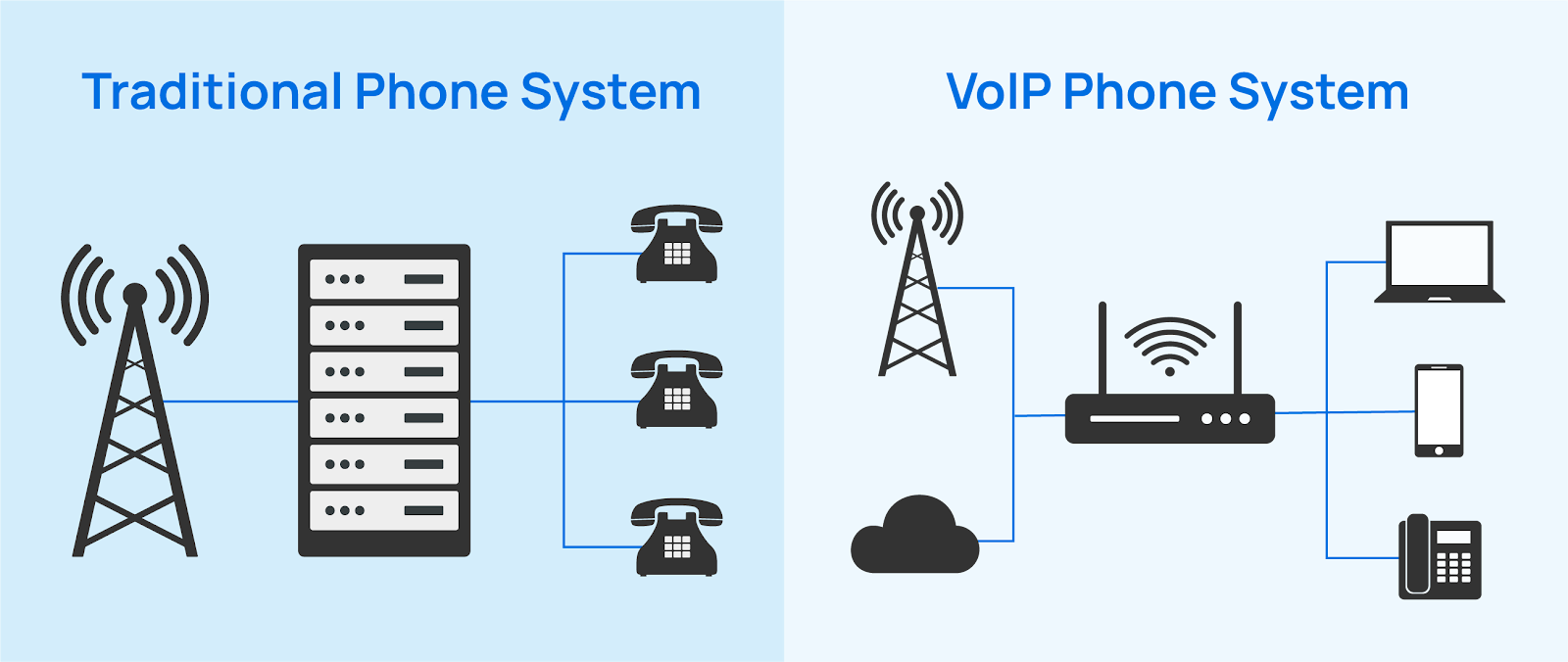
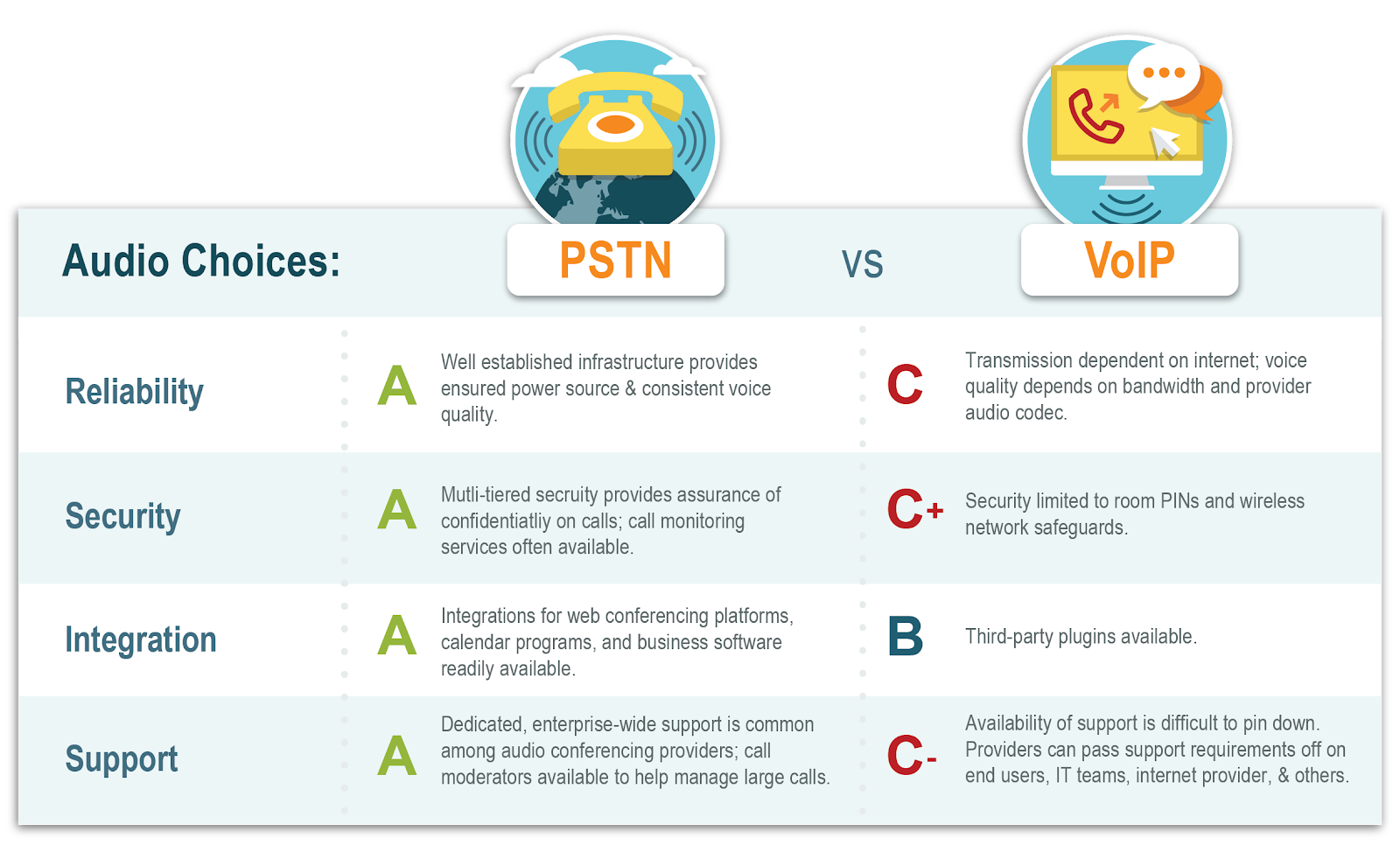
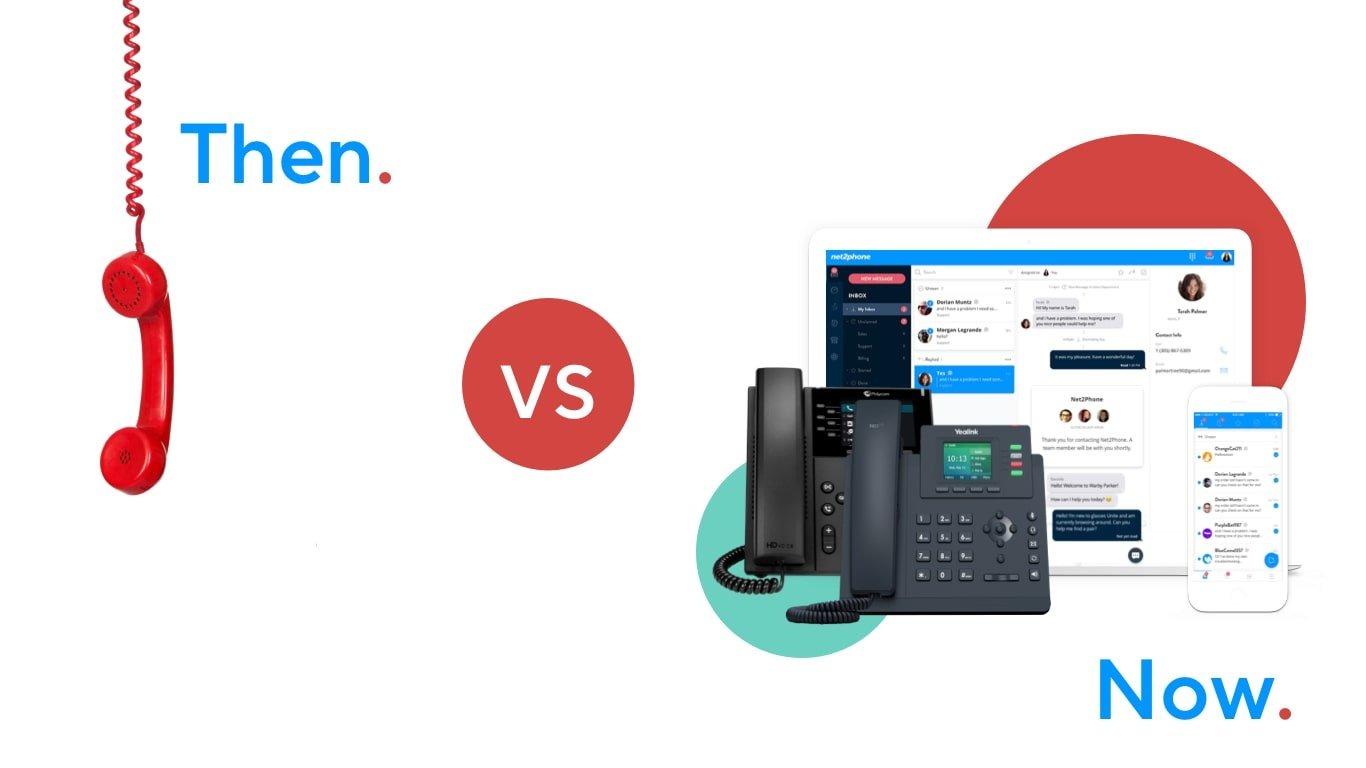
How Landline Phones Work
Traditional phones use PSTN (Public Switched Telephone Network). Calls travel through physical copper wires owned by telecom companies.
Problems?
- Expensive installation
- Limited features
- No mobility
- Hard to scale
Key Differences Between VOIP and PSTN
Cost Comparison
Landlines charge per line and per call. VOIP uses monthly plans with unlimited or low-cost calls.
Flexibility and Scalability
Need 1 user or 50 users? VOIP grows with you—no rewiring needed.
How VOIP Works (Simple Explanation)
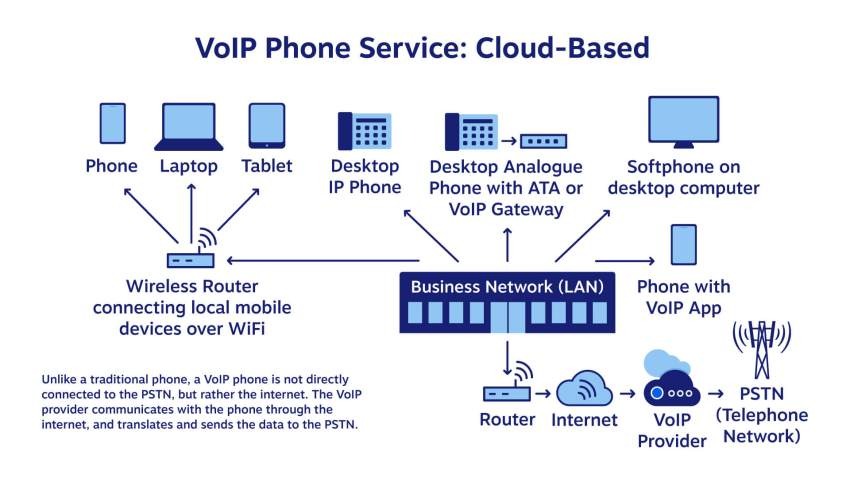
Converting Voice to Data Packets
When you speak:
- Your voice is captured by a mic
- Converted into digital data
- Broken into small packets
Role of the Internet
These packets travel over the internet—just like emails or videos—and reassemble at the other end in real time.
Codecs and Compression
Codecs compress voice data so calls stay clear without eating bandwidth.
Packet Switching Explained
Unlike landlines (fixed path), VOIP finds the fastest route—like Google Maps for voice.
Core Components of a VOIP System
Internet Connection
Stable broadband or fiber is essential.
VOIP Phones and Softphones
- Desk IP phones
- Mobile apps
- Laptop softphones
VOIP Servers and PBX
Cloud-Based PBX vs On-Premise PBX
Cloud PBX is hosted online—no hardware, no headache. Perfect for small businesses.
Types of VOIP Services
Hosted VOIP
Everything runs in the cloud. Easy and affordable.
SIP Trunking
Ideal if you already have a PBX and want internet calling.
Unified Communications
Voice + video + chat + file sharing in one platform.
Mobile VOIP Apps
Take business calls anywhere—office, home, or road.
Key Features of VOIP for Small Businesses
Call Forwarding and Routing
Never miss a call again.
Auto Attendant
“Press 1 for Sales, Press 2 for Support”—sounds professional instantly.
Voicemail to Email
Get voicemails in your inbox.
Call Analytics and Reporting
Track call volume, duration, and performance.
Benefits of VOIP for Small Businesses
Cost Savings
Save up to 60% compared to landlines.
Remote Work Enablement
Your team can work from anywhere.
Professional Business Image
Even a 2-person company can sound like a big brand.
Easy Business Expansion
Add users in minutes, not weeks.
Is VOIP Reliable for Small Businesses?
Call Quality Factors
Good internet = crystal clear calls.
Internet Speed Requirements
Minimum 100 kbps per call is enough.
Redundancy and Failover
Calls can auto-switch to mobile if the internet drops.
VOIP Security Explained
Common VOIP Security Threats
- Call hacking
- Eavesdropping
Encryption and Firewalls
Modern VOIP uses end-to-end encryption.
Best Security Practices
Strong passwords + trusted providers = safe system.
VOIP Hardware and Software Options
Desk Phones
Classic office phones with internet support.
Softphones
Apps on laptop or mobile.
Headsets and Accessories
Noise-canceling headsets improve call quality.
How to Set Up VOIP for Your Small Business
Step-by-Step Setup Guide
- Choose provider
- Select plan
- Add users
- Install app or phone
- Start calling
Common Setup Mistakes to Avoid
- Poor internet
- No backup connection
VOIP Use Cases by Industry
Retail and E-commerce
Customer support & order confirmation.
Healthcare Clinics
Appointment reminders & follow-ups.
IT and Service Businesses
Sales calls, client meetings, remote teams.
VOIP vs Mobile Phones for Business
Why VOIP Is Better Than Personal Numbers
- Business identity
- Call recording
- Team collaboration
Business Continuity Advantages
Numbers stay with business—not employees.
Future of VOIP for Small Businesses
AI and VOIP
AI call summaries, voice bots, smart routing.
Integration with CRM and Tools
VOIP + CRM = smarter sales and support.
Conclusion
VOIP isn’t just a cheaper phone system—it’s a business growth tool. It helps small businesses look professional, stay connected anywhere, and scale without stress. If communication matters to your business (and it does), VOIP is no longer optional—it’s essential.
FAQs
1. Do I need special phones for VOIP?
No. You can use mobile apps, laptops, or IP phones.
2. Can VOIP work with slow internet?
Yes, but stable internet improves quality.
3. Is VOIP safe for business calls?
Yes, with encryption and secure providers.
4. Can I keep my existing number?
Absolutely. Number porting is common.
5. Is VOIP suitable for very small businesses?
Perfect—even for solo founders.
 Don Eckrod