Call Now or Make an Appointment

Boost Customer Service with Advanced VOIP Features

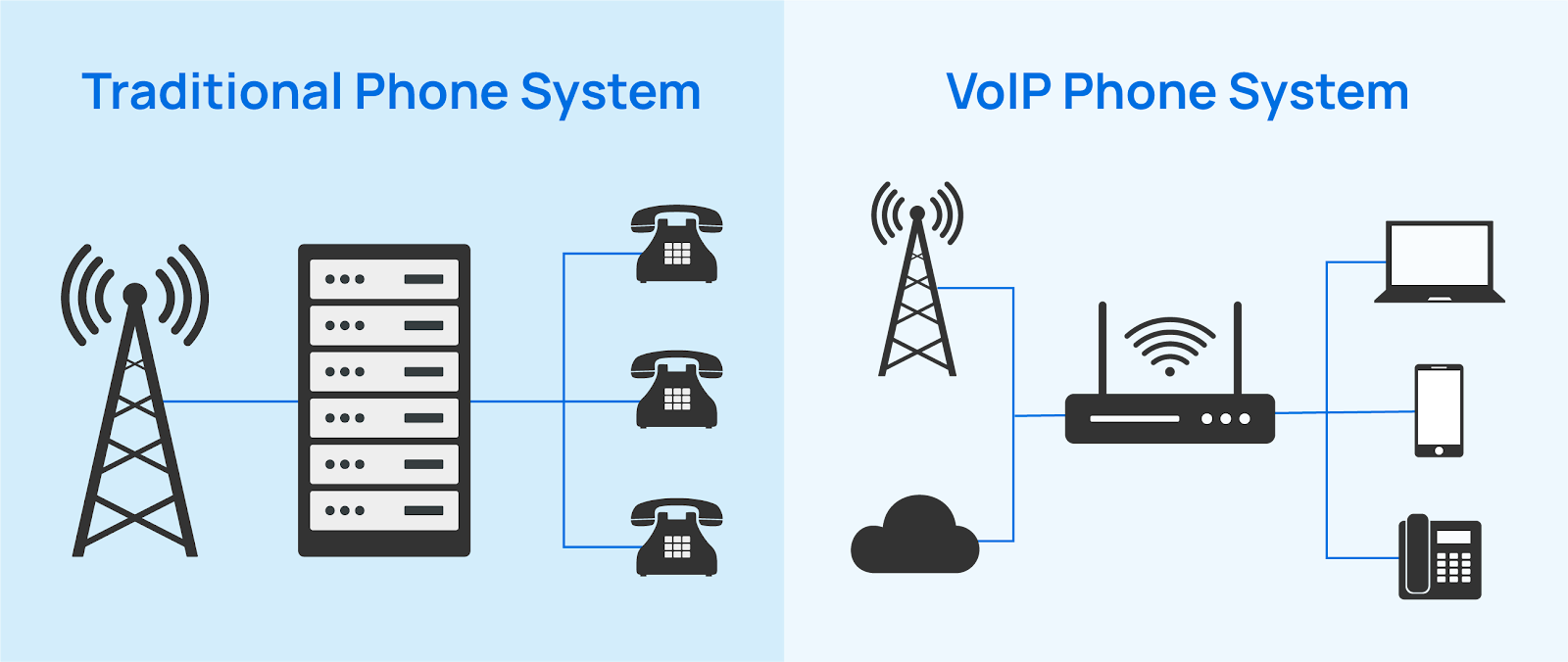
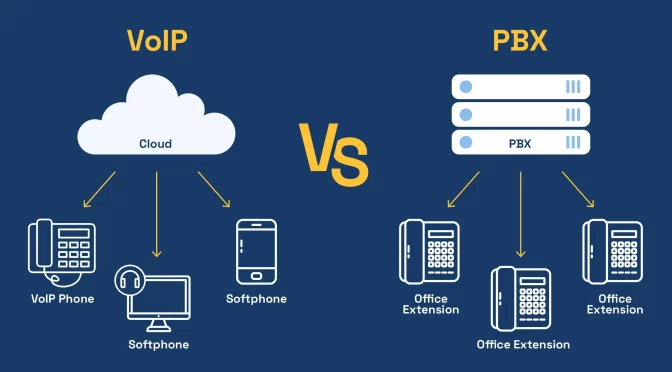
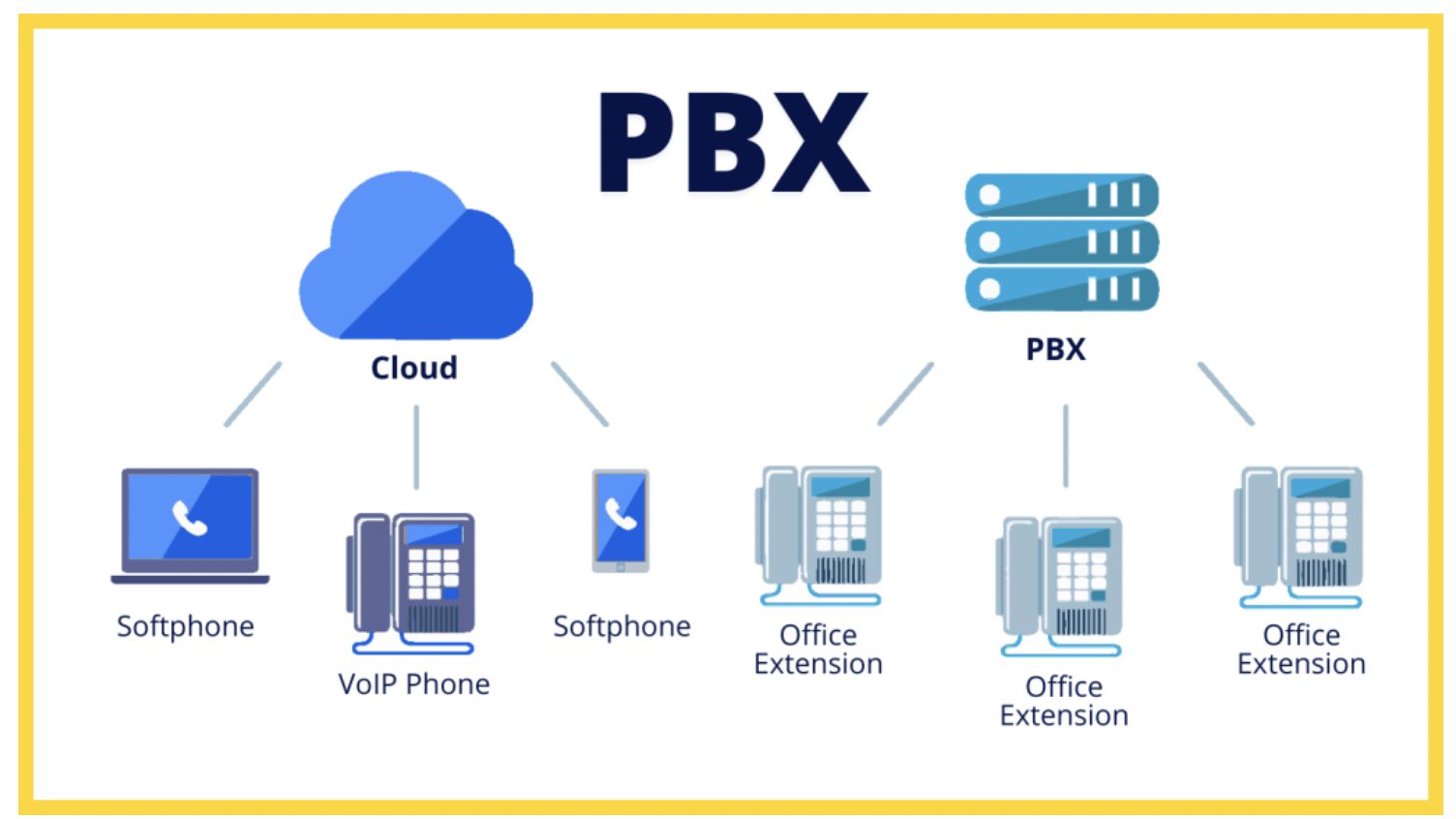
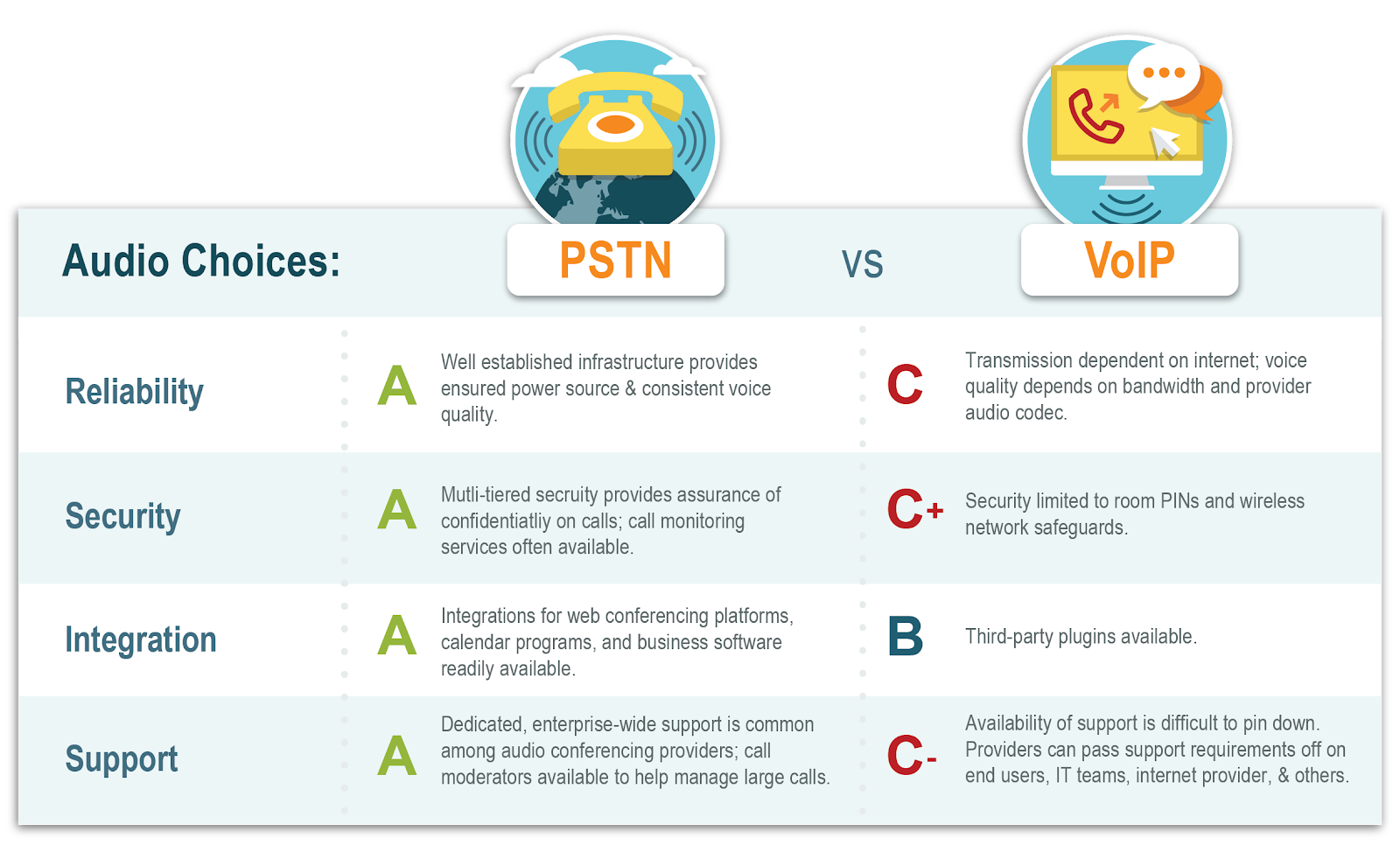
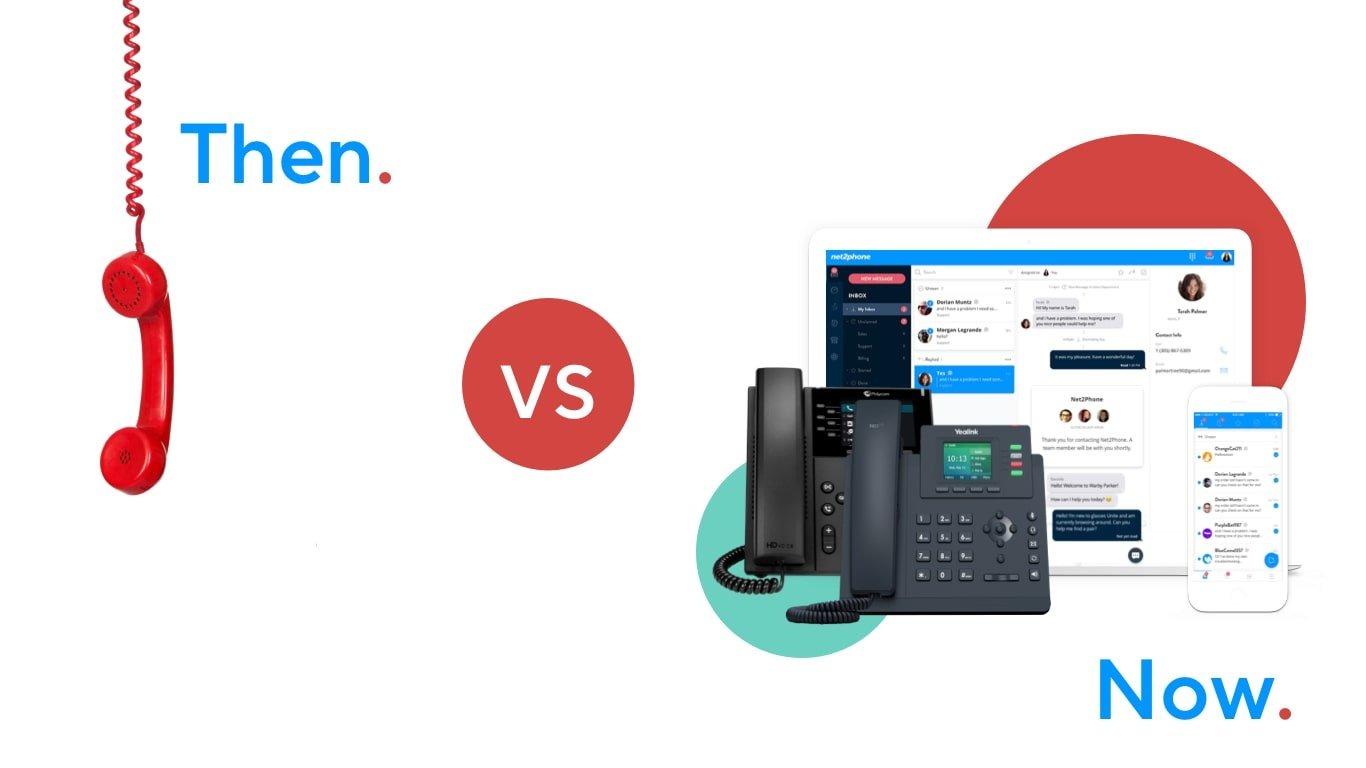
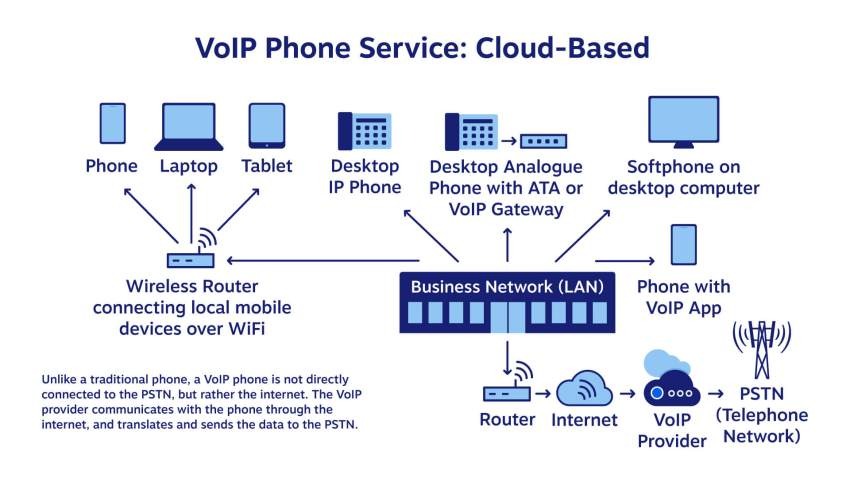
Traditional landline systems are like old highways with limited lanes. They get the job done, but traffic builds up quickly, maintenance becomes expensive, and flexibility is almost nonexistent. Voice over Internet Protocol (VOIP) works differently by sending voice calls through the internet instead of copper phone lines. This simple shift changes everything about how businesses communicate with customers.

Modern VOIP systems are loaded with advanced capabilities that go far beyond voice calling. Businesses can integrate video conferencing, instant messaging, AI-powered call management, and customer relationship tools into a single communication platform. Instead of juggling multiple disconnected systems, customer support teams work from one streamlined dashboard that improves efficiency and response quality.

Another major advantage is scalability. Traditional phone systems often require costly hardware upgrades every time a company grows. VOIP systems allow businesses to add users, numbers, and features instantly through cloud infrastructure. That flexibility is one reason the market continues to expand rapidly worldwide. Industry analysts project strong growth due to increased demand for flexible communication systems and remote work support. (Coherent Market Insights)

The shift to VOIP is not simply about technology modernization. It is about meeting customer expectations in a world where speed, personalization, and convenience matter more than ever before.

Why Businesses Are Rapidly Adopting VOIP
Imagine trying to run a Formula 1 race with a bicycle. That is how many businesses feel when relying on outdated phone systems in today’s fast-moving digital economy. Customers expect instant communication, and VOIP gives businesses the tools to deliver exactly that.

One of the biggest drivers behind VOIP adoption is cost efficiency. Businesses can reduce phone expenses dramatically after switching from legacy systems. Some reports suggest companies save between 30% and 50% on communication costs after migration. (Yeastar) Lower costs combined with better functionality create a powerful incentive for businesses of all sizes.

Remote and hybrid work have also accelerated VOIP adoption. Modern employees need the flexibility to answer calls from laptops, mobile devices, or home offices without compromising service quality. VOIP platforms make this seamless by allowing employees to stay connected from anywhere with internet access.

Businesses are also adopting VOIP because customers now expect smarter service interactions. Features like intelligent call routing, AI chat support, and real-time analytics help support teams resolve problems faster and more effectively. In a world where a single bad customer experience can spread across social media in minutes, communication quality directly impacts brand reputation.

The growing integration of artificial intelligence is making VOIP even more attractive. AI-driven analytics, speech recognition, and automated assistants are becoming standard features that help businesses provide around-the-clock customer support while reducing operational strain. (SPARK Services)

The Role of VOIP in Customer Service

Customer Expectations in 2026

Customers today behave differently than they did just a few years ago. They expect immediate responses, personalized interactions, and smooth experiences across every communication channel. Waiting on hold for ten minutes feels like an eternity in the age of instant messaging and one-click shopping.

Advanced VOIP systems help businesses meet these expectations by creating faster and more intelligent customer interactions. Smart routing systems automatically direct callers to the right department or agent based on customer history, language preferences, or issue type. This eliminates frustration and shortens resolution times significantly.

Customers also expect businesses to remember previous interactions. Nobody enjoys repeating the same problem to five different agents. VOIP platforms integrated with CRM software allow support representatives to access customer records instantly during calls. Agents can see purchase history, previous tickets, and communication notes in real time, creating smoother and more personalized conversations.

Another growing expectation is 24/7 support availability. Businesses no longer operate within strict nine-to-five schedules because customers shop and interact online around the clock. AI-powered VOIP tools such as virtual assistants and automated response systems ensure customers receive immediate attention even outside business hours.

Companies that fail to adapt to these expectations risk losing customers to competitors that offer more responsive and connected experiences. Communication quality is no longer just a support function. It has become a major competitive advantage.

How Communication Shapes Brand Reputation

Customer service is often the human face of a company. A single phone interaction can shape how customers feel about an entire brand. Think about the last time you had a frustrating support experience. Chances are you remembered it far longer than a smooth purchase process.

VOIP technology helps businesses build stronger brand reputations by improving communication consistency and professionalism. Features like call monitoring and recording allow managers to identify weaknesses, train employees effectively, and maintain high service standards across every interaction.

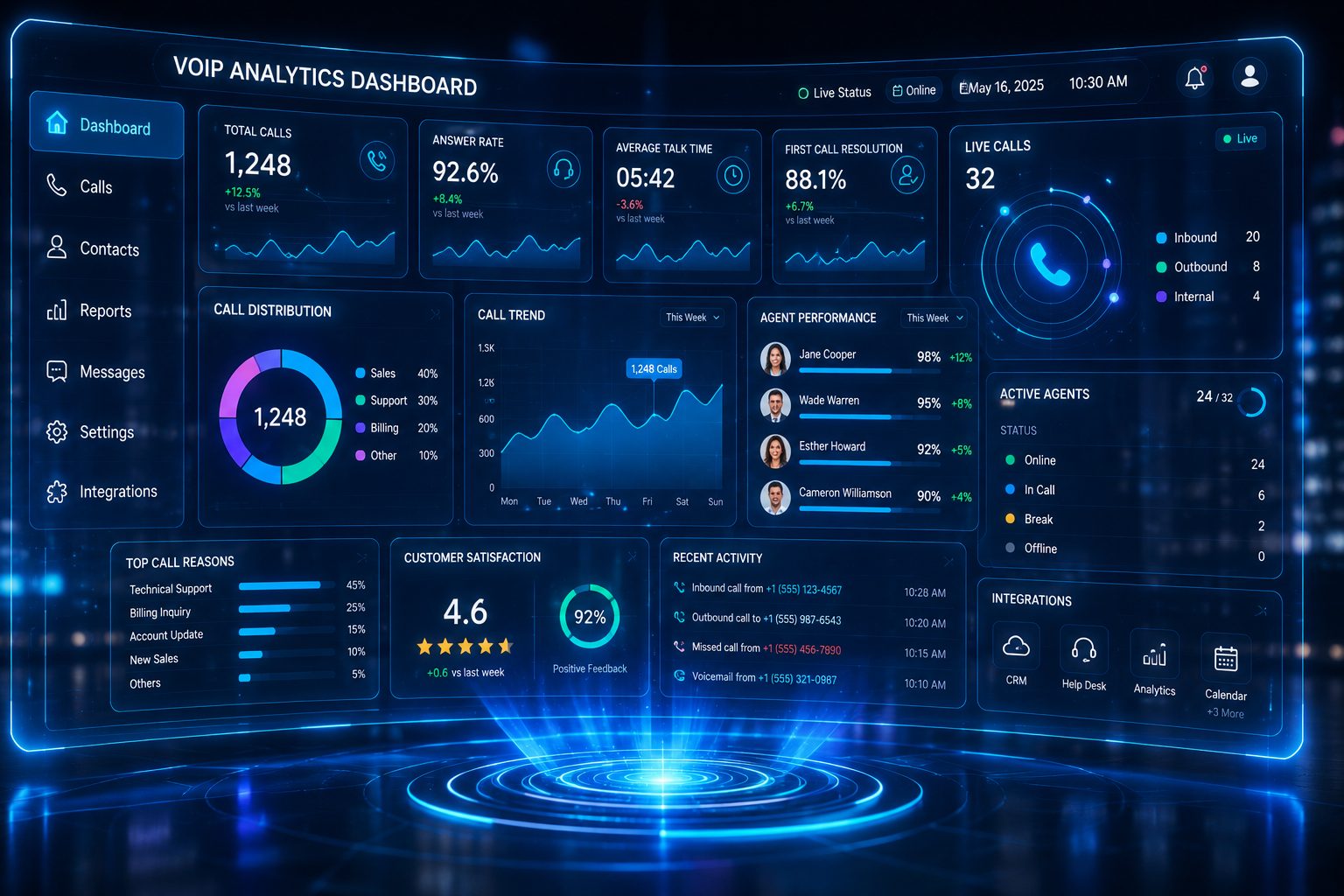
Advanced analytics tools also provide valuable insights into customer behavior. Businesses can track call wait times, resolution rates, customer satisfaction levels, and agent performance. These insights help companies continuously improve their support operations instead of relying on guesswork.

Reliability also plays a crucial role in customer trust. Modern VOIP systems offer backup routing, cloud redundancy, and disaster recovery capabilities that minimize downtime. Customers appreciate businesses that remain accessible and dependable even during unexpected disruptions.

Communication has become more than just answering questions. It is about creating memorable experiences that encourage loyalty, referrals, and positive online reviews. Businesses that invest in advanced VOIP systems are essentially investing in stronger customer relationships and long-term brand growth.

Advanced VOIP Features That Improve Customer Experience

Intelligent Call Routing

One of the most valuable VOIP features is intelligent call routing. Instead of sending callers through endless transfers, the system automatically directs them to the most suitable agent based on predefined criteria.

For example, a customer calling about billing issues can immediately connect with the finance department, while technical support inquiries go directly to trained specialists. Some systems even use AI to analyze caller behavior and predict the best routing path for faster resolutions.

This feature dramatically reduces customer frustration and improves first-call resolution rates. Nobody likes repeating their problem multiple times, and intelligent routing minimizes that annoyance.

Interactive Voice Response (IVR)

IVR systems act like digital receptionists that guide customers through menu options using voice prompts or keypad selections. While poorly designed IVR menus can be frustrating, modern systems have become much smarter and more user-friendly.

Advanced IVR solutions use conversational AI and natural language processing to understand customer intent more accurately. Customers can simply explain their issue verbally instead of navigating complicated button menus.

Businesses benefit because IVR reduces call handling time and lowers support costs. Customers benefit because they receive quicker assistance without unnecessary delays.

Call Recording and Analytics

Call recording is not just about compliance anymore. It has become a critical tool for improving service quality and employee training.

Managers can review recorded calls to identify strengths and weaknesses in customer interactions. Analytics tools can even measure tone, sentiment, and keyword usage to provide deeper insights into customer satisfaction levels.

This data-driven approach allows businesses to make smarter decisions about staffing, training, and support strategies. It transforms customer service from reactive problem-solving into proactive improvement.

CRM Integration

CRM integration creates a unified customer support environment where every interaction becomes more personalized and efficient.

When a customer calls, agents instantly access their order history, previous support tickets, preferences, and communication records. This eliminates repetitive questioning and helps agents resolve issues faster.

Integrated systems also improve collaboration between sales, marketing, and support teams. Everyone works from the same customer data, leading to better consistency across the entire customer journey.

AI-Powered Virtual Assistants

AI-powered assistants are rapidly changing how businesses handle customer support. These virtual agents can answer common questions, schedule appointments, process requests, and escalate complex issues to human representatives when necessary.

Unlike traditional chatbots, modern AI assistants learn from customer interactions and improve over time. They can operate 24/7 without fatigue, helping businesses provide continuous support while reducing staffing pressure.

Reports show AI integration is becoming a core part of future VOIP systems because businesses want faster, smarter, and more scalable customer service solutions. (SPARK Services)

Omnichannel Communication

Customers no longer communicate through just one channel. They move between phone calls, emails, live chat, social media, and messaging apps throughout their customer journey.

Omnichannel VOIP platforms unify all these communication channels into one interface. Agents can manage conversations seamlessly without losing context.

This creates a smoother customer experience because customers do not need to repeat information every time they switch communication methods. Businesses gain better visibility into customer interactions across all touchpoints.

Benefits of Using Advanced VOIP Features

BenefitImpact on Customer Service
Faster Call RoutingReduces wait times and transfers
CRM IntegrationImproves personalization
AI AutomationEnables 24/7 support
Analytics ToolsEnhances service quality
Cloud AccessibilitySupports remote teams
Cost SavingsAllows investment in better support

Faster Response Times

Speed matters enormously in customer service. Studies consistently show that customers value quick resolutions almost as much as successful outcomes.

Advanced VOIP systems reduce delays through automation, intelligent routing, and integrated workflows. Customers reach the right agents faster, agents access information instantly, and issues get resolved more efficiently.

This speed advantage can significantly improve customer satisfaction scores and retention rates.

Improved Team Productivity

Customer support teams often waste time switching between disconnected tools or manually searching for customer information. VOIP platforms streamline workflows by centralizing communication and automation features.

Agents spend less time handling repetitive tasks and more time focusing on meaningful customer interactions. Productivity improves naturally because employees work smarter rather than harder.

Cost Savings and Scalability

VOIP systems help businesses lower infrastructure and maintenance costs while supporting business growth more effectively. Cloud-based solutions eliminate expensive hardware upgrades and reduce reliance on physical office setups.

Businesses can scale operations quickly by adding users or expanding support capabilities without major infrastructure investments. This flexibility makes VOIP particularly valuable for growing companies.

VOIP for Remote and Hybrid Teams

Supporting Distributed Customer Support Teams

Remote work is no longer temporary. Many organizations now operate with hybrid or fully distributed customer service teams. VOIP systems make this transition much easier by allowing employees to work from virtually anywhere.

Agents can answer calls using laptops, smartphones, or softphone applications while maintaining the same professional experience customers expect from office-based support teams.

Reports indicate hybrid work continues to rise globally, driving increased demand for cloud-based communication platforms. (Yeastar)

Mobile Accessibility and Flexibility

Modern VOIP applications give employees mobile access to calls, voicemails, messaging, and video meetings. This flexibility improves responsiveness and ensures businesses remain accessible even when teams are constantly moving.

For customers, this means fewer missed calls, quicker responses, and more reliable support experiences regardless of where employees are located.

Security and Reliability in Modern VOIP Systems

Data Protection Features

Security is a major concern for businesses handling sensitive customer information. Modern VOIP providers include advanced encryption, multi-factor authentication, and fraud detection tools to protect communication data.

Businesses must ensure their chosen provider complies with industry regulations and maintains strong cybersecurity standards. A secure communication system protects both customer trust and business reputation.

Ensuring Business Continuity

Downtime can cripple customer service operations. Cloud-based VOIP systems provide redundancy and failover capabilities that keep communication running during outages or emergencies.

Calls can automatically reroute to backup devices or locations, ensuring customers continue receiving support even during technical disruptions.

Choosing the Right VOIP Provider

Features to Prioritize

Not every VOIP system offers the same capabilities. Businesses should focus on features that directly support customer service goals.

Key features to prioritize include:

  • Intelligent call routing
  • CRM integration
  • AI automation
  • Call analytics
  • Omnichannel support
  • Mobile accessibility
  • Security protections

Scalability and customer support quality should also influence provider selection.

Comparing Leading VOIP Platforms

Several providers dominate the VOIP market, each offering unique strengths for different business needs.

ProviderBest ForNotable Features
RingCentralMedium & Large BusinessesAI tools, video meetings, analytics
NextivaCustomer ExperienceCRM integration, collaboration tools
VonageAdvanced FeaturesCall routing, voicemail tools
8×8Affordable ScalingGlobal calling, analytics
DialpadRemote TeamsAI sentiment analysis

Industry reviews consistently highlight these providers for their reliability, scalability, and advanced customer support capabilities. (TechRadar)

Future Trends in VOIP Customer Service

AI and Predictive Customer Support

Artificial intelligence will continue reshaping customer service over the next several years. Predictive analytics will allow businesses to identify customer problems before they escalate.

AI systems may soon analyze voice tone, customer history, and behavioral patterns to predict dissatisfaction in real time. Support teams can intervene proactively instead of waiting for complaints.

This shift toward predictive service could dramatically improve customer retention and satisfaction.

Cloud-Based Unified Communications

Unified communication platforms are becoming central hubs for voice, messaging, video conferencing, and collaboration tools. Businesses increasingly prefer integrated ecosystems over fragmented communication systems.

Cloud adoption will likely continue accelerating because it offers flexibility, scalability, and easier management for growing businesses. Experts predict VOIP and unified communication markets will maintain strong growth throughout the decade. (Nextiva)

Conclusion

Advanced VOIP features are transforming customer service from a basic support function into a powerful business growth engine. Companies that embrace intelligent routing, AI automation, omnichannel communication, and integrated analytics gain a significant advantage in customer experience and operational efficiency.

Customers expect faster responses, personalized interactions, and seamless communication across every channel. Traditional phone systems simply cannot meet these expectations effectively anymore. VOIP technology bridges that gap by providing smarter, more flexible, and more scalable communication solutions.

Businesses that invest in modern VOIP systems position themselves for stronger customer loyalty, improved productivity, and long-term growth. Communication is no longer just about answering calls. It is about creating experiences customers remember positively long after the conversation ends.

FAQs

1. What is the biggest advantage of using VOIP for customer service?

The biggest advantage is improved flexibility and efficiency. VOIP systems provide advanced features like intelligent call routing, CRM integration, and AI automation that help businesses deliver faster and more personalized customer support.

2. Is VOIP suitable for small businesses?

Yes, VOIP is highly suitable for small businesses because it reduces communication costs while providing enterprise-level features. Many providers offer scalable pricing plans designed specifically for growing businesses.

3. Can VOIP systems support remote employees?

Absolutely. Cloud-based VOIP platforms allow employees to answer calls and access communication tools from anywhere using laptops, smartphones, or internet-connected devices.

4. How secure are modern VOIP systems?

Modern VOIP systems include encryption, authentication protocols, and cybersecurity protections to secure communication data. Businesses should choose reputable providers with strong security standards.

5. What VOIP features improve customer satisfaction the most?

Features like intelligent call routing, CRM integration, AI-powered assistants, and omnichannel communication typically have the greatest impact on customer satisfaction because they improve speed, personalization, and convenience.

How VOIP Improves Remote Work and Distributed Teams

If you’ve ever made a call over the internet instead of using a traditional phone line, you’ve already experienced VOIP (Voice over Internet Protocol) in action. At its core, VOIP converts your voice into digital signals and transmits them over the internet, making communication faster, cheaper, and far more flexible than conventional telephony systems. Think of it like sending a voice message through the internet highway instead of relying on old copper wires—faster lanes, fewer traffic jams, and much more scalability.

What makes VOIP especially powerful is its adaptability. Whether you’re using a smartphone, laptop, or desktop computer, VOIP allows you to stay connected without being tied to a physical location. This flexibility has made it an essential tool for businesses embracing remote work. Instead of investing in expensive hardware and infrastructure, companies can now operate seamlessly with cloud-based communication systems.

Another key aspect is accessibility. Employees working from different cities—or even different continents—can communicate as if they’re sitting in the same office. That’s a game-changer. It eliminates geographical barriers and fosters collaboration in ways that were previously unimaginable.

Evolution from Traditional Telephony to VOIP

Traditional telephony relied heavily on physical infrastructure—wires, exchanges, and maintenance-heavy systems. It worked, sure, but it lacked flexibility. Scaling meant installing more lines, increasing costs, and dealing with logistical headaches. Then came VOIP, flipping the entire model on its head.

With the rise of high-speed internet, VOIP became not just viable but superior. Businesses quickly realized they could reduce communication costs by up to 60–70% by switching to internet-based calling systems. That’s not just a minor upgrade—it’s a transformation. VOIP also introduced features like call recording, voicemail-to-email, and real-time analytics, which traditional systems simply couldn’t offer.

Today, VOIP is no longer a luxury; it’s a necessity for organizations that want to stay competitive in a remote-first world. The shift isn’t just technological—it’s cultural. Companies are moving from rigid, office-bound communication to dynamic, location-independent workflows.

The Rise of Remote Work and Distributed Teams

Global Shift Toward Remote Work

Remote work isn’t just a trend—it’s a fundamental shift in how businesses operate. Over the past few years, companies across the globe have embraced flexible work arrangements, allowing employees to work from home, co-working spaces, or even while traveling. This shift has been fueled by advancements in digital tools, changing employee expectations, and the need for business continuity.

What’s interesting is how quickly organizations adapted. Teams that once relied on face-to-face meetings suddenly had to collaborate virtually. And while tools like email and chat helped, they weren’t enough. Real-time communication became critical, and that’s where VOIP stepped in as a backbone for remote operations.

Employees today expect seamless communication regardless of where they are. They want to join meetings, make calls, and collaborate without friction. VOIP delivers exactly that, making it a cornerstone of modern work culture.

Challenges Faced by Distributed Teams

Let’s be honest—remote work isn’t all sunshine and productivity hacks. Distributed teams face real challenges. Communication gaps, time zone differences, and lack of face-to-face interaction can create misunderstandings and reduce efficiency.

Imagine trying to coordinate a project across three different time zones without a reliable communication system. Emails pile up, responses get delayed, and productivity takes a hit. That’s the reality many teams face without the right tools.

Another major challenge is maintaining team cohesion. When people aren’t physically together, it’s harder to build relationships and trust. Miscommunication becomes more common, and small issues can escalate quickly.

VOIP addresses these challenges by providing real-time communication, video conferencing, and collaboration tools that bring teams closer together—even when they’re miles apart.

Key Benefits of VOIP for Remote Work

Cost Efficiency and Budget Optimization

One of the biggest reasons businesses adopt VOIP is cost savings. Traditional phone systems come with hefty installation fees, maintenance costs, and expensive long-distance charges. VOIP eliminates most of these expenses by using existing internet connections.

For remote teams, this is a huge advantage. Companies don’t need to invest in office-based infrastructure. Employees can use their own devices, reducing hardware costs significantly. Plus, international calls become much cheaper—or even free—depending on the service provider.

Think of it like switching from owning a car to using a ride-sharing app. You only pay for what you use, and you avoid the overhead costs. That’s the kind of efficiency VOIP brings to communication.

Flexibility and Mobility for Teams

VOIP isn’t tied to a desk. That’s its superpower. Employees can make and receive calls from anywhere, using any device. Whether you’re working from home, a café, or a different country, your communication system stays with you.

This level of flexibility boosts productivity. Employees can stay connected without being confined to a specific location. It also supports work-life balance, allowing people to manage their schedules more effectively.

For businesses, this means access to a global talent pool. You’re no longer limited to hiring people in your city. You can build a team from anywhere in the world, and VOIP ensures everyone stays connected.

Enhanced Communication Quality

Gone are the days of crackling phone lines and dropped calls. Modern VOIP systems offer high-definition voice quality, making conversations clearer and more natural. This is especially important for remote teams, where communication clarity can make or break productivity.

Many VOIP platforms also include video conferencing, screen sharing, and instant messaging. These features create a more interactive communication experience, bridging the gap between remote and in-person interactions.

It’s like upgrading from a blurry black-and-white TV to a 4K screen—you notice the difference immediately.

Features of VOIP That Empower Teams

Call Forwarding and Routing

VOIP systems allow calls to be automatically forwarded to different devices or team members. This ensures that no important call goes unanswered, even if someone is unavailable.

For distributed teams, this is incredibly useful. Calls can be routed based on time zones, availability, or department, ensuring efficient communication at all times.

Video Conferencing and Collaboration Tools

Video meetings have become the new normal, and VOIP platforms excel in this area. Teams can hold virtual meetings, share screens, and collaborate in real time.

This reduces the need for physical meetings and travel, saving both time and money. It also makes collaboration more dynamic and engaging.

Integration with Business Applications

VOIP systems can integrate with CRM tools, project management software, and email platforms. This creates a unified communication ecosystem where everything is connected.

For example, a sales team can access customer information during a call, improving efficiency and customer experience. It’s like having all your tools working together instead of in silos.

VOIP vs Traditional Communication Systems

Cost Comparison Table

FeatureTraditional Phone SystemVOIP System
Installation CostHighLow
MaintenanceExpensiveMinimal
International CallsCostlyAffordable/Free
ScalabilityLimitedHighly Scalable
FeaturesBasicAdvanced

Performance and Scalability Differences

Traditional systems struggle to keep up with growing businesses. Adding new lines requires time and investment. VOIP, on the other hand, scales effortlessly. Need to add a new employee? Just create an account.

Performance is also more consistent with VOIP, especially with high-speed internet. It supports multiple communication channels, making it ideal for modern workplaces.

Security and Reliability in VOIP Systems

Encryption and Data Protection

Security is a major concern for any communication system. Modern VOIP platforms use encryption protocols to protect data and prevent unauthorized access.

Businesses can implement additional security measures like firewalls and VPNs to enhance protection. This ensures that sensitive information remains secure.

Managing Downtime and Connectivity Issues

VOIP relies on internet connectivity, which can be a limitation. However, most providers offer backup solutions and redundancy systems to minimize downtime.

With proper setup, VOIP can be just as reliable—if not more—than traditional systems.

Use Cases Across Industries

IT and Tech Teams

Tech companies often operate with distributed teams, making VOIP an essential tool. Developers, designers, and project managers can collaborate seamlessly across different locations.

Real-time communication speeds up decision-making and improves project outcomes.

Customer Support and Sales Teams

VOIP is a game-changer for customer-facing teams. Features like call analytics, recording, and CRM integration enhance customer interactions.

Sales teams can connect with clients globally, while support teams can resolve issues faster.

Future of VOIP in Remote Work

AI Integration and Smart Communication

The future of VOIP is closely tied to artificial intelligence. Features like voice recognition, automated responses, and smart call routing are becoming more common.

These advancements will make communication even more efficient and personalized.

Trends Shaping the Future Workplace

Remote work is here to stay, and VOIP will continue to evolve alongside it. From virtual offices to immersive collaboration tools, the possibilities are endless.

Businesses that adopt these technologies early will have a significant advantage.

Conclusion

VOIP has transformed the way remote teams communicate, making it easier, cheaper, and more efficient to stay connected. It removes geographical barriers, enhances collaboration, and provides the flexibility modern workers need. As remote work continues to grow, VOIP will remain a critical tool for businesses looking to thrive in a distributed environment.

FAQs

1. What is VOIP and how does it work?

VOIP allows users to make voice calls over the internet by converting audio into digital signals.

2. Is VOIP suitable for small businesses?

Yes, it’s cost-effective, scalable, and packed with features that benefit small teams.

3. Does VOIP require special hardware?

No, it works on existing devices like smartphones and computers.

4. Is VOIP secure for business communication?

Modern VOIP systems use encryption and security protocols to protect data.

5. Can VOIP work without the internet?

No, it relies on internet connectivity, but backup solutions can minimize disruptions.

How VoIP Phone Systems Simplify Office Relocation

Relocating an office can feel like trying to move a living organism. There are wires, desks, computers, people, and most importantly—communication systems that keep everything alive. If communication fails during a move, business slows down. Customers get frustrated. Revenue takes a hit.

But here’s the good news: VOIP phone systems can turn a stressful relocation into a smooth transition.

Let’s break it down step by step.

Introduction to Office Relocation Challenges

Moving an office isn’t just about packing boxes. It’s about maintaining productivity while everything around you changes.

The Hidden Costs of Moving an Office

Did you know that traditional phone systems can be one of the most expensive parts of relocation? Rewiring, technician visits, new hardware installations—it all adds up quickly. It’s like buying a new engine every time you move your car.

Communication Disruptions During Relocation

Imagine customers calling your business number and getting a “number not in service” message. That’s a nightmare scenario. Even a few hours of downtime can damage trust.

This is where VOIP becomes a game-changer.

What Is a VOIP Phone System?

VOIP stands for Voice Over Internet Protocol. Instead of using copper wires like traditional landlines, VOIP uses the internet to make and receive calls.

How VOIP Technology Works

Your voice is converted into digital data and transmitted over the internet. It’s similar to how emails or video calls work. The process is fast, seamless, and incredibly efficient.

Key Components of a VOIP Setup

  • Internet connection
  • VOIP provider service
  • IP phones or softphones
  • Cloud-based management system

That’s it. No bulky hardware cabinets. No complex rewiring.

Traditional Phone Systems vs VOIP

Limitations of Landline Systems

Traditional systems tie you to a physical location. If you move offices, you must reinstall everything from scratch. It’s like rebuilding your house instead of just changing the address.

Flexibility of Cloud-Based Communication

VOIP lives in the cloud. That means your phone system isn’t stuck in your office—it moves with you effortlessly.

Portability and Location Independence

Here’s where things get exciting.

Keep Your Business Number Anywhere

With VOIP, you keep your existing number—even if you move to a different city or state. Customers won’t notice any change.

Remote Setup Without Physical Wiring

You can literally plug your IP phone into an internet connection at the new office, and it works instantly. No waiting for technicians.

It’s like taking your office phone system in your backpack.

Easy Scalability During Office Expansion

Relocation often comes with growth. Maybe you’re moving to a bigger space.

Adding New Users Instantly

Need 10 new extensions? Add them through an online dashboard. Done in minutes.

Removing or Adjusting Extensions

Downsizing? Remove unused lines without penalty. Traditional systems can’t match this flexibility.

Cost Savings During Relocation

Let’s talk about money.

No Expensive Rewiring

VOIP eliminates the need for expensive infrastructure installation. Your internet connection does the heavy lifting.

Reduced Hardware Investment

Most VOIP systems work with softphones on laptops and mobile devices. That means fewer physical devices to move or replace.

Lower setup costs. Lower maintenance costs. Lower stress.

Minimal Downtime During the Move

Downtime equals lost revenue. But VOIP minimizes this risk.

Quick Setup at the New Location

Before you even move physically, your VOIP system can be configured remotely. When you arrive, everything is ready.

Business Continuity Strategies

Calls can be forwarded to employee mobile phones during the move. So even while desks are being assembled, customers can still reach your team.

Remote Work Integration

Modern businesses don’t operate within four walls anymore.

Supporting Hybrid Teams

Employees working from home can connect to the same system. Everyone stays connected under one unified network.

Mobile and Softphone Access

Use apps on smartphones or laptops to make business calls from anywhere. The caller ID still shows your business number.

It’s like carrying your office in your pocket.

Advanced Features That Simplify Transition

VOIP isn’t just portable—it’s powerful.

Call Forwarding and Auto-Attendants

Automatically route calls to the right department. Even during relocation, customers experience smooth communication.

Voicemail-to-Email and Call Recording

Voicemails are sent directly to your inbox. No missed messages. No confusion.

Improved IT Management

IT teams love VOIP for one big reason: simplicity.

Cloud-Based Dashboard Control

Manage users, monitor call logs, and adjust settings through a web portal.

Centralized System Management

No need for on-site hardware troubleshooting. Everything is handled remotely.

Security and Reliability

Concerned about safety? Don’t be.

Encrypted Calls

VOIP providers use encryption to protect call data.

Backup and Disaster Recovery

If your new office faces power issues, calls can reroute automatically. Business keeps running.

Customization and Flexibility

Every business is unique.

Custom Call Routing

Create call flows that match your structure.

Integration With CRM and Business Tools

Connect your phone system with CRM software for seamless customer management.

Now that’s efficiency.

Real-Life Example of a Business Relocation

Let’s imagine a mid-sized marketing agency.

Before VOIP

They moved offices and experienced three days of phone downtime. Clients complained. Sales dropped.

After Switching to VOIP

Their next relocation took one day—with zero communication interruptions. Calls were forwarded during transit, and the new office was operational instantly.

The difference? Cloud-based communication.

Choosing the Right VOIP Provider

Not all providers are equal.

Key Factors to Consider

  • Reliability and uptime guarantee
  • Customer support availability
  • Pricing transparency
  • Scalability options

Questions to Ask Providers

  • What happens if internet service fails?
  • Are calls encrypted?
  • Can I keep my existing number?

Choose wisely, and your relocation becomes effortless.

Final Thoughts on Seamless Office Relocation

Office relocation doesn’t have to feel like a logistical nightmare. With a VOIP phone system, your communication infrastructure becomes flexible, portable, and cost-effective.

Think of VOIP as the difference between moving a landline telephone pole and simply updating your GPS location. One is heavy and complicated. The other is light and effortless.

If you’re planning to relocate your office, switching to VOIP might be the smartest move you make.

FAQs

1. Can I keep my existing business number with VOIP?

Yes, most providers allow number porting, so you can retain your existing business number.

2. Does VOIP require special hardware?

Not necessarily. You can use IP phones or softphone apps on computers and smartphones.

3. What happens if the internet goes down?

Calls can be forwarded to mobile devices or backup numbers to ensure continuity.

4. Is VOIP secure for business communication?

Yes, reputable providers use encryption and security protocols to protect call data.

5. Is VOIP suitable for small businesses relocating?

Absolutely. In fact, small businesses benefit the most due to reduced costs and easy scalability.

Integrating VOIP with Cloud CRM for Smarter Business Communication

Integrating VOIP with Cloud CRM and Business Tools

Imagine your business phone system talking directly to your customer database. Sounds smooth, right? That’s exactly what happens when you VOIP and CRM integration and business tools. In today’s fast-moving digital world, businesses can’t afford scattered systems. Communication and data need to flow together like water in a single pipe.

This integration is no longer a “nice-to-have.” It’s a must-have for businesses that want speed, clarity, and better customer relationships.

What is VOIP Technology?

VOIP stands for Voice over Internet Protocol. In simple words, it allows you to make phone calls using the internet instead of traditional phone lines.

How VOIP Works

VOIP converts your voice into digital data packets. These packets travel over the internet and are converted back into sound on the receiver’s end. Think of it like sending a WhatsApp voice note—but in real time.

Key Features of VOIP Systems

  • Internet-based calling
  • Call recording and monitoring
  • Virtual phone numbers
  • Call forwarding and routing
  • Scalability without heavy hardware

Understanding Cloud CRM Systems

What is a Cloud CRM?

A cloud CRM (Customer Relationship Management) system stores customer data online instead of on local servers. This means your sales, support, and marketing teams can access customer information anytime, anywhere.

Popular Cloud CRM Capabilities

  • Contact and lead management
  • Sales pipeline tracking
  • Customer interaction history
  • Automation and analytics
  • Team collaboration

Why Integrate VOIP with Cloud CRM?

Here’s a simple question: what’s the use of great calls if the data is missing?

The Communication–Data Gap Problem

Without integration, your team jumps between tools—phone system here, CRM there. This wastes time and causes errors. Integration bridges that gap by syncing calls directly with customer records.

Core Benefits of VOIP and CRM Integration

Improved Customer Experience

When a customer calls, their details pop up instantly. No more asking, “Can you repeat your issue?” Customers feel heard and valued.

Increased Team Productivity

Click-to-call, automatic call logs, and follow-up reminders save hours every week. Your team focuses on selling and solving, not searching.

Centralized Data Management

All call records, notes, and recordings are stored in one place. It’s like having a single source of truth for customer communication.

How VOIP Integrates with Cloud CRM

API-Based Integrations

APIs allow VOIP systems and CRMs to talk to each other. This method is flexible and powerful, especially for custom workflows.

Native CRM Integrations

Many VOIP providers offer built-in CRM integrations. These are easier to set up and perfect for small to mid-sized businesses.

VOIP Integration with Other Business Tools

Integrating VOIP with Cloud CRM for Smarter Business Communication

CRM is just the beginning.

Helpdesk & Ticketing Tools

Incoming calls can automatically create support tickets. No issue gets lost, and response time improves dramatically.

Marketing Automation Platforms

Call data helps marketers understand campaign performance. Which ad triggered the call? Which keyword converted? Now you know.

Collaboration Tools

VOIP integrates with internal chat and collaboration tools so teams stay aligned in real time.

Real-Time Features Enabled by Integration

Click-to-Call

Just click a phone number inside your CRM and call instantly. Simple, fast, effective.

Call Logging & Recording

Every call is logged automatically with date, duration, and notes. Recordings help with training and quality control.

Screen Pop-ups

When a call comes in, the customer profile pops up like magic. It’s like caller ID on steroids.

Use Cases Across Different Industries

Sales Teams

Sales reps get instant context before calling leads. Follow-ups become smarter and conversions go up.

Customer Support

Support agents resolve issues faster with complete call history and previous tickets in front of them.

Remote & Hybrid Workforces

Cloud-based VOIP and CRM tools keep distributed teams connected without missing a beat.

Security and Compliance Considerations

Data Encryption

Calls and data should always be encrypted. This keeps sensitive customer information safe from breaches.

Compliance Standards

Make sure your tools support standards like GDPR and other regional data protection laws.

Challenges in VOIP–CRM Integration

Technical Compatibility

Not all systems play nicely together. Compatibility checks are crucial before integration.

User Adoption

Even the best system fails if teams don’t use it properly. Training is key.

Best Practices for Successful Integration

  • Choose tools with proven integration support
  • Start with basic features, then scale
  • Train your team thoroughly
  • Monitor performance and optimize workflows

Choosing the Right VOIP and CRM Combination

The right combo depends on your business size, industry, and goals. Focus on ease of use, scalability, and support rather than fancy features alone.

Future of VOIP and Cloud Business Integrations

The future is smarter and more automated. AI-powered call analytics, voice bots, and predictive insights will soon become standard. VOIP and cloud tools will feel less like software and more like digital teammates.

Conclusion

Integrating VOIP with cloud CRM and business tools is like connecting your mouth to your brain—communication finally makes sense. It boosts productivity, improves customer experience, and gives your business a serious competitive edge. If you’re still using disconnected systems, now is the time to upgrade and integrate.

FAQs

1. Is VOIP and CRM integration expensive?
Not really. Cloud-based solutions are cost-effective and scalable for all business sizes.

2. Can small businesses benefit from this integration?
Absolutely. Small teams often see the biggest productivity gains.

3. Does integration require technical expertise?
Basic integrations are simple, especially with native CRM support.

4. Are call recordings stored securely in CRM?
Yes, if proper encryption and security settings are enabled.

5. Will VOIP integration slow down CRM performance?
No. With cloud infrastructure, performance usually improves.

Best VOIP phone system 2026

How to Choose the Best VOIP Phone System in 2026

Let’s be honest—business communication has changed faster than most of us expected. Desk phones tied to wires feel as outdated as fax machines. In 2026, VOIP isn’t just an option anymore; it’s the backbone of modern business communication.

What is a VOIP Phone System?

VOIP (Voice over Internet Protocol) lets you make and receive calls using the internet instead of traditional phone lines. Think of it like sending voice messages the same way you send emails—faster, cheaper, and smarter.

Why VOIP is the Future of Business Communication

Why are businesses ditching old phone systems? Simple. VOIP is flexible, cost-effective, and built for remote work. Whether your team is in one office or spread across cities, VOIP keeps everyone connected without breaking the bank.

Why Choosing the Right VOIP System Matters

Choosing a VOIP system is like choosing a business partner. Get it right, and things run smoothly. Get it wrong, and you’ll deal with dropped calls, frustrated customers, and wasted money.

Impact on Productivity and Customer Experience

Clear calls, fast connections, and smart routing mean customers don’t wait—and employees don’t struggle. A good VOIP system quietly boosts productivity while making your business look professional.

Cost Control and Business Growth

VOIP helps you scale without heavy investments. Add users, open new locations, or support remote teams without installing new hardware every time.

Key Trends Shaping VOIP in 2026

VOIP in 2026 isn’t what it used to be even two years ago.

AI-Powered Call Management

AI now helps with call routing, voice analytics, spam call detection, and even real-time coaching. It’s like having a smart assistant listening in (in a good way).

Cloud-First and Remote Work Support

Cloud-based VOIP systems dominate because they work anywhere. Office, home, or café—your phone system follows you.

Mobile-First VOIP Solutions

Mobile apps now offer full desk-phone features. Your smartphone becomes your business phone, no extra device needed.

Understanding Your Business Needs

Before comparing providers, pause and look inward.

Small Business vs Enterprise Requirements

A small business may need simplicity and affordability. Enterprises need advanced analytics, security, and integrations. One size doesn’t fit all.

Industry-Specific VOIP Use Cases

Sales teams need call recording and CRM sync. Support teams need IVR and queue management. Choose based on how you actually work.

Types of VOIP Phone Systems

Hosted (Cloud-Based) VOIP

This is the most popular choice in 2026. No servers, no maintenance headaches. Just log in and start calling.

On-Premise VOIP

Best for businesses that want full control and have strong IT teams. Higher upfront cost, but more customization.

Hybrid VOIP Systems

A mix of cloud and on-premise. Ideal if you’re transitioning or need flexibility.

Essential Features to Look for in 2026

Call Quality and Reliability

HD voice, low latency, and uptime guarantees are non-negotiable. Poor call quality kills credibility.

Advanced Calling Features

Look for call forwarding, voicemail-to-email, auto attendants, and conference calling.

IVR, Call Recording, and Analytics

These features help you manage calls smarter and improve performance using real data.

Security and Compliance Considerations

Data Encryption and Privacy

Your calls carry sensitive data. Encryption protects you from eavesdropping and breaches.

Regulatory Compliance

Depending on your industry, compliance with local and international regulations is critical. Don’t ignore this.

Scalability and Flexibility

Adding Users and Locations Easily

Your VOIP system should grow with you, not slow you down.

Supporting Remote and Hybrid Teams

In 2026, flexibility isn’t a perk—it’s a requirement.

Integration with Business Tools

CRM and Helpdesk Integration

Integrated systems save time and reduce errors. Calls logged automatically? Yes, please.

Collaboration Tools and APIs

The more your VOIP system talks to other tools, the smoother your workflows become.

Cost and Pricing Models

Subscription vs Usage-Based Pricing

Flat monthly plans are predictable. Usage-based plans work if call volume fluctuates.

Hidden Costs to Watch Out For

Setup fees, hardware costs, international calling—always read the fine print.

Evaluating VOIP Providers

Reputation and Reviews

What do real users say? Reviews often reveal what sales pages hide.

Customer Support and SLA

24/7 support and clear SLAs can save you during critical moments.

Internet and Infrastructure Requirements

Bandwidth and Network Quality

VOIP depends on your internet. Poor connection equals poor calls.

Hardware vs Softphones

Modern businesses increasingly prefer softphones. Less hardware, more flexibility.

Implementation and Setup

Easy Deployment and Training

If your team can’t use it easily, it won’t matter how powerful it is.

Migration from Traditional Phone Systems

Choose providers that offer smooth number porting and migration support.

Common Mistakes to Avoid

Choosing Price Over Quality

Cheap systems often cost more in the long run.

Ignoring Future Needs

Plan for growth now, not later.

Final Checklist Before Buying

Questions to Ask VOIP Vendors

  • Is it scalable?
  • Is support reliable?
  • Are features future-ready?
  • Is pricing transparent?

Conclusion

Choosing the best VOIP phone system in 2026 is about balance—features, cost, scalability, and reliability. Don’t rush. Understand your needs, study trends, and choose a system that grows with your business. The right VOIP system won’t just connect calls—it will connect people, ideas, and opportunities.

FAQs

1. Is VOIP better than traditional phone systems in 2026?

Yes. VOIP is cheaper, more flexible, and better suited for remote and hybrid work.

2. How much internet speed is required for VOIP?

A stable connection with good upload speed is more important than raw speed.

3. Can VOIP work during power outages?

Cloud VOIP can still work via mobile apps if internet access is available.

4. Is VOIP secure for business calls?

Yes, when proper encryption and security practices are used.

5. How long does it take to set up a VOIP system?

Most cloud VOIP systems can be set up within a few hours to a few days.

Cloud-PBX-vs-Traditional-Phone-Systems-for-Virginia-Businesses

Cloud PBX vs Traditional Phone Systems for Virginia Businesses

Running a business without a reliable communication system is like driving a car without a steering wheel—you might move, but you won’t go far safely. For businesses across Virginia, choosing the right phone system has become more important than ever, especially with remote work, customer expectations, and competition increasing every year.

Today, business owners usually face one big question: Cloud PBX or traditional phone systems—what’s the better choice? Let’s break it down in simple, real-world terms.

What Is a Traditional Phone System?

How Traditional PBX Works

A traditional PBX (Private Branch Exchange) system is an on-site phone system installed inside your office. It relies on physical hardware like servers, wiring, and desk phones.

On-Premise Hardware Explained

Think of it like owning a generator instead of using electricity from the grid. You buy the equipment, install it, and maintain it yourself. If something breaks, you fix it—or call a technician.

Common Features of Traditional Phone Systems

  • Internal extensions
  • Call transfers
  • Voicemail
  • Call routing
  • Basic conferencing

Typical Businesses Using Traditional Systems

Traditional systems are often used by:

  • Old-established companies
  • Businesses with zero remote work
  • Organizations with in-house IT teams

What Is a Cloud PBX Phone System?

How Cloud PBX Works

A Cloud PBX system runs entirely over the internet. Instead of hosting equipment in your office, everything is managed in the cloud by a service provider.

Hosted VoIP Infrastructure

Imagine Netflix for phone systems—you don’t own the servers, but you enjoy all the features without worrying about maintenance.

Key Features of Cloud PBX

  • Virtual phone numbers
  • Auto-attendants
  • Call recording
  • Mobile and desktop apps
  • Video conferencing
  • Advanced analytics

Businesses That Benefit Most from Cloud PBX

  • Small and medium businesses
  • Remote or hybrid teams
  • Multi-location companies
  • Fast-growing startups

Cloud PBX vs. Traditional Phone Systems: Core Differences

Cloud PBX vs Traditional Phone Systems for Virginia Businesses

Setup and Installation

Traditional systems can take weeks to install. Cloud PBX? You can be live in hours.

Cost Structure and Pricing

Traditional PBX requires heavy upfront investment. Cloud PBX works on a predictable monthly subscription.

Scalability and Flexibility

Adding a new employee to a traditional system often means new hardware. With Cloud PBX, it’s just a click.

Maintenance and Upgrades

Traditional systems need ongoing maintenance. Cloud PBX updates automatically—no extra cost, no downtime.

Mobility and Remote Work Support

Cloud PBX shines here. Employees can take calls from anywhere—home, car, or café.

Cost Comparison for Businesses in Virginia

Initial Investment

Traditional PBX: High upfront cost
Cloud PBX: Minimal setup cost

Monthly and Long-Term Costs

Traditional systems look cheaper monthly but become expensive over time due to repairs and upgrades.

Hidden Costs to Consider

  • IT support
  • Hardware replacement
  • Downtime losses

Cloud PBX keeps costs transparent and predictable.

Reliability and Call Quality

Internet Dependency vs. Physical Lines

Traditional systems depend on phone lines. Cloud PBX depends on the internet. With modern broadband in Virginia, call quality is rarely an issue.

Power Outages and Disaster Recovery

Cloud PBX wins big here. Even if your office loses power, calls can be rerouted to mobiles instantly.

Uptime Expectations in Virginia

Most Cloud PBX providers guarantee 99.9% uptime—far better than many local setups.

Security and Compliance

Security in Traditional Phone Systems

Physical systems are vulnerable to theft, damage, and outdated security.

Cloud PBX Security Measures

Cloud providers use:

  • Encryption
  • Secure data centers
  • Regular security updates

Compliance Considerations for Virginia Businesses

Industries like healthcare and finance often find Cloud PBX easier to keep compliant due to built-in controls.

Remote Work and Multi-Location Businesses

Supporting Remote Teams

Cloud PBX makes remote work seamless. One number, many devices.

Managing Multiple Offices Across Virginia

Whether you’re in Richmond, Fairfax, or Norfolk, Cloud PBX connects all locations under one system.

Ease of Use and Management

IT Skill Requirements

Traditional systems need IT expertise. Cloud PBX can be managed by anyone with basic computer skills.

User-Friendly Dashboards and Controls

Most Cloud PBX platforms offer simple dashboards for call logs, routing, and analytics.

Integration with Business Tools

CRM and Helpdesk Integrations

Cloud PBX integrates with CRMs, ticketing systems, and collaboration tools.

Productivity and Automation Benefits

Automated call routing and reporting save time and reduce human error.

Environmental and Space Considerations

Office Space Requirements

Traditional PBX takes up physical space. Cloud PBX takes none.

Energy Consumption and Sustainability

Cloud systems are more energy-efficient and eco-friendly.

Which System Is Better for Small Businesses in Virginia?

Startups and Growing Businesses

Cloud PBX is usually the smarter choice due to low cost and flexibility.

Budget and Growth Factors

Why pay more now for something you may outgrow soon?

Which System Is Better for Large Enterprises in Virginia?

Legacy Systems vs. Modern Needs

Some large enterprises still use traditional systems, but many are migrating to cloud for agility.

Customization and Control

Cloud PBX now offers enterprise-level customization without the headaches.

Making the Right Choice for Your Virginia Business

Questions to Ask Before Deciding

  • Do you support remote work?
  • Are you planning to scale?
  • Do you want predictable costs?

Future-Proofing Your Communication System

Cloud PBX is built for the future. Traditional systems are slowly becoming a thing of the past.

Conclusion

When it comes to Cloud PBX vs. traditional phone systems, the answer is clear for most businesses in Virginia. Cloud PBX offers flexibility, cost savings, scalability, and remote-ready features that traditional systems simply can’t match anymore. Unless you have very specific legacy needs, Cloud PBX is the smarter, future-proof choice.

FAQs

Is Cloud PBX reliable for businesses in Virginia?

Yes. With strong internet infrastructure, Cloud PBX offers excellent reliability and uptime.

Can I keep my existing phone numbers with Cloud PBX?

Absolutely. Most providers support number porting.

Is Cloud PBX suitable for small businesses?

It’s ideal—low cost, easy setup, and scalable.

What happens if the internet goes down?

Calls can be forwarded to mobile devices automatically.

Is Cloud PBX more secure than traditional systems?

In most cases, yes—thanks to encryption and professional data center security.

voip-for-small-businesses

What Is VOIP and How It Works for Small Businesses

If you run a small business, every rupee and every minute matters. Communication is the backbone of sales, support, and trust—but traditional phone systems are expensive, rigid, and outdated. That’s where VOIP comes in.

VOIP has quietly transformed how small businesses talk to customers, partners, and teams. And the best part? You don’t need to be a tech expert to use it.

voip-for-small-businesses

What Does VOIP Stand For?

VOIP stands for Voice Over Internet Protocol.

In simple terms, VOIP lets you make phone calls using the internet instead of traditional telephone lines. Your voice becomes digital data, travels through the internet, and turns back into sound on the receiver’s side.

Think of it like WhatsApp calling—but built for professional business use.

Why VOIP Matters in Today’s Business World

Small businesses today are:

  • Remote or hybrid
  • Cost-conscious
  • Customer-experience driven

VOIP fits perfectly because it’s:

  • Affordable
  • Flexible
  • Scalable
  • Easy to manage

Whether you’re a startup, local shop, coaching center, or IT agency—VOIP levels the playing field.

Traditional Phone Systems vs VOIP

How Landline Phones Work

Traditional phones use PSTN (Public Switched Telephone Network). Calls travel through physical copper wires owned by telecom companies.

Problems?

  • Expensive installation
  • Limited features
  • No mobility
  • Hard to scale

Key Differences Between VOIP and PSTN

Cost Comparison

Landlines charge per line and per call. VOIP uses monthly plans with unlimited or low-cost calls.

Flexibility and Scalability

Need 1 user or 50 users? VOIP grows with you—no rewiring needed.

How VOIP Works (Simple Explanation)

Converting Voice to Data Packets

When you speak:

  1. Your voice is captured by a mic
  2. Converted into digital data
  3. Broken into small packets

Role of the Internet

These packets travel over the internet—just like emails or videos—and reassemble at the other end in real time.

Codecs and Compression

Codecs compress voice data so calls stay clear without eating bandwidth.

Packet Switching Explained

Unlike landlines (fixed path), VOIP finds the fastest route—like Google Maps for voice.

Core Components of a VOIP System

Internet Connection

Stable broadband or fiber is essential.

VOIP Phones and Softphones

  • Desk IP phones
  • Mobile apps
  • Laptop softphones

VOIP Servers and PBX

Cloud-Based PBX vs On-Premise PBX

Cloud PBX is hosted online—no hardware, no headache. Perfect for small businesses.

Types of VOIP Services

Hosted VOIP

Everything runs in the cloud. Easy and affordable.

SIP Trunking

Ideal if you already have a PBX and want internet calling.

Unified Communications

Voice + video + chat + file sharing in one platform.

Mobile VOIP Apps

Take business calls anywhere—office, home, or road.

Key Features of VOIP for Small Businesses

Call Forwarding and Routing

Never miss a call again.

Auto Attendant

“Press 1 for Sales, Press 2 for Support”—sounds professional instantly.

Voicemail to Email

Get voicemails in your inbox.

Call Analytics and Reporting

Track call volume, duration, and performance.

Benefits of VOIP for Small Businesses

Cost Savings

Save up to 60% compared to landlines.

Remote Work Enablement

Your team can work from anywhere.

Professional Business Image

Even a 2-person company can sound like a big brand.

Easy Business Expansion

Add users in minutes, not weeks.

Is VOIP Reliable for Small Businesses?

Call Quality Factors

Good internet = crystal clear calls.

Internet Speed Requirements

Minimum 100 kbps per call is enough.

Redundancy and Failover

Calls can auto-switch to mobile if the internet drops.

VOIP Security Explained

Common VOIP Security Threats

  • Call hacking
  • Eavesdropping

Encryption and Firewalls

Modern VOIP uses end-to-end encryption.

Best Security Practices

Strong passwords + trusted providers = safe system.

VOIP Hardware and Software Options

Desk Phones

Classic office phones with internet support.

Softphones

Apps on laptop or mobile.

Headsets and Accessories

Noise-canceling headsets improve call quality.

How to Set Up VOIP for Your Small Business

Step-by-Step Setup Guide

  1. Choose provider
  2. Select plan
  3. Add users
  4. Install app or phone
  5. Start calling

Common Setup Mistakes to Avoid

  • Poor internet
  • No backup connection

VOIP Use Cases by Industry

Retail and E-commerce

Customer support & order confirmation.

Healthcare Clinics

Appointment reminders & follow-ups.

IT and Service Businesses

Sales calls, client meetings, remote teams.

VOIP vs Mobile Phones for Business

Why VOIP Is Better Than Personal Numbers

  • Business identity
  • Call recording
  • Team collaboration

Business Continuity Advantages

Numbers stay with business—not employees.

Future of VOIP for Small Businesses

AI and VOIP

AI call summaries, voice bots, smart routing.

Integration with CRM and Tools

VOIP + CRM = smarter sales and support.

Conclusion

VOIP isn’t just a cheaper phone system—it’s a business growth tool. It helps small businesses look professional, stay connected anywhere, and scale without stress. If communication matters to your business (and it does), VOIP is no longer optional—it’s essential.

FAQs

1. Do I need special phones for VOIP?
No. You can use mobile apps, laptops, or IP phones.

2. Can VOIP work with slow internet?
Yes, but stable internet improves quality.

3. Is VOIP safe for business calls?
Yes, with encryption and secure providers.

4. Can I keep my existing number?
Absolutely. Number porting is common.

5. Is VOIP suitable for very small businesses?
Perfect—even for solo founders.

Video Conferencing in Northern VA for Secure Business Meetings

Video Conferencing in Northern VA for Secure Business Meetings

Video Conferencing in Northern VA – The Complete Guide

Video conferencing in Northern VA has gone from being a “nice-to-have” to an absolute business essential. Whether you’re running a fast-growing startup, managing a government agency, or leading a hybrid workforce, video conferencing is now the backbone of communication. And in Northern Virginia—where technology, government, and enterprise intersect—it plays an even bigger role.

What Is Video Conferencing?

Video conferencing is exactly what it sounds like—real-time face-to-face communication using audio and video over the internet. But modern systems go way beyond simple calls. Think screen sharing, virtual whiteboards, meeting recordings, live chat, and seamless collaboration across locations.

Why Video Conferencing Matters Today

Work isn’t confined to one office anymore. Teams are spread across cities, states, and even countries. Video conferencing bridges that gap. It keeps teams connected, decisions faster, and collaboration smoother—without the cost and time of travel

Why Northern Virginia Is a Hub for Video Conferencing

Proximity to Washington DC

Northern VA sits right next to the nation’s capital. That means heavy government presence, federal contractors, defense agencies, and policy-driven organizations—all of which rely heavily on secure, reliable video communication.

Tech-Driven Business Ecosystem

Northern Virginia is home to one of the world’s largest data center markets. With powerful infrastructure and high-speed connectivity, it’s the perfect environment for high-quality video conferencing solutions.

Government, Corporate, and Enterprise Demand

From daily briefings to classified discussions and global board meetings, the demand here isn’t casual—it’s mission-critical.

Common Uses of Video Conferencing in Northern VA

Corporate Meetings

Internal team meetings, client presentations, leadership discussions—video conferencing keeps everything moving without unnecessary travel.

Government & Defense Communications

Secure video conferencing enables confidential discussions, inter-agency coordination, and remote briefings with strict compliance standards.

Education & Training

Universities, training centers, and corporate learning programs use video conferencing for remote classes, onboarding, and professional development.

Healthcare & Telemedicine

Doctors consult patients remotely, specialists collaborate across locations, and healthcare providers improve access—all through video conferencing.

Types of Video Conferencing Solutions

Cloud-Based Video Conferencing

These are software-driven platforms hosted in the cloud. They’re easy to deploy, flexible, and ideal for remote or hybrid teams.

Hardware-Based Conferencing Rooms

Think dedicated conference rooms with professional cameras, microphones, displays, and control systems. Perfect for boardrooms and executive meetings.

Hybrid Video Conferencing Setups

A mix of cloud software and in-room hardware—best of both worlds for modern workplaces.

Key Features Businesses Look For

HD Video & Clear Audio

No one wants blurry faces or robotic voices. High-definition video and crystal-clear audio are non-negotiable.

Screen Sharing & Collaboration Tools

Sharing presentations, documents, and dashboards in real time keeps meetings productive and focused.

Security & Compliance

Especially in Northern VA, security is everything.

Data Protection Standards

End-to-end encryption, secure access controls, and compliance with industry regulations are critical requirements.

Benefits of Video Conferencing for Northern VA Businesses

Cost Savings

Reduced travel, fewer physical meetings, and optimized office space all lead to significant savings.

Improved Productivity

Meetings start on time, decisions happen faster, and teams collaborate without delay.

Remote Work Enablement

Video conferencing makes flexible work possible without sacrificing communication quality.

Video Conferencing for Government & Defense Sector

Secure Communication Needs

Government and defense organizations require highly secure, reliable systems that work without failure.

Compliance & Regulations

Solutions must align with strict regulatory frameworks, making professional setup and management essential.

Choosing the Right Video Conferencing Provider

Local vs National Providers

Local providers in Northern VA understand regional compliance, infrastructure, and support needs better than generic national vendors.

Custom Installation & Support

Every space is different. Custom room design, installation, and ongoing support make a huge difference.

Video Conferencing Setup Process

Room Assessment

Experts analyze room size, lighting, acoustics, and usage requirements.

Installation & Integration

Hardware, software, and network systems are integrated for seamless performance.

Training & Support

User training ensures teams actually use the system effectively.

Challenges in Video Conferencing

Bandwidth & Connectivity Issues

Poor internet can ruin even the best setup. Proper network planning is essential.

User Adoption Problems

Without training, people struggle. Simplicity and guidance solve this quickly.

Best Practices for Effective Video Meetings

Camera & Lighting Setup

Position cameras at eye level and use soft lighting to look professional and clear.

Audio Optimization

Good microphones matter more than cameras. Clear sound keeps attention focused.

Meeting Etiquette

Mute when not speaking, avoid multitasking, and keep meetings structured.

Future of Video Conferencing in Northern VA

AI & Smart Meetings

AI-powered features like noise cancellation, live captions, and meeting summaries are becoming standard.

Virtual & Hybrid Work Growth

As hybrid work expands, video conferencing will only become more central to daily operations.

Cost of Video Conferencing Solutions in Northern VA

Small Business Pricing

Affordable cloud-based systems can start with minimal investment.

Enterprise-Level Costs

Larger organizations invest more in secure infrastructure, custom rooms, and ongoing support.

Video Conferencing for Small Businesses

Affordable Options

Small teams can start simple and scale as they grow.

Scalability

Modern solutions grow with your business—no need to replace systems every year.

Final Thoughts on Video Conferencing in Northern VA

Video conferencing in Northern VA isn’t just about meetings—it’s about staying competitive, secure, and connected in one of the most dynamic business regions in the country. Whether you’re a startup or a government agency, the right video conferencing setup can transform how you work, communicate, and grow.

FAQs

1. Why is video conferencing so important in Northern VA?

Because the region supports government, defense, and tech industries that demand secure and reliable communication.

2. Is video conferencing secure for government use?

Yes, when implemented with proper encryption, compliance standards, and professional setup.

3. Can small businesses afford video conferencing solutions?

Absolutely. Many scalable and budget-friendly options are available.

4. What is the biggest challenge in video conferencing?

Poor audio quality and lack of user training are the most common issues.

5. Is video conferencing replacing in-person meetings?

Not entirely—but it has significantly reduced the need for frequent travel and physical meetings.

VoIP services Washington DC

Best VoIP Phone Systems in Washington DC | Reliable Solutions

Introduction to VoIP and Its Importance

What Is VoIP?

VoIP, or Voice over Internet Protocol, is a modern communication technology that allows voice calls to be made using the internet rather than traditional landlines. Instead of copper wires, your voice travels as digital signals. Fast, simple, and reliable—VoIP has changed the way businesses communicate. VoIP Phone Systems Washington DC

Why Washington DC Businesses Need Modern Communication

Washington DC is a busy hub filled with government offices, enterprises, law firms, and nonprofit organizations. To keep up with fast communication demands, businesses here need a flexible and advanced phone solution—something traditional landlines simply can’t offer.

VoIP services Washington DC

How VoIP Phone Systems Work

The Technology Behind VoIP

VoIP converts your voice into small digital packets. These packets travel through the internet and reach the receiver instantly. The process is seamless and provides clearer sound quality compared to outdated phones.

Voice Data Transmission Explained

Think of VoIP like sending emails—but instead of text, you’re sending sound packets. They move quickly and are reassembled without lag.

Role of Internet Bandwidth

Your internet speed plays a major role in VoIP performance. Strong bandwidth ensures crystal-clear communication, no call drops, and zero interruptions.

Benefits of VoIP services Washington DCfor Washington DC Businesses

Cost Efficiency

VoIP systems are significantly cheaper than traditional phone lines. You pay only for services you use—no large installation fees or hidden charges.

Scalability for Growing Teams

Whether you’re adding 2 employees or 200, VoIP can grow with you. Adding new lines takes seconds, not days.

Mobility and Remote Work Support

VoIP allows employees to make and receive business calls from anywhere—home, office, or on the go—using smartphones or laptops.

Advanced Features to Improve Productivity

VoIP comes with:

  • Call recording
  • Call forwarding
  • Virtual meetings
  • IVR menus
  • Unified communication platforms

All these help streamline management and improve team efficiency.

Key Features of VoIP Phone Systems

Auto Attendant

Greets callers and directs them to the right department without needing a human receptionist.

Call Routing & Forwarding

Perfect for remote teams—calls automatically go to mobile phones or laptops.

Voicemail-to-Email

Your voicemails are sent to your inbox as audio or text, making communication easier.

Video Conferencing Integration

VoIP systems often include video meeting tools like Zoom or Teams.

Analytics & Call Reporting

Businesses can track call volume, duration, response time, and agent performance.

Why Washington DC Needs VoIP More Than Ever

Fast-Paced Business Environment

DC’s business world moves quickly. VoIP supports instant communication without delays.

HIPAA, Government & Security Requirements

VoIP systems come with encryption and secure communication protocols—perfect for law firms, health institutions, and government contractors.

Enhanced Communication for Professionals

Whether it’s a lobbyist, attorney, doctor, or consultant—clear communication is essential.

Choosing the Best VoIP Phone System in Washington DC

Evaluate Your Internet Connection

Good internet = good call quality. Test your broadband before switching.

Consider Local Support & Reliability

Choose a provider with a local presence in DC for faster support.

Check Security Protocols

Ensure your VoIP system includes:

  • Encryption
  • Multi-factor authentication
  • Firewall protection

Compare Plans & Features

Look for flexible pricing, unlimited calling, and strong customer support.

Hotbed Technology – A Leading VoIP Provider in Washington DC

What Makes Them Stand Out

Hotbed Technology offers enterprise-grade VoIP solutions tailored for businesses of all sizes.

Tailored Solutions for DC Businesses

Whether it’s a government office or a corporate firm, their VoIP systems adapt to unique needs.

Strong Security & 24/7 Support

You get around-the-clock assistance and top-level encryption.

Cost of VoIP Phone Systems in Washington DC

Monthly Subscription Models

Prices usually start low and scale depending on the number of users.

Hardware vs Software Costs

Softphones cost less since they run on existing devices.

Enterprise vs Small Business Plans

Larger companies get advanced call features, while small businesses can choose simple packages.

How to Set Up a VoIP Phone System

Step-by-Step Installation Guide

Hardware Setup

Install IP phones or configure softphones on computers.

Software Configuration

Connect your VoIP account, choose settings, and set call routing.

Testing & Optimization

Make test calls, check call quality, and adjust bandwidth settings.

Common Problems and How to Fix Them

Call Drops

Often caused by low bandwidth—upgrade your internet plan.

Poor Audio Quality

Check for network congestion or wireless interference.

Latency Issues

Improve router settings or switch to wired connections.

Future of VoIP in Washington DC

AI-Powered Call Management

AI will automate routing, transcriptions, and customer interactions.

Cloud Communication Trends

Cloud-based VoIP offers scalability and remote access.

Integration with Smart Offices

Smart devices and IoT tools will streamline communication even more.

Conclusion

VoIP phone systems are transforming the way Washington DC businesses communicate. With lower costs, scalability, advanced features, and high security, VoIP is now the smartest choice for any modern organization. Whether you’re a startup or a government contractor, upgrading your communication system can significantly improve productivity and customer experience.

FAQs

1. Are VoIP phone systems reliable in Washington DC?

Yes, with good internet, VoIP systems are extremely reliable and secure.

2. How much internet speed is required for VoIP?

A minimum of 100 kbps per call is recommended for high clarity.

3. Can VoIP work for remote employees?

Absolutely—VoIP supports remote work through smartphones and apps.

4. Is VoIP secure for government and legal businesses?

Yes, encrypted VoIP systems meet HIPAA and industrial security standards.

5. Do I need new hardware for VoIP?

Not always. Many businesses use softphones on computers or mobile devices.

VoIP services Washington DC

Modern Phone Systems in DC to Boost Business Communication

What is a modern phone system?

Old and new phone systems

For many years, traditional landline systems have served businesses well; however, they have some drawbacks: they are expensive, have limited features, and connections are often limited in scope. Modern phone systems, which are typically cloud-based or VoIP (Voice over Internet Protocol), offer numerous advanced features that older systems can’t match. They are also more flexible and can grow with your needs.

Essential Parts of Modern Systems

Modern phone systems offer a range of features, including call forwarding, auto-attendants, voicemail-to-email integration, mobile integration, video conferencing, and CRM integration. These tools help businesses communicate more clearly and quickly, which reduces mistakes and delays.

Better Call Quality

Technology for HD Voice

Clients and employees alike can become frustrated when calls don’t sound clear. Modern phone systems utilize HD voice technology, which produces clear sound, allowing everyone to hear every word.

Fewer calls that get dropped

Modern systems feature intelligent call routing and robust infrastructure, which significantly reduces dropped calls and enhances communication reliability.

Cost Effectiveness

The costs of running the business are lower. Cloud-based phone systems eliminate the need for expensive hardware and maintenance, resulting in lower overhead costs.

Models that let you pay as you go

Many modern providers have pricing models that can grow with your business. This means that companies only pay for the features they actually use, making it a good choice for businesses of all sizes.

Support for mobility and remote work, integration with mobile devices

Smartphones and tablets are well-suited for use with modern phone systems, allowing employees to stay connected from anywhere.

Modern -Phone -Systems -in -DC- to- Boost -Business -Communication

Help for workers who work from home

Virtual extensions and cloud access enable remote teams in DC to collaborate seamlessly, without disruptions to business operations.

Advanced features for managing calls

Automatic Attendant

An automated receptionist quickly directs calls to the correct department, reducing wait times and ensuring clients reach the proper location.

Call Routing: Smart call routing ensures that calls are directed to the right person based on their availability, department, or client priority, resulting in a seamless experience.

Call recording can be beneficial for training, ensuring quality, and resolving disagreements.

Working with other business tools

CRM Software

Combining a phone system with CRM software makes it easier to track client interactions, which in turn helps with sales and support.

Email and Messaging Services

Businesses can save time and boost productivity by consolidating their email and messaging platforms into a single platform.

Scalability for businesses that are growing

Simple to Grow

As a business grows, modern phone systems can grow with it. It’s easier than ever to add new offices or extensions.

Options in the Cloud

Cloud-based systems eliminate physical limitations, enabling growth without requiring significant infrastructure changes.

Better Experience for Customers

Shorter response times

Modern systems ensure that calls are answered promptly, reducing wait times for customers.

Interactions that are unique to you

Features like caller ID and CRM integration enable employees to tailor conversations to each client, thereby improving relationships with them.

Safety and Dependability

Communications that are encrypted

It’s essential to prioritize safety. Modern phone systems use encryption to keep private business conversations secure.

Planning for Business Continuity

Cloud-based systems provide backup and disaster recovery options, ensuring uninterrupted communication.

Tracking Calls and Analytics

Companies can monitor call volume, response times, and other key performance indicators to enhance their operations.

Metrics for Performance

Managers can make informed decisions about staffing, training, and workflow improvements with the aid of detailed analytics.

Easier to manage Dashboards that are easy to use

Dashboards on modern systems are easy to use, allowing users to change settings and features without needing to know how to code.

Easy Setup: Administrators can quickly add or modify extensions, manage voicemail, and add new features, saving time and effort.

VoIP vs. regular landlines in DC

VoIP’s pros

VoIP is more flexible, costs less, and has more features than regular landlines.

Benefits of Local Business

VoIP helps DC businesses by reducing long-distance calls, enabling employees to work remotely, and facilitating easier customer contact.

Things to Think About When Choosing the Right Phone System Provider

Consider the provider’s reliability, features, ability to integrate, support, and cost when making your decision.

Service and Support: A provider with excellent customer support ensures that any problems are resolved promptly, keeping business communication smooth.

Conculsion

Businesses in DC that want to stay competitive must now buy a modern phone system. The benefits are substantial, ranging from improved call quality to more advanced management tools, lower costs, and the ability to expand. Modern phone systems not only make it easier for people in the same company to talk to each other, but they also make it easier for customers to do business with you. This helps build stronger relationships and grow your business. Upgrading to a modern phone system is a necessary and creative step for any company in DC that wants to streamline communication and increase productivity.

FAQ

1. Why is a modern phone system better than a landline?

Modern phone systems offer features that traditional landlines lack, including HD voice, call routing, mobile integration, and the ability to scale with your business needs.

2. Can people work from home with modern phone systems?

Cloud-based systems enable employees to make and receive calls from anywhere, ensuring that remote teams can communicate easily with each other.

3. What do modern phone systems do to make customer service better?

Customer satisfaction increases significantly when you reduce wait times, allow people to interact with each other in a more personal manner, and provide them with call tracking to measure their performance.

4. Are modern phone systems worth the money?

Yes, of course. They reduce hardware costs, offer flexible pricing, and eliminate the high maintenance costs associated with traditional systems.

5. How do I pick the best phone service provider in Washington, DC?

When selecting a provider, consider reliability, customer support, a comprehensive feature set, seamless integration options, and competitive pricing.

  • Page 1 of 2
  • 1
  • 2
  • >