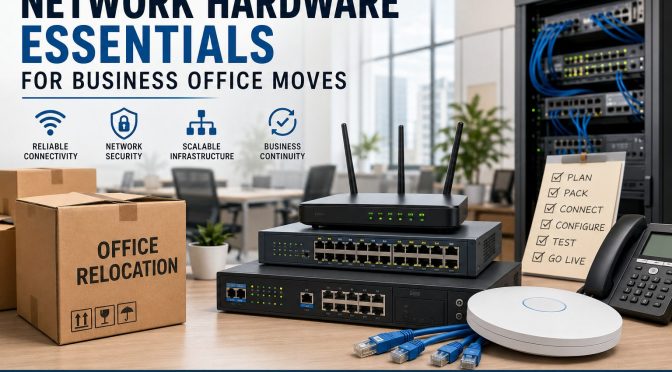
Relocating a business office sounds exciting at first. A bigger workspace, better infrastructure, improved employee comfort, and room for future growth all look great on paper. But behind every smooth office move is something most companies underestimate—network hardware planning. You can have the most beautiful office in the city, but if the internet crashes, Wi-Fi fails, phones stop working, or servers refuse to connect, productivity collapses instantly. Moving an office without carefully planning the networking infrastructure is like moving into a new house without checking the electricity or plumbing. Everything may look fine until you actually try to use it.
Modern businesses rely heavily on cloud platforms, video meetings, VoIP calls, cybersecurity systems, smart devices, and uninterrupted internet connectivity. According to recent enterprise networking reports, businesses are rapidly investing in cloud-first and policy-driven networking systems to support hybrid work, AI-powered operations, and secure connectivity. This shift means office relocations are no longer just about moving desks and chairs. They are now major IT infrastructure projects that require strategic planning and decisions on future-ready hardware.
In this guide, you’ll discover everything you need to know about network hardware essentials for business office moves, including switches, routers, firewalls, cabling, wireless access points, server planning, backup systems, and security considerations. Whether you run a small startup or a growing enterprise, this article will help you avoid downtime, protect data, and create a scalable network environment that supports long-term business growth.
Why Network Planning Matters During Office Relocation
Moving an office without a networking strategy is one of the fastest ways to create operational chaos. Businesses often spend months planning furniture layouts, branding designs, and employee seating arrangements, yet they leave networking decisions until the final week. That approach usually leads to unexpected downtime, rushed installations, and expensive troubleshooting. A company’s digital infrastructure is now the heartbeat of its operations, and every connected device depends on a reliable network foundation. If that foundation fails, daily workflows slow down instantly.
Think about how many business operations rely on stable connectivity today. Customer support teams need VoIP systems; sales teams depend on CRM platforms; marketers use cloud software; finance departments access online accounting tools; and employees collaborate through video meetings. Even a small network interruption can affect customer trust and revenue generation. Recent research in the networking industry highlights that hybrid work and cloud adoption is forcing companies to redesign their office networks from the ground up. Businesses are no longer building networks only for office desktops. They are designing infrastructures that support remote workers, mobile devices, and AI-powered applications simultaneously.
Another important reason network planning matters is scalability. Many businesses relocate because they are growing. Unfortunately, some companies simply transfer old hardware to a larger office without considering future expansion. That’s like putting a tiny engine into a heavy truck and expecting high performance. Smart organizations use office relocations as opportunities to upgrade infrastructure, improve cybersecurity, increase bandwidth capacity, and modernize connectivity systems. A carefully planned network setup not only prevents disruptions but also positions the business for long-term efficiency and innovation.
The Hidden Cost of Poor Network Preparation
The biggest mistake companies make during office relocation is underestimating the financial impact of downtime. Most business owners focus only on hardware costs while ignoring the operational damage caused by network failures. Imagine a customer support center losing internet access for half a day or a finance department being unable to access cloud-based accounting software during payroll processing. The consequences multiply quickly. Lost productivity, frustrated employees, delayed client responses, and missed opportunities all add up faster than expected.
Poor preparation also leads to hidden repair costs. When businesses rush networking installations, technicians often have to redo cabling, replace incompatible hardware, or troubleshoot unstable configurations. That means paying twice for the same work. In many cases, businesses discover after relocation that their existing switches cannot support higher internet speeds or modern Wi-Fi demands. According to networking trend reports, businesses are increasingly moving toward 2.5G and 10G networking switches to handle cloud traffic, HD video conferencing, and large file transfers. Older equipment often becomes a bottleneck in modern office environments.
There’s also a cybersecurity risk. During relocation, IT teams are busy managing logistics, which creates opportunities for overlooked vulnerabilities. Temporary setups, unsecured devices, and rushed configurations can expose sensitive business data. Cybercriminals love weak transition periods because businesses are distracted. That’s why network security planning should always be integrated into relocation strategies from day one. Investing in proper planning may feel expensive initially, but it saves massive operational costs later.
Core Network Hardware Every Office Needs
Every successful office network depends on a few essential hardware components working together seamlessly. These devices form the nervous system of your business environment. Without them, communication between employees, devices, servers, and cloud platforms simply cannot function effectively. Understanding these core components helps businesses make smarter purchasing decisions during relocation.
| Hardware | Purpose | Importance |
| Router | Connects office to internet | Essential |
| Network Switch | Connects devices internally | Essential |
| Firewall | Protects network from threats | Critical |
| Wireless Access Point | Provides Wi-Fi coverage | Essential |
| UPS System | Backup power during outages | Highly Recommended |
| Rack Cabinet | Organizes networking equipment | Recommended |
| PoE Switch | Powers IP devices through Ethernet | Highly Useful |
Routers are responsible for directing internet traffic between the office network and external connections. A high-quality business router ensures stable bandwidth distribution, secure VPN connectivity, and advanced traffic management. Businesses handling cloud applications or video meetings should prioritize enterprise-grade routers rather than consumer models. Modern routers also support SD-WAN technology, which many companies now prefer because it offers flexibility and improved cloud performance.
Network switches are equally important because they connect internal devices like computers, printers, servers, and cameras. Managed switches provide better control, monitoring, and scalability than unmanaged switches. They allow IT teams to segment traffic, prioritize bandwidth, and improve security. Wireless access points create strong Wi-Fi coverage throughout the office, which is especially important in hybrid work environments where employees rely heavily on laptops and mobile devices. Businesses upgrading offices in 2026 are increasingly adopting Wi-Fi 7 solutions for faster speeds and lower latency.
Choosing the Right Cabling Infrastructure
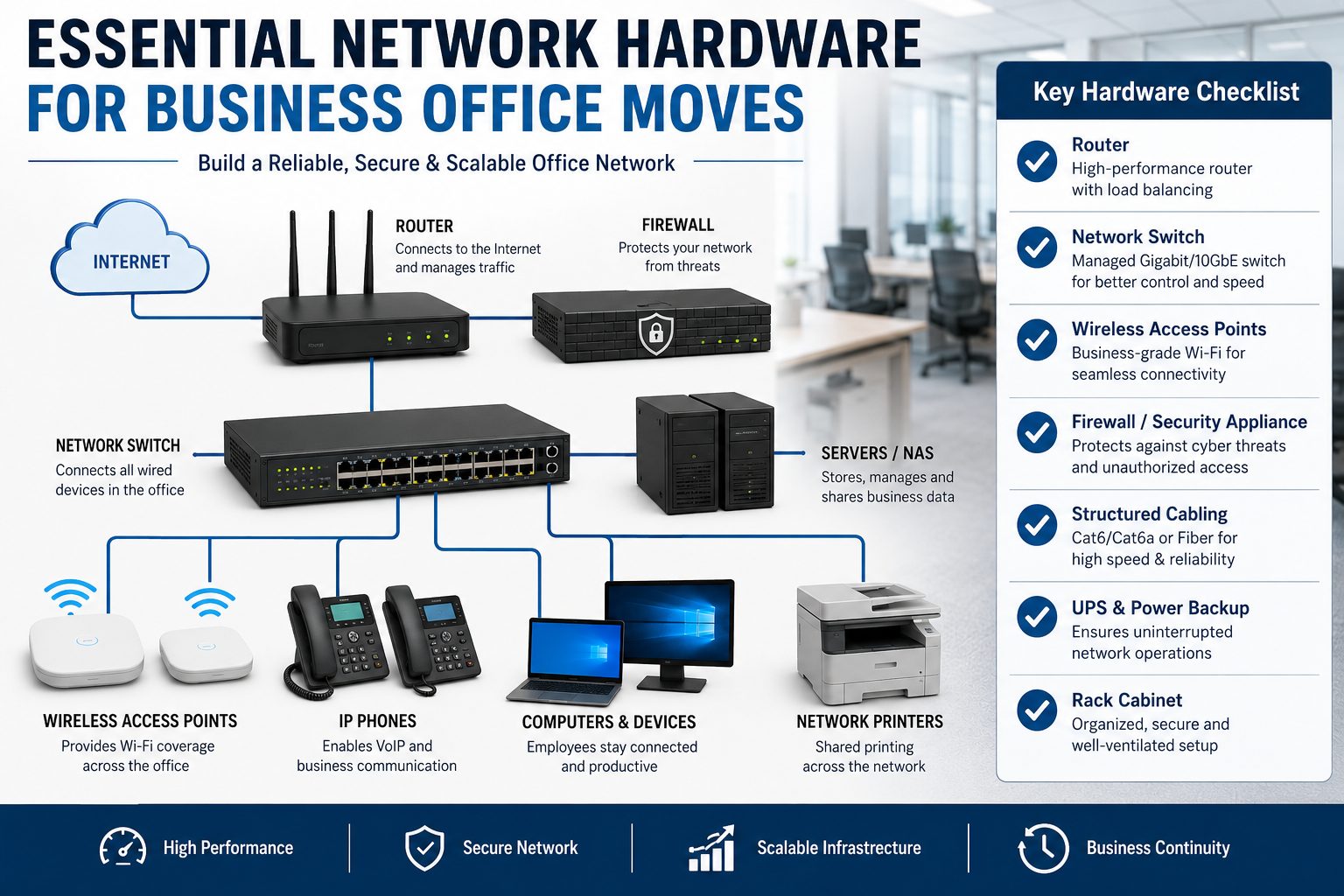
Cabling is the invisible foundation of every office network. People often focus on flashy hardware like routers and firewalls while ignoring the cables connecting everything together. That’s a dangerous mistake because even the best networking equipment cannot perform properly with outdated or poorly installed cabling. Think of cables like highways for digital traffic. If the highways are damaged or too narrow, traffic slows down regardless of how powerful the vehicles are.
Businesses relocating offices should strongly consider installing Cat6a or fiber optic cabling instead of older Cat5e systems. Cat6a cables support higher speeds and improved performance over longer distances, making them ideal for modern offices with cloud applications and video conferencing demands. Fiber optic cabling goes even further by delivering extremely high bandwidth with minimal interference. While fiber installations cost more upfront, they provide exceptional scalability and future-proofing benefits.
Recent network cabling reports also show increasing adoption of Power over Ethernet (PoE) infrastructure. PoE technology allows devices like security cameras, VoIP phones, and wireless access points to receive both power and data through a single cable. This simplifies installation, reduces clutter, and lowers infrastructure costs. For growing businesses, PoE creates cleaner and more efficient office environments.
Another factor businesses should consider is structured cabling design. Random cable placement may work temporarily, but it becomes a nightmare during troubleshooting or expansion. Organized cable management inside racks improves airflow, simplifies maintenance, and reduces accidental disconnections. Professional labeling systems also save enormous amounts of time for IT teams managing large office networks.
Server Room and Rack Planning
A server room is more than just a storage area for networking equipment. It’s the control center of the entire business infrastructure. Poor server room planning can lead to overheating, hardware failure, and costly downtime. During office relocation, businesses should carefully evaluate the size, cooling capacity, ventilation, and accessibility of their server rooms before moving equipment.
Temperature management is one of the biggest priorities. Networking hardware generates significant heat, especially switches, servers, and firewalls running continuously. Without proper cooling systems, hardware lifespan decreases rapidly. It’s similar to driving a car engine at maximum speed without enough coolant. Eventually, something breaks. Businesses should install dedicated cooling systems or ensure proper air circulation to maintain stable operating temperatures.
Power protection is equally important. A sudden power outage can damage servers, corrupt data, and interrupt business operations instantly. That’s why UPS (Uninterruptible Power Supply) systems are essential for modern offices. UPS devices provide temporary backup power during outages, allowing systems to shut down safely or continue operating until generators activate. Businesses handling sensitive data or customer transactions should never ignore backup power planning.
Rack cabinets also deserve attention. Proper racks organize networking equipment efficiently while improving airflow and cable management. Businesses should avoid stacking equipment randomly because it creates maintenance problems and increases the risk of accidental damage. Modern rack systems also support scalable expansion, making future upgrades easier and more cost-effective.
Network Security During Office Moves
Office relocations create temporary vulnerabilities that cybercriminals often exploit. During transitions, businesses frequently disconnect devices, reconfigure systems, and establish temporary internet connections. That creates opportunities for unauthorized access, weak security settings, and overlooked vulnerabilities. Cybersecurity should never be treated as an afterthought during relocation projects.
Modern businesses are increasingly adopting Zero Trust security models, where no device or user is automatically trusted without verification. Recent enterprise networking reports show Zero Trust becoming a standard requirement rather than an optional upgrade. This approach is especially valuable during office moves because employees, contractors, and devices may connect from multiple locations simultaneously.
Firewalls remain one of the most critical security investments for any office network. Modern UTM (Unified Threat Management) firewalls combine multiple security functions into a single appliance, including antivirus protection, intrusion prevention, content filtering, and threat monitoring. According to recent SMB networking trends, UTM firewalls are becoming increasingly popular because they simplify network security management while improving protection.
Businesses should also encrypt sensitive data before relocation and create full backups of critical systems. If hardware gets damaged or lost during transit, backups ensure business continuity. Employee cybersecurity awareness is equally important because phishing attacks often increase during busy transition periods. Even the best hardware cannot protect a business if employees unknowingly compromise credentials.
Future-Proofing Your Office Network
Technology evolves faster than most businesses expect. A network setup that feels advanced today may become outdated within a few years. That’s why smart organizations focus on future-proofing during office relocation instead of only solving immediate problems. Investing slightly more today can prevent expensive infrastructure replacements later.
One of the biggest networking trends in 2026 is the rise of Wi-Fi 7 and multi-gig networking. Industry reports highlight growing demand for ultra-fast wireless connectivity capable of supporting video conferencing, cloud computing, AI applications, and smart office devices simultaneously.Businesses planning office relocations should consider hardware capable of handling higher bandwidth demands, even if they don’t need maximum capacity immediately.
Cloud-managed networking systems are also becoming increasingly popular. These platforms allow IT teams to monitor, configure, and troubleshoot networks remotely through centralized dashboards. For businesses with multiple offices or hybrid employees, cloud management dramatically improves visibility and operational efficiency. Instead of manually configuring every device onsite, administrators can manage networks from anywhere.
Sustainability is another emerging factor in networking infrastructure. New hardware designs focus on energy efficiency, reduced heat generation, and environmentally friendly materials. Energy-efficient switches and routers not only reduce electricity costs but also support corporate sustainability goals. Businesses upgrading offices should view networking investments as long-term strategic assets rather than short-term expenses.
Common Mistakes Businesses Make During Relocation
Office relocations are stressful, and businesses often repeat the same networking mistakes. One of the most common problems is waiting too long to involve IT teams. Some companies finalize office layouts before discussing networking requirements, which leads to poor cable routing, weak Wi-Fi coverage, and limited scalability. Networking should influence office design from the beginning, not the other way around.
Another frequent mistake is reusing outdated hardware simply to save money. Old switches, routers, and firewalls may function temporarily, but they often struggle with modern workloads and security requirements. Businesses eventually spend more on troubleshooting and replacements than they would have spent upgrading initially.
Poor Wi-Fi planning is another major issue. Companies sometimes install access points randomly without conducting proper wireless site surveys. That results in dead zones, signal interference, and inconsistent performance. Modern offices filled with video calls and cloud applications require carefully designed wireless coverage.
Some businesses also ignore redundancy planning. They assume internet connectivity will always remain stable, which is risky. Smart offices often install backup internet connections or redundant networking paths to maintain uptime during outages. Downtime can be incredibly expensive, especially for customer-facing operations.
Best Practices for a Smooth Network Migration
Successful network migration requires planning, testing, and coordination. Businesses should start by creating a complete inventory of existing hardware, including routers, switches, servers, cables, and security devices. This inventory helps identify outdated equipment and ensures nothing important gets overlooked during the move.
Testing is critical. Before employees arrive at the new office, IT teams should verify internet connectivity, Wi-Fi coverage, VoIP systems, server access, and security configurations. Think of it like rehearsing before a live performance. Problems discovered early are much easier to fix.
Businesses should also schedule migrations during weekends or low-activity periods whenever possible. Minimizing disruption helps maintain productivity and reduces customer impact. Communication is equally important. Employees should understand what systems may experience temporary downtime and how to access support if issues arise.
Working with professional network engineers can also make a huge difference. Experienced professionals understand cabling standards, security configurations, bandwidth planning, and hardware compatibility. Their expertise often prevents expensive mistakes and accelerates deployment timelines.
Cost Breakdown of Business Network Hardware
Office networking costs vary depending on company size, bandwidth requirements, and security needs. Small offices may spend a few thousand dollars, while large enterprises can invest hundreds of thousands into infrastructure upgrades. Understanding typical hardware costs helps businesses budget more effectively.
| Hardware Component | Estimated Cost Range |
| Business Router | $300 – $2,500 |
| Managed Switch | $500 – $5,000 |
| Wireless Access Point | $150 – $1,200 |
| UTM Firewall | $700 – $10,000 |
| UPS Backup System | $200 – $3,000 |
| Rack Cabinet | $400 – $2,500 |
| Fiber Cabling Installation | Varies by office size |
Research indicates that the global networking hardware market continues to expand rapidly due to increasing cloud adoption, AI workloads, and enterprise connectivity demands. Businesses investing in modern infrastructure today are positioning themselves for future scalability and operational resilience.
Price should never be the only factor when choosing networking equipment. Reliability, security, vendor support, scalability, and compatibility matter just as much. Cheap hardware may reduce upfront costs but often creates long-term operational headaches.
Conclusion
A business office move is much more than transporting desks, computers, and office furniture. It’s a rare opportunity to redesign your digital infrastructure for better speed, stronger security, and future scalability. Companies that treat networking as a strategic priority usually experience smoother transitions, fewer disruptions, and stronger operational performance after relocation.
From routers and managed switches to structured cabling, Wi-Fi systems, firewalls, and backup power solutions, every networking component plays a critical role in business continuity. Modern networking trends like Wi-Fi 7, SD-WAN, cloud-managed systems, and Zero Trust security are reshaping how offices operate, making it essential for businesses to think beyond traditional infrastructure models.
The smartest approach is proactive planning. Assess current infrastructure, identify future requirements, involve IT teams early, and invest in scalable hardware that supports long-term growth. A properly planned office network becomes more than a utility — it becomes a competitive advantage that enables productivity, collaboration, and innovation for years to come.
FAQs
1. What is the most important network hardware during an office move?
The most important hardware includes routers, managed switches, firewalls, wireless access points, and structured cabling. These components form the core infrastructure of the office network.
2. Should businesses upgrade network hardware during relocation?
Yes. Office relocation is the perfect opportunity to replace outdated equipment, improve security, increase bandwidth capacity, and prepare for future business growth.
3. What type of cabling is best for modern offices?
Cat6a and fiber optic cabling are highly recommended because they support faster speeds, better reliability, and future scalability compared to older cable standards.
4. Why are managed switches better than unmanaged switches?
Managed switches provide advanced control, monitoring, traffic prioritization, and security features that are essential for modern business environments.
5. How can businesses reduce downtime during office relocation?
Businesses can reduce downtime by planning early, testing systems before launch, scheduling migrations during low-activity periods, and working with professional network engineers.